Categories
Digital Signages

12 Digital Menu Board Examples Restaurants Can Learn From (With Lessons You Can Apply)

12 Digital Menu Board Examples Restaurants Can Learn From (With Lessons You Can Apply)

The days of static printed menus are quickly becoming a thing of the past. Restaurants are now embracing digital menu boards to create engaging customer experiences, promote high-margin items, and adapt their menus in real time.

Whether you're running a quick-service restaurant (QSR), cafe, bakery, food truck, or fine dining establishment, digital menu boards offer much more than visual appeal. They help customers make decisions faster, reduce perceived wait times, simplify menu updates, and encourage larger orders through strategic merchandising.

The best part? You don't need a global brand's budget to create an effective digital menu board. Many of the principles used by industry leaders can be applied by restaurants of any size.

In this guide, we'll explore 12 outstanding digital menu board examples and the lessons they offer for designing menus that look great and drive sales.

Why Digital Menu Boards Matter

Before diving into examples, it's worth understanding why so many restaurants are replacing printed menus with digital displays.

Digital menu boards allow restaurants to:

  • Update prices instantly across multiple locations
  • Promote seasonal specials and limited-time offers
  • Display daypart-specific menus automatically
  • Highlight profitable menu items
  • Improve brand consistency
  • Reduce printing costs
  • Display appetizing visuals that influence purchasing decisions

Unlike traditional menus, digital displays can evolve throughout the day based on customer traffic, weather, inventory, or promotional campaigns.

1. McDonald's: Keep It Simple

McDonald's has spent decades refining one of the world's most recognizable menu systems. Despite offering dozens of products, its digital menu boards remain remarkably easy to understand.

Instead of treating every menu item equally, McDonald's emphasizes its bestselling products with larger visuals and strategically places combo meals at eye level.

What makes it effective?

  • Large food photography
  • Clear category separation
  • High contrast colors
  • Minimal text
  • Consistent branding

Customers can quickly identify burgers, chicken, breakfast items, desserts, and beverages without feeling overwhelmed.
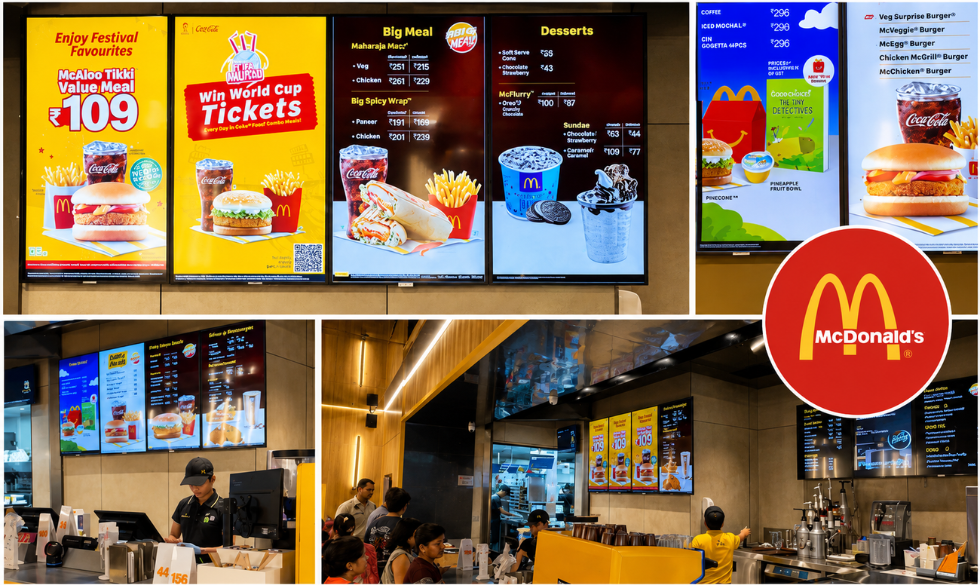
McDonald's interior with digital menu boards

Lesson for restaurants

Avoid displaying everything at once. Customers should be able to identify your primary offerings within a few seconds.

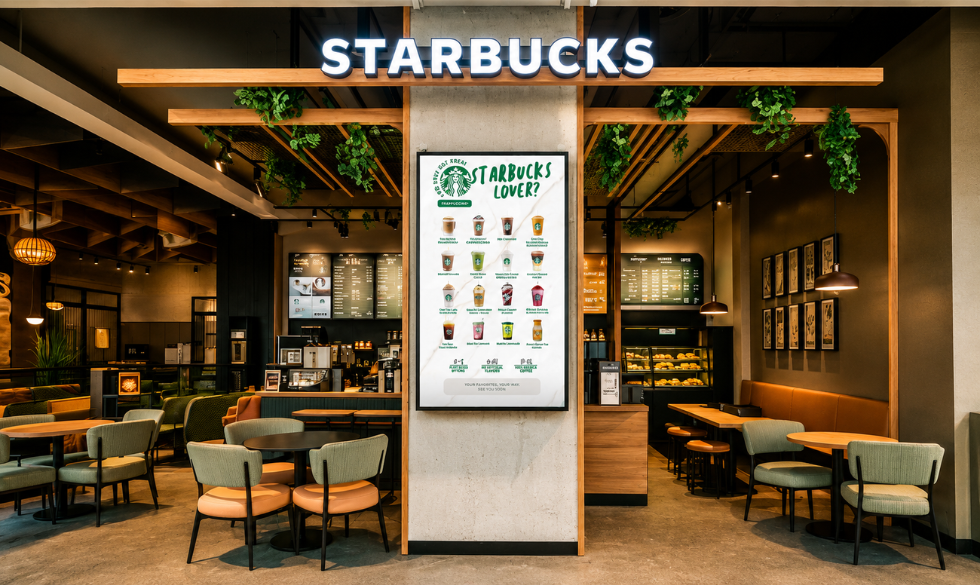
2. Starbucks: Sell an Experience, Not Just Coffee

Starbucks uses digital menu boards to reinforce its premium brand image.

Instead of overwhelming customers with dozens of drink combinations, Starbucks focuses on storytelling through seasonal campaigns, lifestyle imagery, and featured beverages.

Pumpkin Spice Latte season is a perfect example. Rather than simply adding another menu item, Starbucks creates an entire visual experience around it.

Why it works

  • Warm color palettes
  • Lifestyle-focused photography
  • Seasonal promotions
  • Clean typography
  • Premium visual hierarchy
Starbucks digital menu boards

Lesson

People often buy emotions before they buy products. Your menu should communicate the feeling customers associate with your restaurant.

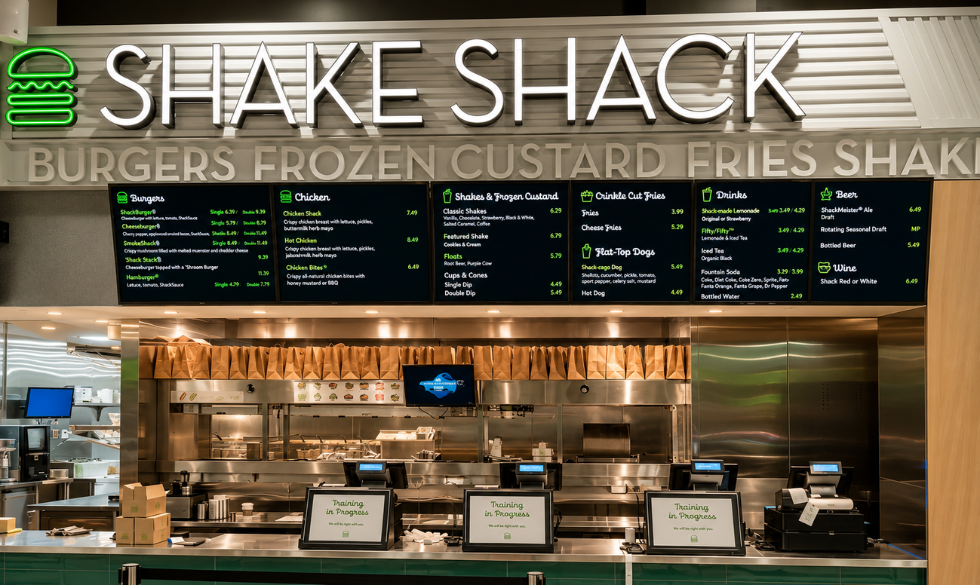
3. Shake Shack: Minimalism Creates Premium Appeal

Shake Shack proves that less is often more.

Its digital menu boards feature plenty of white space, allowing premium burger photography to stand out without competing against excessive text or promotional clutter.

Every section feels intentional.

Design highlights

  • Simple backgrounds
  • Bold food imagery
  • Limited promotional messaging
  • Easy-to-read pricing
  • Consistent typography
Shake Shack digital menu boards

Lesson

A cluttered menu creates decision fatigue. White space helps customers focus on what matters most.

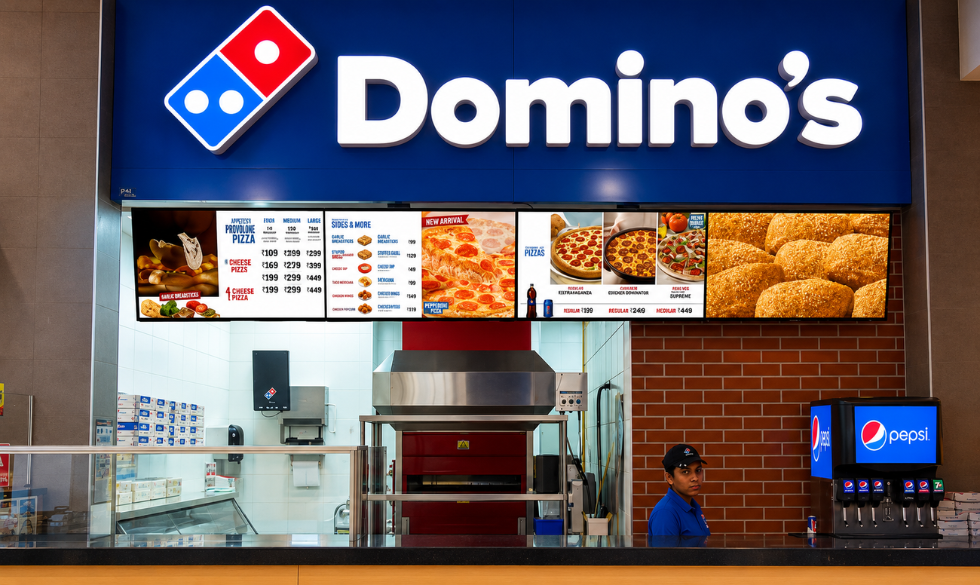
4. Domino's: Make Promotions Impossible to Miss

Domino's frequently changes its digital menu boards to showcase meal deals, combo offers, and limited-time promotions.

Instead of treating promotions as an afterthought, they're integrated into the menu design.

This encourages customers to upgrade their orders.

Why it works

  • Dynamic promotional banners
  • Combo pricing
  • Time-sensitive offers
  • Large call-to-action sections
Domino's restaurant interior with digital menu boards

Lesson

Your digital menu should actively sell, not simply display information.

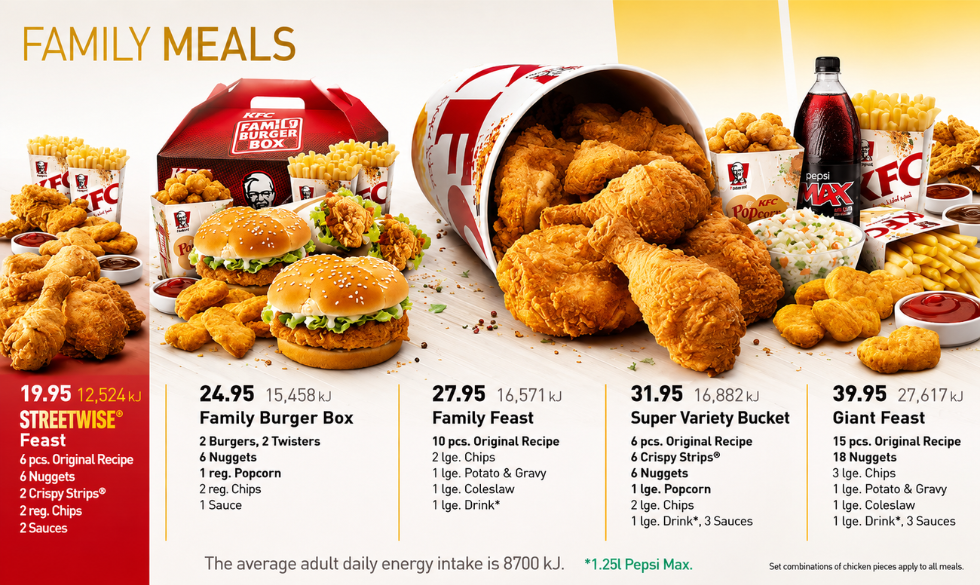
5. KFC: Let Food Photography Do the Selling

KFC's digital menu boards rely heavily on close-up food photography.

Customers don't need lengthy descriptions when they can clearly see crispy fried chicken, fresh sandwiches, and family meals.

Professional photography immediately triggers appetite.

Design strengths

  • Large product images
  • High color contrast
  • Minimal copy
  • Clear meal combinations
Family meals feast at KFC on digital menu board

Lesson

Investing in professional food photography often delivers a higher return than adding more text.

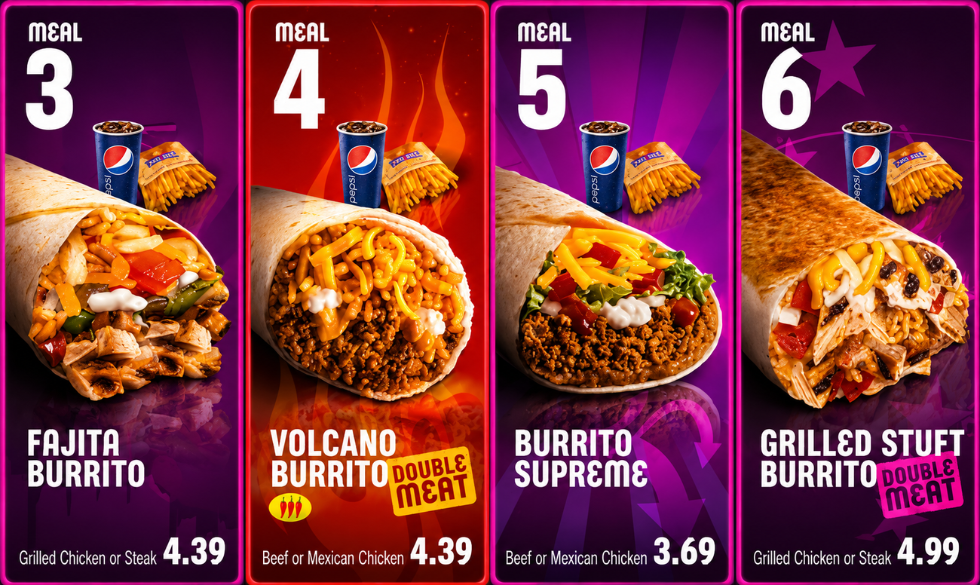
6. Taco Bell: Use Motion to Capture Attention

One advantage digital menu boards have over printed menus is movement.

Taco Bell uses subtle animations to showcase promotions without distracting customers.

New products fade into view, featured meals gently animate, and promotional graphics rotate automatically.

Benefits

  • Draws attention naturally
  • Highlights limited-time offers
  • Keeps menus feeling fresh
  • Encourages repeat visits
Vibrant fast food menu board design with motion

Lesson

Animation should support your message, not dominate it.

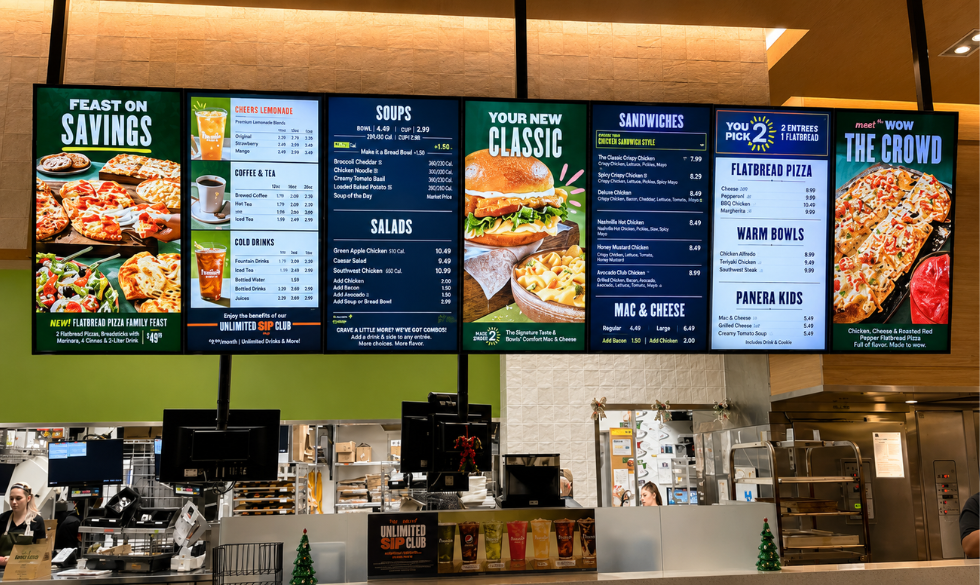
7. Panera Bread: Organize by Customer Journey

Panera serves soups, sandwiches, salads, pastries, drinks, and breakfast items.

Without proper organization, the menu could easily become overwhelming.

Instead, Panera groups similar products into clear sections that align with how customers naturally browse.

Why customers love it

  • Easy navigation
  • Clear categories
  • Logical product placement
  • Balanced layouts
Modern fast casual restaurant menu display

Lesson

Customers shouldn't have to search for what they want.

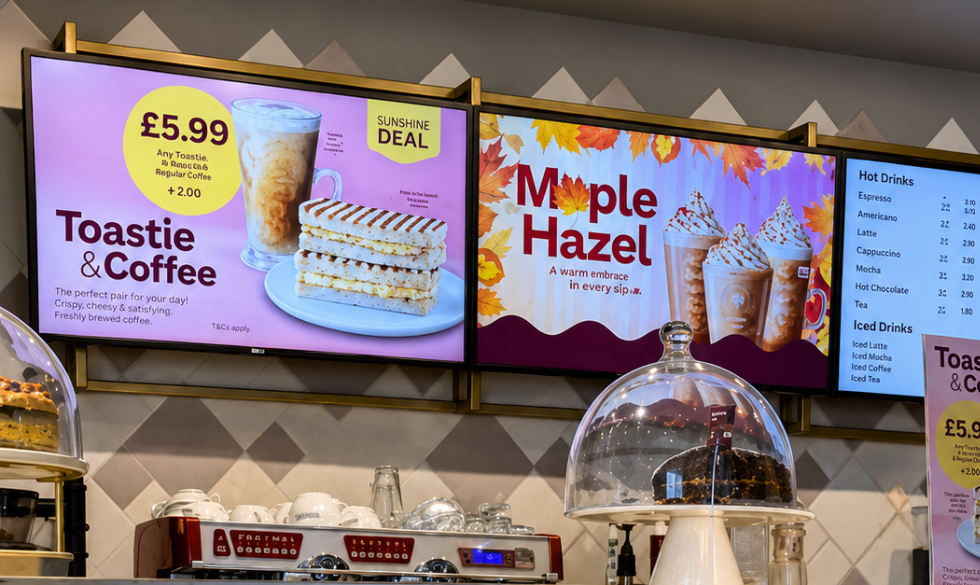
8. Costa Coffee: Refresh the Menu Throughout the Year

Costa updates its digital menu boards regularly to reflect changing seasons.

  • Winter introduces festive beverages.
  • Summer highlights iced drinks.
  • Autumn promotes pumpkin-flavored products.

These updates keep returning customers engaged.

Advantages

  • Seasonal excitement
  • Better product visibility
  • Increased repeat purchases
  • Fresh visual identity
Costa Coffee digital menu boards

Lesson

If your menu always looks the same, customers stop noticing it.

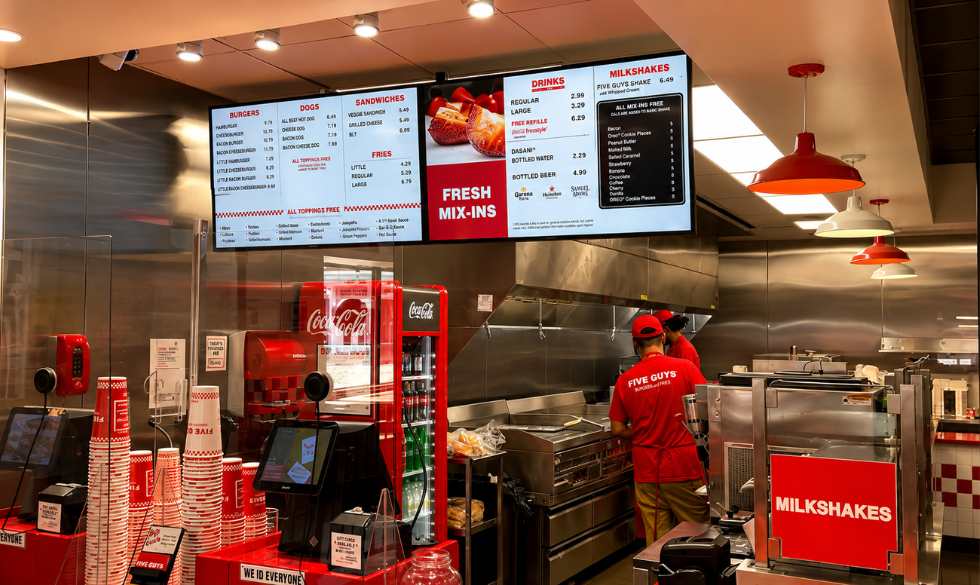
9. Five Guys: Stay Authentic

Five Guys demonstrates that digital menu boards don't always need elaborate animations or flashy designs.

Instead, they reinforce the restaurant's straightforward, honest brand identity.

Simple layouts communicate confidence.

Design approach

  • Strong brand colors
  • Honest messaging
  • Straightforward pricing
  • Minimal distractions
Five Guys digital menu board with authentic branding

Lesson

Your menu should reflect your brand personality.

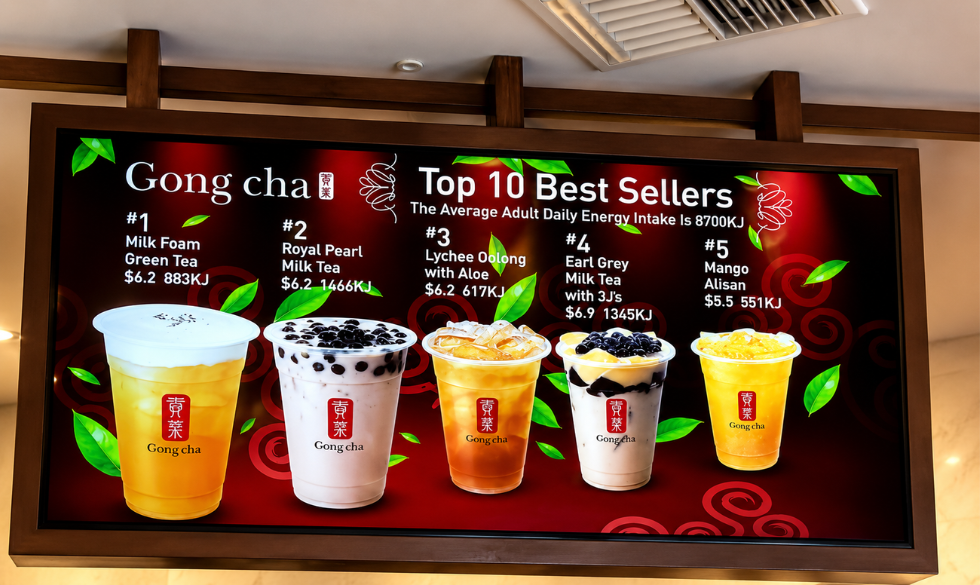
10. Bubble Tea Shops: Embrace Color Psychology

Bubble tea brands often use bright colors because their products are playful, customizable, and visually exciting.

Their digital menu boards mirror that personality.

Customers instantly associate vibrant colors with refreshing drinks.

Common design elements

  • Colorful backgrounds
  • Large drink photography
  • Topping illustrations
  • Playful typography
Bubble tea shops digital menu boards with bright colors

Lesson

Choose colors that complement your food category and brand identity.

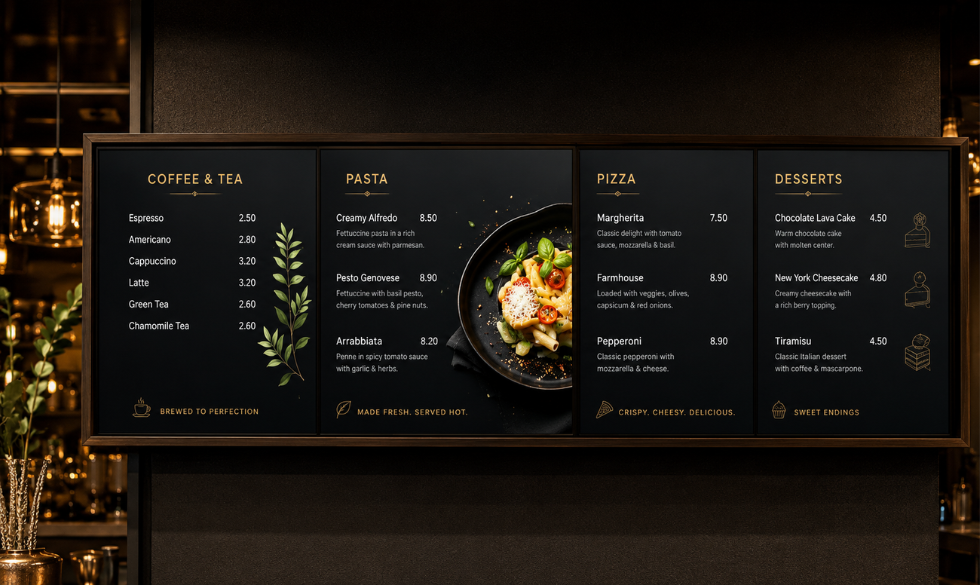
11. Fine Dining Restaurants: Luxury Through Simplicity

Luxury restaurants often take the opposite approach of QSRs.

Instead of displaying dozens of dishes, they use elegant typography, subtle backgrounds, and refined spacing.

The menu feels curated.

Characteristics

  • Dark backgrounds
  • Gold or neutral typography
  • Minimal imagery
  • Sophisticated layouts
Fine dining restaurant digital menu board

Lesson

Premium brands communicate confidence through restraint.

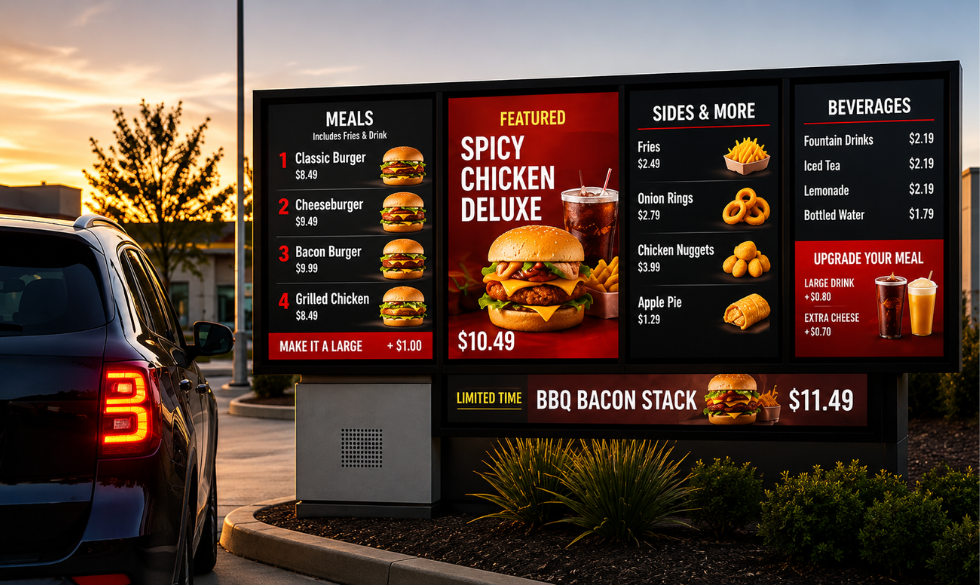
12. Drive-Thru Digital Menu Boards: Design for Speed

Drive-thru customers make purchasing decisions within seconds.

Successful drive-thru menu boards prioritize visibility over aesthetics.

Large fonts, simplified layouts, and clearly highlighted combo meals reduce ordering time.

Best practices

  • Large typography
  • High contrast
  • Minimal scrolling
  • Weather-resistant brightness
  • Fast-changing promotions
Drive-thru digital menu boards designed for speed

Lesson

Always design for the environment where customers will view your menu.

What Makes a Great Digital Menu Board?

Across all these examples, several best practices consistently appear.

1. Clear Visual Hierarchy

Customers should instantly identify:

  • Featured products
  • Categories
  • Prices
  • Promotions

Avoid treating every menu item equally.

2. High-Quality Food Photography

Professional photography increases appetite appeal and helps customers understand what they're ordering.

Avoid low-resolution or inconsistent images.

3. Readable Typography

Customers often stand several feet away from menu boards.

Use:

  • Large font sizes
  • High contrast
  • Simple font families
  • Adequate spacing

4. Strategic Color Usage

Colors influence emotion.

For example:

  • Red encourages urgency and appetite.
  • Green suggests freshness.
  • Black conveys sophistication.
  • Orange creates energy.
  • Blue should be used sparingly in food menus, as it is less commonly associated with appetite.

Choose colors that align with your brand and improve readability rather than overwhelming the design.

5. Dynamic Content

Take advantage of digital technology by scheduling:

  • Breakfast menus
  • Lunch promotions
  • Happy hour specials
  • Seasonal campaigns
  • Limited-time offers

This keeps your menu relevant throughout the day.

Common Digital Menu Board Mistakes

Even well-designed restaurants can make mistakes that reduce the effectiveness of their menu boards.

Avoid these common pitfalls:

  • Displaying too much information on one screen
  • Using low-quality food images
  • Choosing fonts that are difficult to read
  • Overusing animations
  • Failing to update promotions regularly
  • Poor color contrast
  • Inconsistent branding across locations
  • Making prices difficult to find

Remember: simplicity often performs better than complexity.

How Restaurants Can Get Started

You don't need a massive budget to launch digital menu boards.

Start by:

  1. Identifying your bestselling and highest-margin items.
  2. Organizing products into clear categories.
  3. Investing in professional food photography.
  4. Designing layouts with readability in mind.
  5. Scheduling content updates for different times of the day.
  6. Measuring customer response and refining the design over time.

Even small improvements can have a meaningful impact on customer experience and sales.

Frequently Asked Questions

What is a digital menu board?

A digital menu board is an electronic display that presents restaurant menus, pricing, promotions, and product images on screens instead of printed signage.

Do digital menu boards increase sales?

They can. By highlighting featured products, promotions, and high-margin items, digital menu boards often encourage customers to purchase more and improve average order value.

What size should restaurant menu boards be?

The ideal size depends on viewing distance and restaurant layout. The priority should always be clear readability from where customers place their orders.

Can small restaurants benefit from digital menu boards?

Absolutely. Cafes, bakeries, food trucks, and independent restaurants can all use digital displays to update menus quickly, reduce printing costs, and present their offerings more attractively.

Create and Manage High-Performing Digital Menu Boards with Intelisa

Great digital menu boards combine thoughtful design with the right technology to deliver a seamless customer experience. Once you've finalized your menu strategy, a platform like Intelisa can help bring it to life with centralized content management, instant menu updates, automated daypart scheduling, and dynamic promotions across one or multiple locations.

It also supports rich media like videos and social media feeds, helping restaurants keep their displays fresh and engaging. With the right design and a flexible digital signage solution, restaurants can improve efficiency, strengthen their brand, and drive more sales.

Want to see how it works?

Book a 14-Day Free Trial Today
I
Intelisa Content Team

The Intelisa team writes about digital signage, digital menu boards and smart display technology for businesses across India. Questions? Write to us at info@intelisa.in

Categories
Digital Signages

What Is a Digital Kiosk? Types, Design and Smart Uses

What Is a Digital Kiosk? Types, Design, and Smart Uses

You have used a digital kiosk more often than you realise. The screen where you order a burger without talking to anyone, the machine that prints your movie ticket, the touch display that shows you the way around a mall, the counter where you pay an electricity bill in seconds. All of these are digital kiosks, and they are quietly becoming a normal part of daily life in India.

This guide explains what a digital kiosk is in plain language, where the word comes from, the main types, what good kiosk design looks like, and how businesses across India use them, from food and cafe counters to self-service and payments. By the end you will know exactly how a digital kiosk can work for your business.

What Is a Kiosk?

To define a kiosk simply: a kiosk is a small, standalone booth or station placed in a public space where people can get information, a product or a service. The word originally meant a small open pavilion. Over time it came to mean the little booths you see in markets, malls and streets, and today it most often means a self-service machine with a screen.

So the meaning of kiosk in plain English is a compact, self-contained station that serves people directly, whether that is a newspaper stall, a ticket booth, or a modern touchscreen terminal.

Kiosk full form: is there one?

A common search is the kiosk full form, as if kiosk were an abbreviation. It is not. Kiosk is a complete word, not an acronym, so it has no full form. It comes from the Persian and Turkish word for a garden pavilion or booth, and English adopted it centuries ago. So if you were looking for a full form, the short answer is that there is not one, kiosk is simply a word that means a small booth or self-service station.

What Is a Digital Kiosk?

A digital kiosk is a self-service station built around a screen, usually a touchscreen, that lets people complete a task or get information on their own without staff help. It combines three things: a display, a small computer or media player inside, and software that controls what appears and what the user can do.

The difference from an old-style kiosk is simple. A traditional booth needed a person to run it. A digital kiosk runs itself, can be updated remotely, works around the clock, and can handle everything from browsing a menu to taking a payment. It is the same idea as digital signage, but with interaction added, the user touches the screen and the kiosk responds.

Digital kiosk with a touchscreen used for self-service in India

A digital kiosk puts information, ordering and payment directly in the customer's hands

The Digital Kiosk Market in 2026

Self-service has moved from a novelty to an expectation, and the growth shows it, in India and worldwide.

$37.7B Global interactive kiosk market size in 2026
11.1% India self-service kiosk market CAGR to 2030
Fastest Asia Pacific is the fastest-growing kiosk region

The global market for interactive kiosks is worth around 37.7 billion US dollars in 2026 and keeps climbing. India is one of the fastest movers: its self-service kiosk market is growing at roughly 11 percent a year and is set to nearly double to close to 3 billion US dollars by 2030. Smart-city projects, airport and metro expansion, QSR self-ordering, and UPI-based payments are all pushing kiosk adoption across Indian cities and towns.

"The shift to self-service is driven by customers, not just cost. People want speed and control, and a well-designed digital kiosk gives them both while easing your queues and staffing pressure." Intelisa Product Team

Types of Digital Kiosks

Different jobs call for different kiosks. Here are the main types you will see across India, and where each fits best.

Info

Information Kiosk

Shares directions, schedules, directories and general information. The simplest and most common type, used in malls, airports and campuses.

Malls, airports, universities

Self-Service

Self-Service Kiosk

Lets users check in, order, register or apply on their own. Common at airport check-in, hospital registration and QSR counters.

Airports, hospitals, QSRs

Food

Food Kiosk

Self-ordering screens for restaurants, cafes and food courts. Customers browse the menu, customise, and pay, which lifts order value and cuts queues.

QSRs, food courts, cafes

Payment

Payment Kiosk

Handles bill payments, recharges and transactions. In India, UPI and QR payments make these fast and popular.

Banks, utilities, parking

Wayfinding

Wayfinding Kiosk

Interactive maps that help people navigate large or complex spaces quickly, reducing confusion and staff questions.

Malls, hospitals, campuses

Retail

Retail Kiosk

Lets shoppers browse products, check stock and prices, and buy. Modern versions add AI recommendations and virtual try-on.

Stores, malls, trade shows

Food Kiosks and Cafe Kiosks: A Closer Look

Few places show the value of a digital kiosk better than food and beverage. A food kiosk is a self-ordering screen that lets customers browse the menu, customise their order, and pay, all without waiting for a counter to free up. For a busy quick-service restaurant or a cafe, that means shorter queues, fewer order mistakes, and higher average spend, because a screen never forgets to suggest a side or a dessert.

A kiosk cafe setup can be as simple as one self-ordering screen near the entrance or a row of them in a food court. Customers order in their own time and language, the order goes straight to the kitchen, and staff focus on making and serving rather than taking orders. Menus, prices and offers update instantly through the software, so a festive combo or a new item goes live in seconds.

Food kiosk at a modern cafe counter in India

Modern food and cafe kiosks with vibrant menus, overhead signage, and digital ordering screens, displaying fresh pastries and beverages in a compact setup.

What Good Kiosk Design Looks Like

A digital kiosk succeeds or fails on its design. The best kiosk design is not about looking flashy, it is about making the task effortless for a first-time user. Keep these principles in mind.

1

Simple, guided flow

Lead the user step by step with large buttons, clear labels and few choices per screen. Anyone should finish without instructions.

2

Readable and accessible

Big text, high contrast, an adjustable or reachable screen height, and multi-language support. In India, offering local languages is a real advantage.

3

Fast and responsive

Touch should feel instant. Slow screens frustrate users and create queues, defeating the whole purpose of a kiosk.

4

On-brand and inviting

Colours, logo and imagery should match your brand, with an attract screen that draws people in when the kiosk is idle.

5

Durable, well-placed hardware

Commercial-grade screens, sturdy enclosures, and placement in high-traffic spots where people naturally pause.

Benefits of a Digital Kiosk

Why are businesses across India investing in kiosks? Because the gains are quick and clear.

BenefitWhat It Means for Your Business
Shorter queuesCustomers serve themselves, so waiting lines shrink even during rush hours.
Higher order valueSmart upsells and clear visuals encourage add-ons, lifting average spend.
Lower staff loadRoutine tasks are automated, freeing staff for service that needs a human.
Fewer errorsCustomers confirm their own orders and details, reducing mistakes.
24 x 7 serviceMany kiosks run round the clock, serving people outside business hours.
Useful dataKiosks capture what people choose, giving insights to improve your offer.

Digital Kiosks in India

The kiosk story in India is moving fast. Government Digital India programmes are placing service kiosks across smaller cities, retail chains are rolling out self-service and payment kiosks, and food brands are adding self-ordering screens in outlets and food courts. UPI and QR payments have made transactions instant, and local-language interfaces are opening kiosks to a much wider audience.

For any Indian business, from a single cafe to a national chain, a digital kiosk is now an affordable, practical way to serve more customers with the same team. The key is pairing the right hardware with reliable software that keeps every kiosk online and easy to update.

Power Your Digital Kiosks With Intelisa

A kiosk is only as good as the software behind it. Intelisa's cloud platform runs your touch content, updates it remotely, and keeps every kiosk online and monitored from one dashboard.

  • Runs interactive and touch content on any kiosk
  • Update menus, prices and content in seconds, everywhere
  • Monitor uptime and fix issues without a site visit
  • Works offline: kiosks keep running if the internet drops
  • Scales from one kiosk to a nationwide fleet
Explore the Platform
Digital self-service kiosk powered by Intelisa cloud software

Digital Kiosk vs Traditional Kiosk

The difference becomes clear the moment something needs to change or scale.

FactorTraditional Kiosk or BoothDigital Kiosk
Needs staffYes, someone must run itNo, it is self-service
Updating contentManual, reprint or redoInstant, remote, from anywhere
Working hoursStaffed hours only24 x 7 possible
PaymentsCash or card at counterUPI, QR, card, self-service
Data and insightsNoneCaptures usage and choices
Scaling to many sitesSlow and manualOne dashboard for all

Ready to Add a Digital Kiosk to Your Business?

Tell us your use case, from food and cafe ordering to payments, wayfinding and check-in. We will recommend the right kiosk setup and show you how Intelisa runs it all from one dashboard.

Talk to the Intelisa Team

Frequently Asked Questions

What is a digital kiosk?

A digital kiosk is a self-service station built around a touchscreen that lets people complete a task or get information on their own without staff help. It combines a display, a small computer inside, and software that controls the content and what the user can do, from ordering food to making a payment.

What is the meaning of kiosk?

A kiosk is a small, standalone booth or station in a public space where people can get information, a product or a service. In modern use it usually means a self-service machine with a screen, such as a food ordering kiosk, a ticket machine or an information terminal.

What is the full form of kiosk?

Kiosk has no full form because it is not an acronym or abbreviation. It is a complete word that comes from the Persian and Turkish word for a small garden pavilion or booth. So there is no expanded form, kiosk simply means a small booth or self-service station.

What is a food kiosk?

A food kiosk is a self-ordering touchscreen used in restaurants, cafes and food courts. Customers browse the menu, customise their order and pay themselves, which cuts queues, reduces order errors and increases average spend through smart upsells. Menus and prices update instantly through software.

How is a digital kiosk different from a normal kiosk?

A normal kiosk or booth needs a person to run it. A digital kiosk is self-service: it runs on a touchscreen, updates remotely, can work 24 hours a day, accepts digital payments like UPI, and captures useful data. It serves customers on its own while freeing your staff for other work.

What makes a good kiosk design?

Good kiosk design keeps the task effortless: a simple guided flow, large readable text, high contrast, an accessible screen height, local-language support, fast touch response, on-brand visuals, and durable commercial hardware placed in a high-traffic spot.

Are digital kiosks popular in India?

Yes. India's self-service kiosk market is growing at about 11 percent a year and is set to nearly double by 2030. Growth is driven by smart-city projects, airport and metro expansion, QSR self-ordering, UPI and QR payments, and local-language interfaces that make kiosks usable for more people.

What software runs a digital kiosk?

A digital kiosk runs on kiosk or digital signage software that displays interactive content, controls what the user can access, supports remote updates and keeps the kiosk secure. Cloud platforms like Intelisa let you update content and monitor every kiosk from one dashboard.

Conclusion

A digital kiosk turns a simple screen into a self-service assistant that serves customers, cuts queues, and works around the clock. Whether it is a food kiosk in a busy cafe, a payment kiosk at a utility centre, or a wayfinding screen in a mall, the idea is the same: give people a fast, easy way to help themselves. And in India, with UPI, smart cities and local-language support, the opportunity has never been bigger.

What ties every kiosk together is the software running it. With a reliable cloud platform like Intelisa, you can run your touch content, update it instantly across every location, and keep your whole kiosk network online from one dashboard. If you are ready to explore digital kiosks for your business, get in touch with Intelisa.

I
Intelisa Content Team

The Intelisa team writes about digital signage, kiosks and smart display technology for businesses across India. Questions? Write to us at info@intelisa.in

Categories
Digital Signages

What Is Digital Signage? A Complete Guide for 2026

What Is Digital Signage A Complete Guide for 2026
What Is a Digital Kiosk? Types, Design and Uses | Intelisa

Walk into any modern airport, mall or restaurant in India and you are surrounded by screens. Flight boards, digital menus, glowing product ads, welcome messages, live queue numbers. Almost none of it is printed anymore. That shift from paper posters to smart, updatable screens is called digital signage, and it has quietly become one of the most effective ways for a business to communicate.

This guide explains what digital signage is, how it works, the parts that make up a system, the main types, and the real benefits for businesses in India and around the world. Whether you run a single cafe or a chain of two hundred stores, by the end you will understand exactly how it works and what you need to get started.

What Is Digital Signage?

Digital signage is the use of electronic display screens to show dynamic content such as videos, images, menus, offers and information for advertising or communication. Instead of a fixed printed poster, the content is digital, so it can be changed instantly and controlled remotely through digital signage software.

You have almost certainly used it without thinking about it: the bright screens along a highway, the menu boards above a fast-food counter, the interactive kiosk at a metro station, and the arrival boards at an airport are all examples of digital signage. The core idea is simple. Show the right message, to the right audience, at the right time, and update it whenever you like without reprinting anything.

"The whole point of digital signage is control. One screen can show a hundred different messages, and one dashboard can control a thousand screens. That is something no printed banner will ever do." Intelisa Product Team

How Does Digital Signage Work?

Digital signage looks impressive on the wall, but the way it works is straightforward. It comes down to four steps that connect a screen to the content you want to show.

1

Set up the hardware

Place the display screen where your audience is, and connect a media player to it. The player plugs into the screen and connects to the internet or a local network. Many modern screens have the player built in.

2

Create content in the software

Use the digital signage software, a cloud-based content management system, to build your content: images, videos, menus, layouts and playlists. Good software offers ready templates so you do not need a designer.

3

Publish and schedule

Assign content to specific screens or groups, and schedule when each item plays. Show breakfast menus in the morning and dinner menus in the evening, all automatically.

4

Manage remotely

Monitor and update every screen from a central dashboard, from anywhere. Change content, check that screens are online, and fix issues without visiting the location.

If you want a deeper walkthrough of the beginner basics, our introduction to digital signage technology covers the fundamentals step by step.

400% Higher view rate than static signage, per Intel research
90,000 Estimated connected digital screens across India
24 x 7 Continuous operation supported on commercial displays

The Key Parts of a Digital Signage System

A screen on the wall is only the visible part. A complete digital signage system has three core elements working together. Understanding them helps you plan the right setup for your business.

Part 1

The Hardware

The physical parts: the display screen and the media player. Screens range from small standees to large video walls. Commercial-grade panels are built for long daily use, unlike consumer TVs.

Screens, players, mounts

Part 2

The Software (CMS)

The content management system where you create, schedule and update everything. This is the brain of the system, and the quality of your software decides how easy the whole thing is to run.

Create, schedule, control

Part 3

The Content

The actual media you show: videos, images, text, menus, live feeds, social walls and offers. Content is the lifeblood of signage, and it should suit your audience and location.

Videos, images, feeds, menus

A word on the hardware

The display can be a commercial screen, a digital standee, a touch screen, or a large LED video wall. The media player is usually a small Android device, a Fire Stick, or a Windows player, and some smart screens have it built in. If you want to understand the screen types themselves, our guide to digital display screens and their business uses breaks down every option.

Types of Digital Signage

Digital signage is not one single thing. Different formats suit different goals, spaces and budgets. Here are the main types businesses use.

Indoor and Outdoor Signage

Indoor signage is designed for use inside stores, offices, malls, hotels and clinics, where normal brightness is enough. Outdoor signage is built to survive heat, rain and dust, and uses much higher brightness so it stays visible in direct sunlight, which matters a lot in Indian weather. Outdoor screens are common on highways, building facades and transit stations.

Interactive Signage and Kiosks

Interactive signage lets people touch the screen to browse, order or find their way. In retail, customers check product details and stock. In restaurants, they place orders at a self-service interactive kiosk and skip the queue. Kiosks are also widely used for wayfinding in malls, hospitals and airports.

Digital Menu Boards

Digital menu boards replace printed menus in restaurants, cafes and QSRs. They let you update prices and items instantly, promote combos, and change menus by time of day. They also reduce perceived wait time by keeping customers engaged while they decide.

Video Walls

A video wall tiles several screens together to create one large, high-impact display. They are used in mall atriums, corporate lobbies and control rooms where size and visual impact matter. Learn more about custom video walls by Intelisa.

Digital menu board signage above a modern cafe counter in India

Digital menu boards let restaurants and cafes update menus and offers instantly, without reprinting

Where Is Digital Signage Used?

Almost any business that wants to communicate better with customers uses digital signage. These are the sectors where it delivers the strongest results in India.

Retail Stores and Malls

Promote offers, guide shoppers, and build brand image at entrances and aisles. Signage lifts footfall and encourages impulse purchases.

Restaurants and Cafes

Show digital menus, combos and food visuals that change by meal time, far cheaper and faster than printing new boards.

Corporate Offices

Share announcements, dashboards, welcome messages and safety information across lobbies, cafeterias and meeting areas.

Hospitals and Clinics

Manage queues, guide patients with wayfinding, and run health awareness content in waiting areas and receptions.

Hotels and Hospitality

Welcome guests, promote services, and display event schedules and directions in lobbies and banquet areas.

Transport and Education

Show timings and wayfinding at stations and airports, and events, results and notices across schools and colleges.

You can see the full range of use cases on our digital signage solutions page, which breaks it down by industry.

Run Every Screen With Intelisa

Intelisa is a cloud-based digital signage platform that connects to any screen and lets you manage all your content and displays from one simple dashboard.

  • Works with any screen: LED, LCD, standee, video wall, touch
  • Update content in seconds from your phone or laptop
  • Schedule by time, day, location or campaign
  • Works offline: screens keep playing if the internet drops
  • Manage one screen or thousands across cities
Explore the Platform
Intelisa digital standee running cloud-based digital signage software

Benefits of Digital Signage

Why are businesses across India moving from printed signage to screens? Because the advantages add up quickly, both in engagement and in long-term cost.

BenefitWhat It Means for Your Business
Grabs attentionBright, self-lit screens with motion draw far more eyes than static posters, even in busy, well-lit spaces.
Instant updatesChange offers, prices or messages in seconds from anywhere, with no printing or waiting.
Higher engagementVideo and dynamic content hold attention longer and communicate more than a fixed image.
Better experienceWayfinding, menus and queue displays make life easier for customers and reduce stress.
Lower long-term costNo repeated printing, courier or installation costs. The savings add up with every update.
Central controlManage many screens across many locations from one dashboard, saving time and travel.

Digital Signage vs Traditional Signage

The clearest way to understand the value is to compare it directly with the printed banners and boards most businesses still use.

FactorTraditional Printed SignageDigital Signage
Updating contentReprint and reinstall each timeChange in seconds, remotely
Messages per screenOne fixed messageUnlimited, in a rotating loop
Video and motionNot possibleFull video and animation
Real-time infoNot possibleLive queues, prices, feeds
Recurring costEvery change costs moneyNo print cost after setup
Multi-location controlManual at each siteOne dashboard for all

How to Choose the Right Digital Signage Software

The hardware matters, but the software is what makes digital signage easy or painful to run. Whether a project succeeds usually comes down to the platform you choose. Look for these things.

  • Cloud-based: so you can manage screens from anywhere and scale easily as you add locations, with lower upfront cost.
  • Easy to use: a simple, drag-and-drop interface and ready templates, so anyone on your team can create content without design skills.
  • Scheduling and playlists: so the right content plays at the right time automatically.
  • Works offline: content should keep playing even if the internet drops, which matters in Indian conditions.
  • Supports all content formats: images, 4K video, animations, live feeds and social walls.
  • Remote monitoring: so you can see which screens are online and fix issues without visiting each site.
  • Secure: encrypted connections and role-based access to keep your content and data safe.

Intelisa is built around exactly these needs. See how it compares on our digital signage software page, or explore the full list of Intelisa features.

Ready to Get Started With Digital Signage?

Tell us your goals and we will show you how Intelisa can power your screens, from a single display to a network across India. Join 1,000+ businesses already using Intelisa.

Start Your Free 14-Day Trial

Frequently Asked Questions

What is digital signage in simple terms?

Digital signage is the use of electronic screens to show content like videos, images, menus, offers and information, instead of printed posters. The content is digital, so it can be updated instantly and controlled remotely through software, letting businesses show the right message at the right time.

How does digital signage work?

Digital signage works in four steps. First, you connect a display screen to a media player. Second, you create content in cloud-based signage software. Third, you publish and schedule that content to specific screens. Fourth, you manage and monitor everything remotely from a central dashboard, updating content from anywhere.

What are the main parts of a digital signage system?

A digital signage system has three core parts: the hardware (the display screen and a media player), the software or content management system used to create and schedule content, and the content itself, which includes videos, images, menus and live feeds shown on the screens.

What are the different types of digital signage?

The main types are indoor and outdoor signage, interactive signage and kiosks, digital menu boards, and video walls. Indoor signage suits stores and offices, outdoor signage handles sunlight and weather, kiosks allow touch interaction, menu boards replace printed menus, and video walls create large high-impact displays.

What are the benefits of digital signage for business?

Digital signage grabs attention with bright, dynamic visuals, allows instant content updates, increases customer engagement, improves the customer experience through wayfinding and menus, lowers long-term costs by removing repeated printing, and lets you control many screens across locations from one central dashboard.

What do I need to get started with digital signage?

You need three things: a display screen, an internet or local network connection, and power. Add a media player if the screen does not have one built in, and digital signage software to manage content. Intelisa handles the setup for you and can supply the hardware too if you need it.

Is digital signage suitable for small businesses in India?

Yes. Cloud-based signage is scalable and budget-friendly, so a single cafe, salon, clinic or retail store can start with one screen and add more over time. Intelisa offers flexible plans designed for small and growing businesses, with no need for large upfront hardware investment.

Does digital signage work without the internet?

Yes. With Intelisa, content is cached locally on the media player, so your screens keep playing their scheduled content even if the internet connection drops. Once the connection returns, the screens sync and update automatically. This reliability matters in Indian conditions where connectivity can vary.

The Bottom Line

Digital signage has moved from a nice-to-have to a practical, everyday tool for businesses of every size. It grabs attention, communicates clearly, updates instantly, and saves money over time. From a single menu board in a cafe to a nationwide network of screens, the technology is now affordable, reliable and easy to run.

The one thing that ties it all together is the software. With a reliable, cloud-based platform like Intelisa, any business in India can connect its screens, control content from one place, and start communicating in a way that printed signage never could. If you are ready to begin, explore Intelisa and see how simple digital signage can be.

I
Intelisa Content Team

The Intelisa team writes about digital signage, display technology and smart communication for businesses across India. Questions? Write to us at info@intelisa.in

Categories
Digital Signages

Top Digital Signage Companies in India and Worldwide for 2026

Top Digital Signage Companies in India and Worldwide for 2026

A screen on the wall is the easy part. The platform behind it is what decides whether your message goes live in thirty seconds or three days, whether one store looks the same as five hundred, and whether your team enjoys using the system or quietly avoids it. That is why picking the right digital signage company matters far more than picking the screen.

Digital signage in India has moved well past static posters and printed flex boards. From retail and quick service restaurants to hospitals, banking, transport and corporate offices, brands now use dynamic screens to inform, sell, and guide customers in real time. With cloud-based and AI-ready platforms now standard, the real question is not whether you need digital signage, but which provider can actually deliver it reliably at your scale.

This guide compares the best digital signage companies for 2026, both the strongest providers in India and the leading global names, with honest pros and cons for each. By the end you will know which digital signage solution fits your business, your environment and your budget.

Why Choosing the Right Digital Signage Provider Matters

Your digital signage partner is not a one time vendor. They become a long term part of how your business communicates, so the decision deserves real attention. A strong digital signage company gives you more than a content management system. It gives you reliable uptime, simple day to day control, and the room to grow from one screen to a national network without switching platforms.

Here is what separates a good digital signage solution provider from an average one:

  • Higher uptime and fewer technical interruptions on live screens
  • A dashboard simple enough that your own team can run it without training
  • Content control that scales cleanly across locations and screen types
  • Integrations with analytics, social feeds, menus, POS and data sources
  • Local support that understands Indian conditions, bandwidth and languages

Top Digital Signage Companies in India

India has a fast maturing set of digital signage vendors, from cloud first software platforms to LED manufacturers. These are the names worth shortlisting if local support, Indian pricing and on ground deployment matter to you.

1

Intelisa

India and global

Intelisa is an end-to-end digital signage company that brings cloud software, displays, and content together on one platform. What makes it stand out is that it is display agnostic. Whether you run an LCD screen in an office, an LED video wall in a mall, a commercial standee at a store entrance, or a touch kiosk, Intelisa manages content on all of them from a single dashboard. It pairs cloud-based digital signage software with both cloud and on-premises deployment, which is rare in this market and important for businesses with security or data control needs.

Intelisa is built for Indian conditions, with offline playback that keeps screens running when the internet drops, multi location control, scheduling, zones, templates and social media integration. At the same time it powers deployments globally, so growing brands do not outgrow the platform. For most retail, restaurant, mall, hospital and enterprise use cases in India, it offers the strongest balance of reliability, flexibility and local support.

Best for: Multi location retail, QSR, malls, hospitality and enterprise brands that want one platform for every screen

Pros
  • Display agnostic, works on LCD, LED, OLED, standees and video walls
  • Cloud and on premise options for full data control
  • Offline playback so screens never go blank
  • One dashboard for unlimited screens and locations
  • In house hardware plus strong India support and a free trial
Cons
  • Single screen hobby users may not need every advanced feature

One Platform, Every Screen

Intelisa connects to any display through an Android media player, Fire Stick, Windows PC or built in Samsung Smart Signage player, then lets you control everything from one login.

  • Cloud based and on premise CMS
  • Digital standees, video walls and fabricated displays
  • Schedule, zone and update content in real time
  • Works offline with locally cached content
  • Trusted by businesses across India and beyond
Explore Intelisa Solutions
Intelisa digital standee for commercial digital signage in India
2

Pickcel

India

Pickcel is an India based digital signage software provider with a cloud CMS used across several countries. It is known for a large template and widget library, real time content scheduling and video wall support, which makes it a fit for mid and large enterprises running more complex display networks.

Best for: Enterprises with template heavy, multi widget display needs

Pros
  • Wide template and widget library
  • Cloud CMS with video wall support
  • Free trial available
Cons
  • Feature depth can take time for first time users
  • Advanced setups may need onboarding help
3

Xtreme Media

India

Xtreme Media brings years of experience in LED display manufacturing and large format installations. With its own CMS and strong hardware capability, it suits government bodies, banks and large institutions that need video walls and outdoor signage delivered at scale.

Best for: Government and enterprise grade LED and video wall projects

Pros
  • Strong LED and video wall expertise
  • In house CMS and integration support
  • Trusted on large institutional projects
Cons
  • More hardware led than software first
  • Premium pricing can be high for small businesses
4

Scala India

Global with India presence

Scala is a long established global signage platform with an India presence, focused on advanced visual content, advertising applications and deep customisation. Its API ready platform and third party integrations make it popular with agencies and marketing led teams that want creative control.

Best for: Advertising agencies and marketing driven display networks

Pros
  • Highly customisable and API ready
  • Strong visual content and integrations
  • Enterprise grade capability
Cons
  • Steeper learning curve
  • Better suited to medium and large setups
Digital signage menu screen in a cafe managed by a cloud based digital signage company

Cloud based digital signage lets a cafe or retail chain update menus and offers across every screen in seconds

Leading Global Digital Signage Companies

If you operate internationally, or simply want to compare Indian providers against the biggest global names, these platforms shape the worldwide digital signage market. Many of them work in India too, though local support and pricing can vary.

5

ScreenCloud

Global

ScreenCloud is a widely used digital signage platform built for ease of use, security and scale. It connects with everyday tools like Google Slides, Canva, Microsoft Teams and Power BI, and offers a large app store, which makes it a strong pick for corporate and enterprise internal communication.

Best for: Corporate and enterprise communication screens

Pros
  • Very easy to use with many ready apps
  • Strong integrations and enterprise security
  • Hardware agnostic
Cons
  • Subscription cost adds up at large scale
  • Hardware is usually separate
6

Yodeck

Global

Yodeck is an affordable, plug and play digital signage solution popular with small and medium businesses worldwide. It ships pre configured media players, hundreds of free templates and a simple drag and drop editor, so screens can go live almost out of the box.

Best for: Budget conscious small and medium businesses

Pros
  • Affordable and quick to set up
  • Plug and play players and many templates
  • Strong support resources
Cons
  • Deep enterprise features are more limited
  • Best for simpler networks
7

NoviSign

Global

NoviSign is an award winning digital signage software platform powering tens of thousands of screens worldwide. Its drag and drop studio, large template set and support for interactive touchscreens and wayfinding make it a good choice for businesses that want engaging, interactive content.

Best for: Interactive, touchscreen and wayfinding content

Pros
  • Easy studio with hundreds of templates
  • Strong interactive and touchscreen support
  • Hardware agnostic with offline playback
Cons
  • Power users may want deeper data integrations
  • Local India support depends on partners
8

BrightSign

Global

BrightSign is the global leader in digital signage media players. Rather than a pure software story, its strength is rock solid solid state players running a purpose built operating system, trusted for high uptime in retail, transport, museums and public spaces.

Best for: High reliability player driven deployments

Pros
  • Industry leading, reliable media players
  • Secure, purpose built operating system
  • Excellent longevity and uptime
Cons
  • Primarily a hardware and player ecosystem
  • Pairs best with its own devices
9

Samsung VXT

Global

Samsung VXT is the cloud signage platform that runs natively on Samsung Smart Signage displays through their built in player. For businesses that already buy Samsung commercial screens, it removes the need for an external media player and keeps everything in one ecosystem.

Best for: Businesses standardising on Samsung Smart Signage

Pros
  • Runs on the screen with no extra player
  • Tight integration with Samsung displays
  • Clean, modern interface
Cons
  • Best value only with Samsung hardware
  • Less flexible across mixed screen brands
10

Xibo

Global

Xibo is a leading open source digital signage platform that can be self hosted or run on Xibo cloud hosting. With a flexible CMS and a very large global install base, it appeals to technical teams that want full control and the option to host their own system.

Best for: Technical teams wanting open source control

Pros
  • Flexible open source CMS
  • Self hosted or cloud hosted options
  • Huge worldwide install base
Cons
  • Self hosting needs technical resources
  • Setup is less plug and play

The Digital Signage Market in 2026

Adoption is accelerating across India and the world. Screens are now a core marketing and communication channel, not a nice to have, and the numbers behind that shift explain why so many businesses are evaluating digital signage companies this year.

20%+ Annual growth of digital out of home advertising in India
$30B+ Projected global digital signage market size by 2030
3x More attention earned by motion and video over static boards

Key Features to Look for in a Digital Signage Company

Company names only get you so far. Before you commit, check that the platform delivers on the functionality that actually keeps screens useful over the long run.

Essential

Content Management System

The CMS is the foundation. It should let you upload and schedule content easily, manage playlists and templates, and track how each screen is performing without technical headaches.

Essential

Cloud Based Access

A cloud based digital signage software platform lets you control content from anywhere, which is non negotiable the moment you run more than one location.

Important

Real Time Updates

Promotions, events and urgent notices should go live instantly or on a schedule, not after a manual visit to each screen.

Important

Multi Screen Control

If you plan to scale, insist on managing many screens and locations from one dashboard, with grouping and permissions.

Technical

Integrations

Look for connections to social feeds, weather, POS, menus, dashboards and tools like Google Drive, so content stays dynamic and automated.

Technical

Offline Reliability

Screens should keep playing cached content if the internet drops. Offline playback is essential for Indian retail and transport conditions.

How to Choose the Right Digital Signage Provider

The best digital signage company for someone else may be wrong for you. Work through these four steps to match a provider to your real needs.

1

Define your signage goal

Decide what the screens must do. A retail store may want promotional displays, a hospital may prioritise queue and information screens, and an office may need internal dashboards.

2

Evaluate the CMS and hardware fit

Check that the CMS is easy to use, handles multiple screens across locations, and works with the displays and players you already own or plan to buy.

3

Compare pricing and support clarity

Make sure pricing covers setup, updates and support. Ask about response times, onboarding and whether support hours match your business hours.

4

Test before you commit

Request a free trial or demo. Judge ease of use, loading speed and how well it runs on your existing screens before signing anything.

Benefits of Digital Signage for Business

Whichever provider you choose, moving from static signage to digital screens delivers real, measurable gains for an Indian business.

  • More engagement: moving visuals and video attract far more attention than printed posters
  • Dynamic content: change menus, offers and messages anytime, with no reprinting cost
  • Affordable advertising: after the hardware is in place, updates cost almost nothing
  • Real time messaging: push a flash sale, alert or update across every screen instantly
  • Central control: manage one screen or hundreds from a single login

One Platform for Every Screen You Run

From a single display to a network across India and beyond, Intelisa manages LCD, LED, standees and video walls from one dashboard. Try it free and see the difference.

Start Your Free Trial

Frequently Asked Questions

What is the difference between a digital signage company and digital signage software?

Digital signage software is the content management system used to schedule and display content. A full digital signage company also provides the displays, media players, installation and support around that software. Intelisa is an end to end provider, offering both the cloud CMS and the hardware, so businesses can deploy from one partner.

How much does digital signage software cost in India?

Pricing depends on the number of screens, the software plan, and whether you need hardware like standees or video walls. Many cloud based digital signage providers, including Intelisa, offer affordable monthly plans and free trials, so small businesses can start without a large upfront cost and scale as they grow.

Can one digital signage platform manage screens across multiple locations?

Yes. A good cloud based platform lets you control screens in different cities from a single dashboard. With Intelisa you can group screens by location, schedule content, push updates in real time and monitor every display remotely, which is ideal for retail chains, franchises and enterprises.

Do digital signage screens keep working without internet?

With offline playback, yes. Content is cached locally on the media player, so if the connection drops the screen keeps playing its scheduled content without interruption. Intelisa supports offline playback across display types, which is important for Indian retail and transport environments where connectivity can be unstable.

Which industries use digital signage the most?

Retail stores, restaurants and quick service chains, malls, hospitals, banks, hotels, schools, airports and corporate offices are the heaviest users of digital signage. Each uses it differently, from menu boards and promotions to wayfinding, queue management and internal communication.

How do I choose between an Indian and a global digital signage provider?

Global platforms can be strong on features, but local support, Indian pricing, language handling and on ground installation often matter more for day to day reliability. A provider like Intelisa that has deep India presence along with global deployment capability gives you the best of both, local support with the ability to scale internationally.

Find the Right Digital Signage Setup for Your Business

Tell us your use case, your environment and your budget. We will recommend the right screens and show you how Intelisa manages them all.

Visit Intelisa.in
I
Intelisa Content Team

The Intelisa team writes about digital signage, display technology and smart communication for businesses across India and beyond. Questions? Write to us at info@intelisa.in

Categories
Digital Signages

Interactive Digital Billboards: Examples and Ideas for 2026

A regular billboard talks at you. An interactive digital billboard talks with you. That single difference is quietly changing how brands advertise on the streets of Mumbai, Delhi and Bengaluru, and on high streets around the world. Instead of a fixed message that people glance at and forget, these screens react to the person in front of them, to the weather, to a live cricket score, or to a simple scan of a phone.

This guide breaks down what interactive digital billboards actually are, the technology that powers them, the most memorable campaigns from India and across the globe, and practical ideas you can borrow whether you are a large brand or a growing business. No jargon, just a clear picture of where outdoor advertising is heading.

What Is an Interactive Digital Billboard?

An interactive digital billboard is a digital out-of-home (DOOH) screen that invites the viewer to take part, rather than just watch. The content changes in response to an action or a signal. That action might be a person scanning a QR code, waving a hand, touching the screen, looking at it, or simply walking past at a certain time of day.

Traditional outdoor advertising is one-way. A printed hoarding shows the same image to everyone for weeks. A standard digital billboard is a step up because the content can move and update, but it still plays the same loop to every passer-by. An interactive billboard closes the loop between the brand and the audience. It turns a passive onlooker into an active participant, and that participation is what makes the message stick.

"The screens that win attention in 2026 are the ones that respond. Intelisa is built to power exactly this kind of dynamic, sensor-driven, remotely managed content across any display, anywhere." Intelisa Product Team

Why Interactive Billboards Work So Well

People are surrounded by advertising and have learned to ignore most of it. Interactive content cuts through that wall because it does something the human brain cannot resist: it reacts. When a screen responds to you, it feels less like an ad and more like an experience, and experiences are remembered and shared.

The numbers back this up. Studies of outdoor media consistently show that dynamic, digital screens hold attention far longer than static print, and that interactive formats push recall and social sharing even higher. For a brand, that means more eyeballs, more time spent with the message, and a real chance of the campaign travelling online long after someone walks away from the screen.

For the Viewer

It is fun, surprising and often rewarding. A game, a discount, a selfie with a star, or a message that seems to know the weather turns a boring commute into a moment worth talking about.

For the Brand

It delivers deeper engagement, stronger recall, measurable interactions, and free amplification when people post the experience on social media. One clever screen can earn millions of online impressions.

The Technology That Makes a Billboard Interactive

Interactivity is not one single technology. It is a toolkit, and different campaigns mix and match from it depending on the goal, the location and the budget. Here are the main methods used on interactive digital billboards today.

Most Popular

QR Codes and Mobile Links

The simplest and most affordable form of interaction. A viewer scans a code on the screen and lands on a website, an offer, a game, a WhatsApp chat or a video. It needs no special hardware and works on any digital screen, which makes it ideal for Indian businesses of any size.

Best for: offers, lead capture, app installs

Immersive

Augmented Reality (AR)

The billboard blends digital objects into the real world. A viewer points a phone at the screen and sees a 3D product, a virtual try-on, or an animated character in their surroundings. AR works especially well for beauty, fashion, auto and entertainment brands.

Best for: product launches, try-before-you-buy

Hands On

Touch Screens

The viewer touches the screen to browse products, play a game, pick an option or find directions. Common on street furniture, bus shelters and mall displays where people stand close enough to reach the screen.

Best for: malls, transit hubs, discovery

Sensor Driven

Gesture and Motion Sensing

Cameras and sensors detect movement, so the content reacts as people wave, move or simply walk by. No touching required, which keeps it hygienic and works even for large high-mounted screens.

Best for: big installations, crowd moments

Smart

Face and Audience Detection

Anonymous sensors estimate age group, gender, group size or even mood, and the screen plays the most relevant of several ready videos. Used responsibly and with privacy in mind, it makes an ad feel personal.

Best for: personalized, targeted creative

Contextual

Data and Weather Triggers

The screen changes with live signals: weather, temperature, traffic, time of day, or a cricket score. Cold drinks on a hot Delhi afternoon, hot tea when it rains. Simple to run and highly relevant.

Best for: FMCG, seasonal and real-time offers

Rs 2,000cr Projected size of India's DOOH industry by 2026
25%+ Annual growth rate of DOOH in India
90,000 Estimated connected DOOH screens across India
Large interactive digital billboards lighting up a busy city street at night

Large digital billboards in high-traffic city centres are the natural home for interactive campaigns

Interactive Digital Billboards: Global Examples

Some of the world's most talked-about outdoor campaigns became famous precisely because they invited people to take part. These are worth studying for the creative thinking behind them, not just the technology.

GMC Arcadia: Ads That Read the Crowd

Car brand GMC installed screens fitted with video sensors in a shopping centre. The system could sense whether the person in front was alone, in a couple or with family, an adult or a child, and even whether they were smiling. Based on that, it played one of around thirty tailored videos for the vehicle, so different shoppers saw a different, more relevant version of the same ad.

Women's Aid: Look at Me

One of the most powerful uses of interactive DOOH was a domestic-violence awareness campaign that used gaze-tracking technology. A bruised face was shown on the screen, and the more people who actually looked at it, the faster the injuries appeared to heal. It turned collective attention into the message itself, and became a landmark example of purpose-driven outdoor advertising.

Dallas Cowboys: Pose With the Pros

At a sports stadium, special kiosks let fans take augmented-reality selfies standing next to virtual star players. Fans picked their favourite players, posed, and shared the images on social media. The campaign generated tens of millions of social impressions, showing how a simple, shareable interaction can massively extend a physical activation online.

"The best interactive billboards are not the ones with the most expensive technology. They are the ones with the simplest idea that makes a stranger stop, smile and pull out their phone." On what makes DOOH campaigns work

Interactive Digital Billboards: India Examples

India has quickly become one of the most exciting markets for interactive outdoor advertising, driven by smart-city projects, metro expansion, and brands hungry to stand out. Here are campaigns that captured attention across Indian cities.

Netflix India: Motion-Sensitive Stranger Things Billboard

To promote a hit show, Netflix used a motion-sensitive billboard in Mumbai that flickered and reacted as people walked past, mimicking the eerie lights from the series. The pairing of pop-culture relevance with a screen that responded to movement made it a natural photo and video moment for passers-by.

Pepsi: Real-Time Cricket Polling

During cricket season, Pepsi ran billboards across Delhi that asked viewers to vote for their favourite players. The live results appeared on the screens themselves, tapping into India's love of the game and turning a billboard into a shared, real-time conversation with the crowd.

Coca-Cola: 3D and Experiential Moments

Coca-Cola has repeatedly used eye-catching outdoor executions in India, from a 3D bottle that appeared to pour LED bubbles at a busy Delhi intersection to interactive vending activations in Mumbai malls that rewarded people for engaging. These moments earned huge social media attention and became instant photo spots.

Absolut: Augmented Reality in Bengaluru

As part of a city campaign, Absolut set up AR installations in Bengaluru where people could scan to unlock animations that told the brand's story. It resonated strongly with a younger, tech-comfortable audience and lifted both engagement and brand awareness.

Large LED video wall used for dynamic interactive digital advertising

High-brightness LED video walls are the hardware backbone of most large interactive billboard campaigns

Creative Ideas You Can Actually Use

You do not need a Hollywood budget to make outdoor advertising interactive. The most practical ideas use low-cost triggers that any brand can run on a good digital signage platform. Here are ideas sorted by effort and budget.

Idea How It Works Effort Great For
QR code offer Scan to unlock a coupon, menu, or WhatsApp chat Low Retail, cafes, local brands
Weather-based creative Screen swaps content based on live temperature or rain Low Beverages, apparel, FMCG
Live social wall Show real customer posts using a campaign hashtag Medium Events, launches, malls
Real-time polling Viewers vote by SMS or scan, results shown live Medium Sports, entertainment, youth brands
Countdown and stock Live countdown to a sale or a shrinking stock counter Low Retail, e-commerce, offers
Touch to explore Touch screen to browse a catalogue or find a store Medium Malls, showrooms, transit
AR try-on or 3D Scan to see a 3D product or virtual try-on High Beauty, auto, fashion, premium
Gesture game Sensors let people play using body movement High Big brand activations, festivals

Where Interactive Billboards Perform Best in India

Location decides success. Interactive formats need dwell time, the few seconds or minutes when people are standing, waiting or walking slowly enough to notice and respond. These are the high-value environments across Indian cities.

1

Metro Stations and Transit Hubs

Millions of daily commuters with real waiting time. Delhi and Mumbai metro networks are ideal for QR, polling and social-wall interactions while people wait for a train.

2

Shopping Malls

A captive, buying-minded audience with time to spare. Touch screens, AR try-ons and store-finder interactions fit naturally in mall atriums and corridors.

3

Airports

Long dwell time and an affluent audience. Premium AR and immersive 3D executions land well with travellers who have time to engage.

4

High-Traffic Intersections and Highways

Best for weather-triggered and 3D anamorphic content that impresses at a glance, since drivers and pedestrians have only a few seconds.

Power Your Screens With Intelisa

Interactive campaigns need a platform that can schedule, trigger and update content across many screens in real time. Intelisa does exactly that, on any display, from one cloud dashboard.

  • Manage one screen or thousands from a single login
  • Schedule content by time, day, location or live trigger
  • Show social walls, QR campaigns and dynamic feeds
  • Works offline, content keeps playing if the internet drops
  • Display agnostic: LED walls, standees, touch screens and more
Explore Intelisa Software
Intelisa commercial digital display powered by cloud signage software

Standard Digital Billboard vs Interactive Digital Billboard

It helps to see the difference side by side. Both are far ahead of printed hoardings, but interactivity adds a layer of engagement and measurement that a standard loop cannot match.

Feature Standard Digital Billboard Interactive Digital Billboard
Audience role Passive viewer Active participant
Content Same loop for everyone Responds to person, data or action
Engagement Glance and move on Stops, plays, scans, shares
Social amplification Limited High, built for sharing
Measurement Estimated views Scans, taps, interactions counted
Cost Lower Higher, varies by method
Best use Broad awareness Engagement, launches, buzz

Things to Plan Before You Launch

Interactive billboards reward good planning. Before committing budget, think through these points so the experience is smooth and the results are measurable.

  • Start with the idea, not the tech. Decide what you want people to feel or do, then pick the simplest trigger that achieves it.
  • Match the interaction to the location. Touch works where people stand close, weather and 3D work for fast-moving traffic, QR works almost anywhere.
  • Keep it quick. Most people give a screen five to seven seconds. The reward for interacting should be obvious and fast.
  • Respect privacy. If you use cameras or audience sensing, keep it anonymous, disclose it clearly, and follow data-protection norms.
  • Check local rules. Outdoor advertising in India needs municipal permissions, and rules on lighting and placement vary by city.
  • Plan the software. You need a reliable platform to schedule content, feed live data, and keep screens running without downtime.

The Future of Interactive Billboards

Interactive DOOH is moving from rare, big-brand stunts to an everyday option for businesses of all sizes. Three forces are driving this. Falling LED and screen prices are putting quality displays within reach of smaller brands. Programmatic DOOH platforms let advertisers buy screen time by the hour or by the view instead of locking into long contracts. And smarter software makes live triggers, personalization and measurement simple to run.

Add faster connectivity, better sensors and AI-assisted content, and the direction is clear. Outdoor screens are becoming responsive, measurable media that behave more like the digital channels marketers already know. The brands that experiment now, even with something as simple as a well-placed QR code or a weather-triggered creative, will be the ones people remember.

Turn Any Screen Into an Interactive Experience

Whether you run one display or a nationwide network, Intelisa gives you the cloud software to schedule, trigger and manage dynamic content in real time. Join 1,000+ businesses across India using Intelisa.

Start Your Free 14-Day Trial

Frequently Asked Questions

What is an interactive digital billboard?

An interactive digital billboard is a digital out-of-home screen that responds to the viewer or to live data instead of showing a fixed message. People can engage by scanning a QR code, touching the screen, using augmented reality on their phone, or moving in front of motion sensors. The content changes based on that action, turning a passive viewer into an active participant.

How is an interactive billboard different from a normal digital billboard?

A normal digital billboard plays the same content loop to everyone, though it can move and be updated remotely. An interactive billboard reacts to the individual or to live signals such as weather, time or a scan. This creates two-way engagement, higher recall, social sharing, and measurable interactions like scans and taps that a standard billboard cannot provide.

What technologies make a billboard interactive?

The main methods are QR codes and mobile links, augmented reality, touch screens, gesture and motion sensing, anonymous face or audience detection, and live data triggers such as weather, traffic or sports scores. Campaigns often combine two or more of these. QR codes and data triggers are the cheapest and easiest to run, while AR and gesture-based interactions are more advanced and costly.

Are interactive billboards only for big brands?

No. While large, custom AR and sensor installations tend to be run by big brands, smaller businesses can add interactivity affordably. A QR code that opens an offer or WhatsApp chat, a weather-triggered creative, or a live countdown needs no special hardware and works on any digital screen. Programmatic DOOH platforms also let small brands buy screen time flexibly by the hour or by the view.

Where do interactive billboards work best in India?

They perform best in locations with dwell time, where people wait or move slowly. Metro stations, shopping malls and airports are ideal because commuters and shoppers have time to scan, touch or play. High-traffic intersections and highways suit weather-triggered and 3D content that makes an impact in a few seconds. Delhi, Mumbai and Bengaluru currently lead in digital screen availability.

How do you measure the success of an interactive billboard campaign?

Unlike static hoardings, interactive campaigns produce real data. You can track QR scans, touch interactions, AR activations, poll votes, and the website visits or WhatsApp chats they drive. Many screens also carry sensors that estimate how many people passed and engaged. Combined with social media impressions from shared content, this makes interactive DOOH far more measurable than traditional outdoor advertising.

What software do I need to run interactive content on screens?

You need a digital signage platform that can schedule content, pull in live data feeds, display social walls and QR campaigns, and manage many screens remotely. Intelisa is a cloud-based, display-agnostic platform that does this across LED walls, standees, touch screens and more from one dashboard, and it keeps playing content offline if the internet drops.

The Bottom Line

Interactive digital billboards are where creativity, technology and location meet. They take the reach of outdoor advertising and add the engagement and measurability of digital, giving brands a way to genuinely connect with people in busy public spaces. From a global gaze-tracking campaign to a cricket poll in Delhi or a simple QR offer outside a shop, the principle is the same: give people a reason to take part, and they will remember you.

The technology to run these experiences no longer sits out of reach. With the right idea and a reliable platform like Intelisa to power the screens, any brand in India can start turning ordinary displays into interactive moments that get noticed, and shared.

I
Intelisa Content Team

The Intelisa team writes about digital signage, DOOH, and smart display technology for businesses across India. Questions? Write to us at info@intelisa.in

Interactive Digital Billboards: Examples and Ideas for 2026