Your restaurant's menu, on a kiosk. Your guests, ordering themselves.
Menu, cart, Razorpay QR, kitchen token — one guided flow per guest, on every kiosk you activate. Restaurant admins manage their own catalog, stock, and staff. You control onboarding, licensing, and go-live. Multi-restaurant. Built for real service hours.
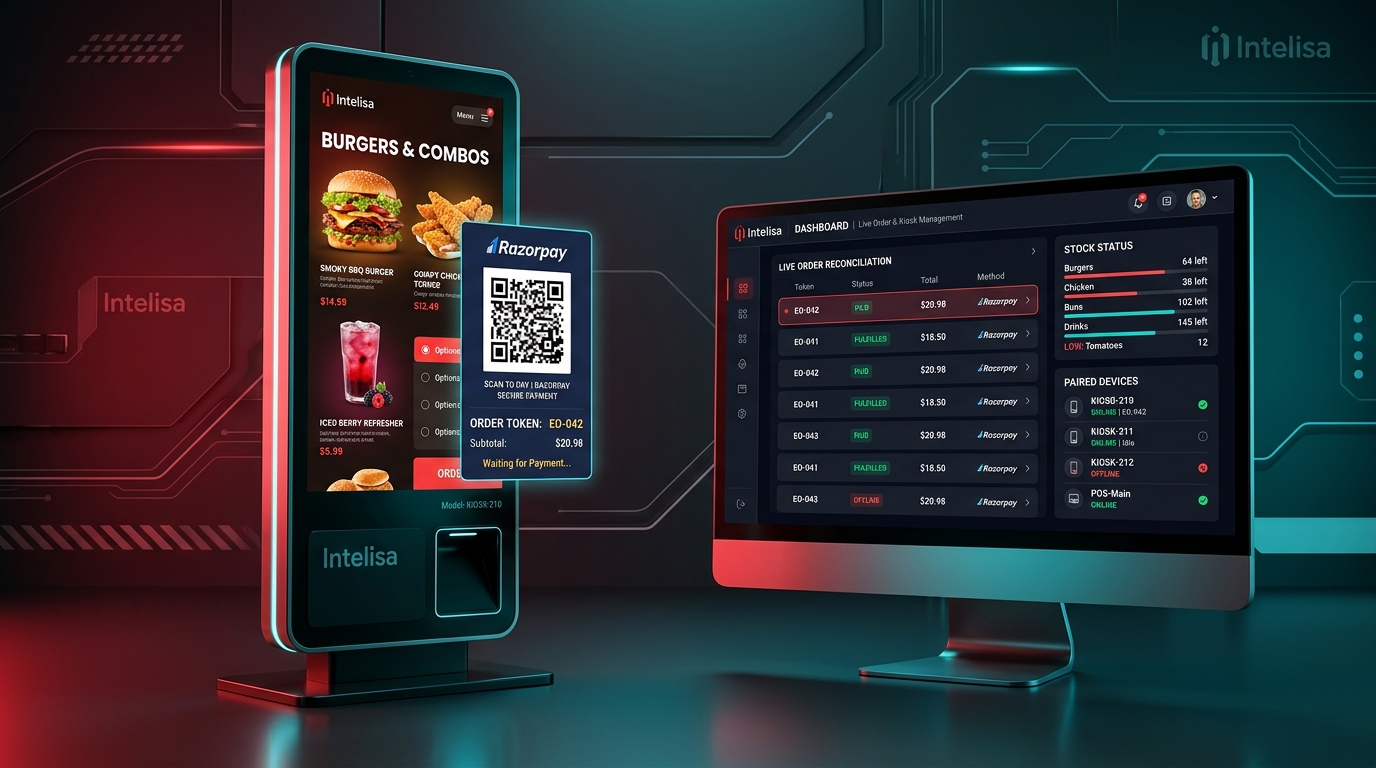
Every "did that order get paid?" moment is a system that doesn't exist.
Most quick-service counters run on a person taking orders, a person taking cash or a phone screenshot, and a kitchen guessing what's next. Every guest who orders has no consistent way to confirm their own payment went through.
"Did the QR actually get scanned, or is the guest just standing there?"
Counter staff waste valuable service minutes trying to peek at customer phones or guessing if payment was initiated.
"Is this order paid, or did they just show me a screenshot?"
Manual UPI flows leave restaurants vulnerable to fake payment apps and unverified screenshot trickery.
"Which order was that — the till roll ran out an hour ago."
Jammed or missing receipt paper stops the line cold and leaves kitchen staff without order tokens.
"Why is this item still on the kiosk if the kitchen is out of it?"
Static menu boards cause angry guests when items sell out mid-rush without real-time item toggles.
One kiosk. One clear flow. Every order, every state, always visible.
EasyOrder is a multi-restaurant self-order kiosk platform. Each restaurant sees only its own menu, users, and payment provider. Onboarding runs through a controlled path before anything reaches a guest.
● For Super Admin (Platform Operator)
Create and approve restaurants, assign supported payment providers, issue kiosk licenses, and approve the move from TEST to LIVE only once readiness is proven.
● For Restaurant Admin
Manage catalog, categories, stock, images, GST, printing, kiosk PIN, and export daily reconciliation reports.
● Bulk Menu Excel Loading
Import catalog fast with strict product validation; image URL issues trigger soft warnings so bad photo links never block a valid menu.
● Daily KOT Tokens (EO-###)
Short daily tokens (EO-001, EO-002...) issued strictly on server-confirmed payments, resetting daily at 4:00 AM restaurant time.
Guest Order & Payment Flow Simulator
Step 1: Browse Category Catalog
Guest browses high-res auto-cropped food items with clear pricing and item availability.
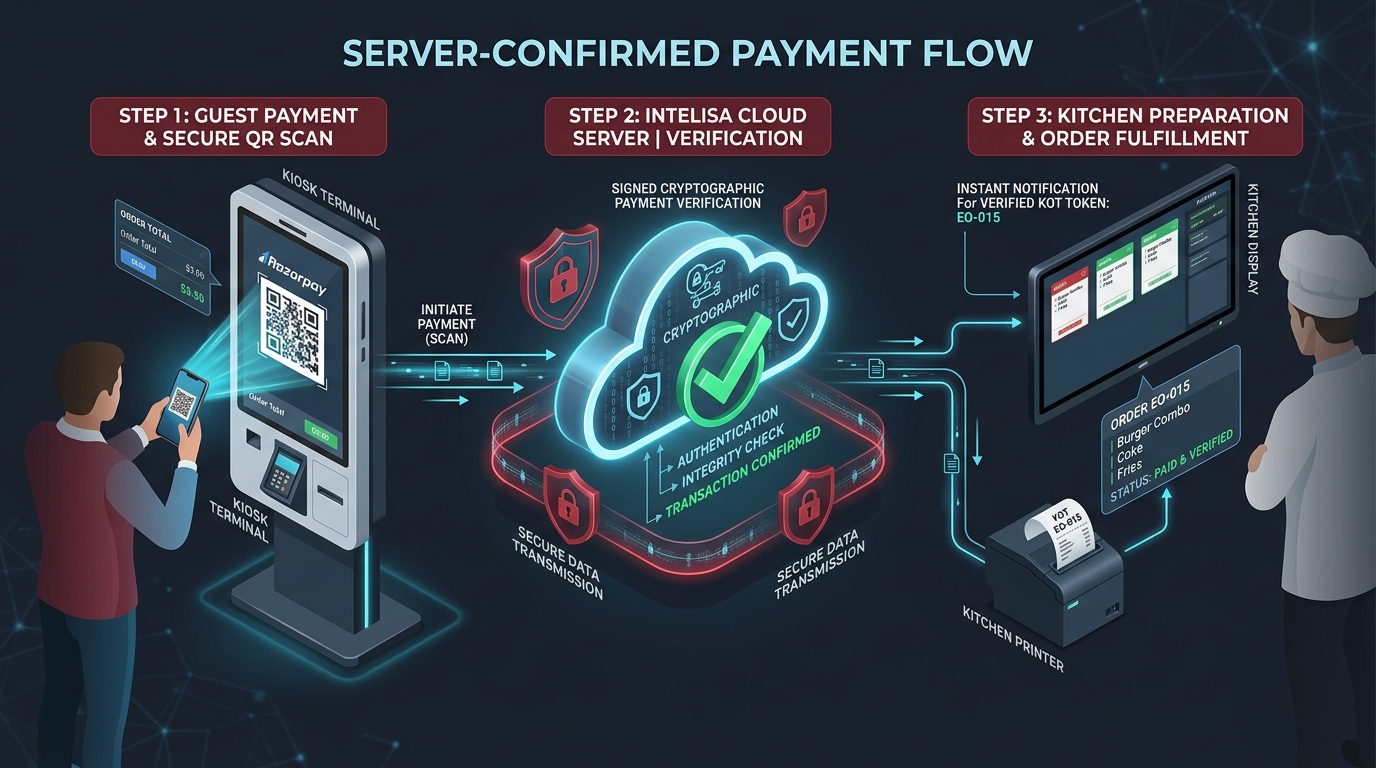
The QR doesn't trust the guest to say "paid." Neither should you.
This is the critical part of the flow most self-order kiosks quietly skip.
Payment status guest and staff can both see
Every order moves through plain, transparent statuses: pending, processing, paid, failed, expired, or cancelled — never a guess.
Server-Authoritative Razorpay Confirmation
The kiosk doesn't load Razorpay's checkout script and doesn't decide an order is paid on its own — finalization comes strictly from signed provider webhooks on the server.
Final check before anything is cancelled
If payment and cancellation happen simultaneously, the server verifies with Razorpay first, guaranteeing legitimate payments are never discarded.
Cart survives hiccups, payment stays verified
Local cart persistence protects against Wi-Fi drops, while checkout and payment confirmation strictly enforce live server validation.
Everyone gets exactly the access they need — nothing they shouldn't have.
Multi-role permissions separate platform governance, restaurant catalog management, device installer setup, counter operations, and guest ordering.
Configures multi-tenant platform infrastructure and approves restaurant go-live credentials.
Super Admin Platform Access
- Restaurant onboarding, isolation, and approval workspace
- Payment provider assignment per restaurant (Razorpay, Paytm)
- Kiosk license issuance and slot capacity management
- Strict TEST-to-LIVE move approval gate
Not a generic POS. Not a generic kiosk app. Built around how a real counter actually runs.
Reversed pairing, not a shared setup code
The kiosk generates its own six-digit code on first boot; the restaurant admin enters it against an available license slot in their account. No shared credentials sit inside live hardware.
A token that isn't the payment record
Short EO-### tokens are what staff shout across the counter. Underlying transaction references handle support & audit — the token only exists because an order was verified paid.
Printing is optional, never a blocker
A missing, jammed, or empty printer never holds up the kiosk from accepting the next guest's order — paid state and on-screen EO tokens confirm orders independently.
Stock control at the item level
Mark an individual item unavailable the second the kitchen runs out, without hiding or editing the entire menu category.
Menu changes verified on kiosk
Our explicit operational model requires checking category order, thumbnails, stock filters, and prices directly on the kiosk screen after any admin edit.
GST that doesn't rewrite history
Every order captures and locks its own GST snapshot at the exact second it was placed — future tax rate updates never alter historical reports.
Background Petpooja order delivery
Where configured, paid orders queue for Petpooja delivery in the background with automatic retries — guests are never kept waiting on external systems.
What changes on day one.
See how EasyOrder transforms everyday counter chaos into automated precision.
| Operational Task | Today (Counter & Cash / Manual UPI) | With EasyOrder |
|---|---|---|
| Confirming a payment | Staff eyeballs a phone screen or hears "I paid" | Server-confirmed Razorpay status, visible on-screen |
| Calling out an order | Shouted description, or a handwritten number | A daily EO token, issued only on paid orders |
| An item running out | Told verbally, hoped staff remember | Marked unavailable, instantly hidden on the kiosk |
| Updating the menu | Reprint or re-tell every counter person | Update once in admin, visible on every kiosk |
| A jammed printer | Order confusion, guests asked to wait | Kiosk continues taking the next order regardless |
| Reviewing the day's sales | Manual tally from receipts | Reconciliation view with GST snapshots, exportable to Excel |
| Opening a second restaurant | Rebuild the whole setup from scratch | New restaurant, own menu, own users, own license pool |
"Staff stopped asking each other whether an order actually went through. The kiosk just tells them."
Built for scale, security, and real service hours.
Platform & Onboarding
- Multi-restaurant isolated architecture
- Controlled TEST → LIVE onboarding path
- Super Admin approval gate for live access
- Per-restaurant payment provider assignment
Kiosk & Devices
- Reversed 6-digit kiosk pairing flow
- License-based activation slot tracking
- Device-specific exit PIN security
- Full-screen kiosk mode relaunch defense
Ordering & Payments
- Guided 4-step guest ordering flow
- Server-side Razorpay QR generation
- Optional manual UPI/Paytm fallback
- Local cart persistence during drops
Catalog & Operations
- Auto-cropped square product image upload
- Excel bulk import with product validation
- Item-level stock control toggles
- Daily EO-### KOT tokens (reset at 4:00 AM)
Reporting & Integrations
- Read-only date-filtered reconciliation view
- Per-order GST snapshot preservation
- Excel report export for daily close
- Petpooja queued background delivery
Frequently Asked Questions
Does EasyOrder work without internet?
The guest's cart is stored on the device, so it survives a brief connectivity drop or refresh. Checkout, payment confirmation, and most admin actions still require a live connection — EasyOrder doesn't offer offline payment capture.
Does every payment method get the same confirmation?
No. Razorpay QR is confirmed server-side, from signed provider communication. Where a restaurant uses a manual UPI/Paytm flow instead, that relies on staff's own verification process, and the two are never presented as equivalent.
What happens if the printer is down?
Nothing stops. The kiosk can always start the next order; staff verify a paid order using the on-screen state and the EO token, and follow the restaurant's manual kitchen fallback until printing is restored.
Can a restaurant self-manage its Petpooja setup?
Backend support for retrieving menu data and sending paid orders to Petpooja exists once configured, with queued delivery and retries. Each restaurant's integration still needs to be validated individually before it's relied on for live service.
How does a restaurant go live?
Every restaurant starts in TEST — for catalog setup, device pairing, and a full end-to-end order on the physical kiosk. LIVE approval is a one-way, Super-Admin-approved step once the restaurant has proven it's ready, not a casual toggle.
How does a kiosk get paired to a restaurant?
The kiosk shows its own six-digit code on first boot. The restaurant admin selects an available license and enters that code from their own device — nobody needs shared installer access to a live kiosk.
Stop guessing whether an order actually got paid.
See how a guest moves from browsing the menu to a confirmed payment and a kitchen token — and how your team stays in control of every restaurant on the platform.