
Getting management to approve a digital signage project isn’t just about convincing them that screens look better than printed posters. It’s about showing them how digital signage can solve a real business problem, what the investment will cost, and how you’ll know whether it was worth it.
Whether you want to improve internal communications, promote products in retail stores, streamline visitor experiences, or keep employees informed across multiple locations, a strong digital signage business case connects the technology to outcomes your leadership team already cares about.
Here’s how to build that case, address the questions management is likely to ask, and make a recommendation backed by numbers rather than assumptions.
What is a digital signage business case?
A digital signage business case is a document or presentation that explains why an organization should invest in digital signage, what it will cost, which business problems it will address, and what results it can reasonably expect.
A good business case covers five things:
- The business problem: What’s not working with your current communication, advertising, or information-sharing process?
- The proposed solution: How will digital signage address that problem?
- The investment: What will you spend on displays, software, installation, content, maintenance, and ongoing support?
- The expected return: What financial or operational benefits could the organization gain?
- The measurement plan: Which metrics will tell you whether the project is succeeding?
Why should you pitch digital signage to management now?
Digital signage has become an established communication and marketing channel across retail, hospitality, corporate offices, education, and other environments.
Businesses use it to display promotions, share announcements, guide visitors, communicate operational updates, and keep information current across multiple locations.
The more important question, though, is whether your organization has a problem that digital signage can solve.
For example, if your retail team spends hours coordinating poster updates across 30 stores, a centrally managed signage platform could simplify the process. If employees working on a factory floor rarely check their email, screens displaying safety notices and production updates could help make essential information more accessible.
In both cases, the pitch starts with an operational need, not a screen.
Step 1: Identify the business problem before proposing the solution
Before you start comparing digital signage software or requesting hardware quotes, document how your organization handles communication today.
Management is more likely to consider your proposal seriously when you can point to a specific inefficiency, recurring cost, or missed opportunity.
Start by asking:
- How much time do employees spend creating, printing, distributing, and replacing physical signs?
- How often does information become outdated before someone can update it?
- Do employees, customers, or visitors miss important announcements?
- Is it difficult to maintain consistent messaging across locations?
- Are existing communication channels reaching the people they’re intended for?
- What does the current process cost in time, money, and resources?
Try to quantify the answers wherever possible. If the marketing team spends 12 hours each month coordinating printed promotional materials across multiple locations, calculate the annual cost of that work. If store managers regularly report that promotions are displayed late, record how often that happens and what it means for campaigns.
You don’t need to have every number on day one. Even a reasonable baseline is more persuasive than a vague claim that the current process is inefficient.
Step 2: Connect digital signage benefits to business outcomes
Once you’ve established the problem, explain how digital signage could help solve it. Avoid presenting a long list of features without showing why those features matter to your organization.
Here are some common business objectives and how digital signage can support them.
| Business Objective | How digital signage can help | What to measure |
|---|---|---|
| Reduce printing costs | Replace selected printed posters, notices, menus, and promotional materials with digital content | Annual printing, shipping, and replacement costs |
| Improve internal communications | Display company announcements, safety notices, employee updates, and operational information in shared spaces | Message recall, employee awareness, and update delivery time |
| Increase retail sales | Promote relevant products, offers, and seasonal campaigns at the point of purchase | Sales of promoted products, conversion rate, and average transaction value |
| Improve visitor experience | Show directions, meeting schedules, service information, and visitor instructions | Wayfinding requests, check-in time, and visitor feedback |
| Improve consistency across locations | Publish approved content centrally and schedule updates across multiple screens | Time spent coordinating updates and compliance with campaign schedules |
| Communicate operational information | Display production metrics, performance dashboards, and safety reminders | Update frequency, response time, and relevant operational KPIs |
These are potential benefits and your actual outcomes will depend on screen placement, content quality, audience attention, existing processes, and how well the system is managed.
For example, replacing printed promotional posters across 20 locations may produce measurable savings. By contrast, displaying employee announcements on office screens may improve access to information without creating an immediate, easily quantifiable financial return.
Both can be worthwhile, but they need different business cases.
Step 3: Build a realistic digital signage cost estimate
One of management’s first questions will probably be, “How much is this going to cost?”
Your answer should include the full cost of ownership rather than just the price of the displays.
A digital signage deployment can involve several expenses, depending on the size and complexity of the project.
| Cost component | What to include |
|---|---|
| Displays | Commercial displays or other suitable screens, including mounts |
| Media players | Dedicated devices if the selected displays don’t support native playback |
| Digital signage software | Subscription or licensing fees for content management, scheduling, and device management |
| Installation | Mounting, cabling, electrical work, and professional installation where required |
| Network and infrastructure | Connectivity, network configuration, and any necessary upgrades |
| Content creation | Design, video production, templates, copywriting, and localization |
| Maintenance and support | Repairs, replacement hardware, software support, and troubleshooting |
| Staff time | Content updates, approvals, training, and day-to-day administration |
Ask vendors to separate one-time implementation costs from recurring expenses. This makes it easier to compare proposals and understand the total cost over a defined period, such as three years.
It’s also worth comparing the cost of commercial-grade displays with consumer televisions. A consumer TV may be sufficient for a low-usage environment, while a screen operating for long hours in a public or commercial setting may require more suitable hardware.
Don’t forget the cost of keeping content fresh. Digital signage software can make publishing easier, but it doesn’t automatically create useful content or ensure that someone updates it regularly.
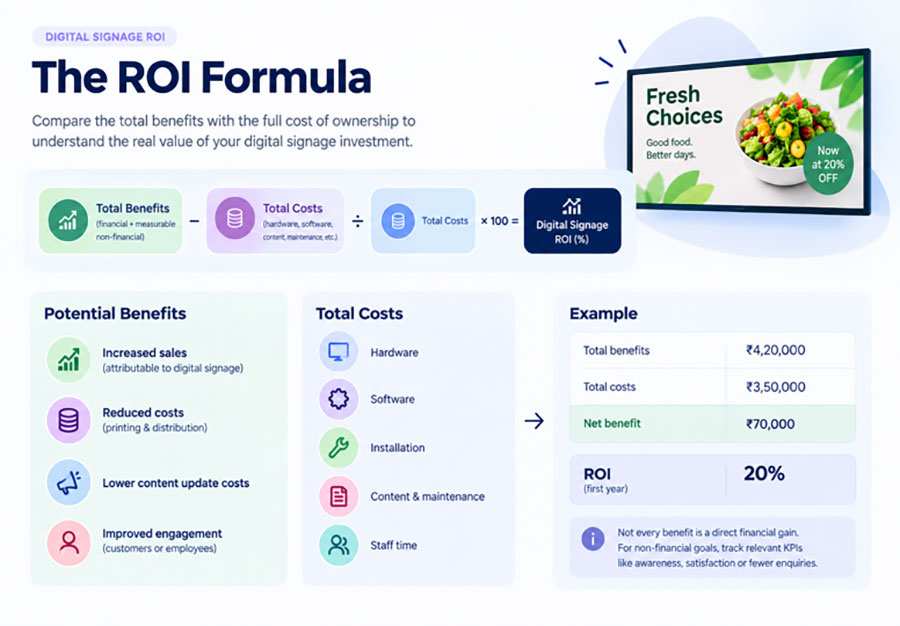
Step 4: Calculate digital signage ROI
Management will want to know whether digital signage is worth the investment. To answer that, calculate the financial benefits against the total cost of ownership, including hardware, software, installation, content creation, maintenance, and staff time.
Benefits may include increased sales attributable to digital signage, reduced printing costs, and lower distribution expenses. Be careful not to count all additional sales as profit or treat time saved as direct financial savings unless you can demonstrate the actual value.
For example, if your business invests ₹3,50,000 in digital signage and generates ₹4,20,000 in measurable financial benefits during the first year, the ROI is 20%.
| Metric | Amount |
|---|---|
| Total financial benefits | ₹4,20,000 |
| Total first-year costs | ₹3,50,000 |
| Net benefit | ₹70,000 |
| ROI | 20% |
These figures are illustrative, not industry benchmarks.
What if the benefits aren’t financial?
Not every digital signage project generates directly measurable revenue. For internal communications or wayfinding, you can measure outcomes such as employee awareness, visitor satisfaction, or fewer repetitive enquiries.
This is known as return on objectives (ROO).
To measure success accurately, establish a baseline before implementation and compare results afterward. Remember that impressions and playback counts indicate screen activity, not necessarily business impact.
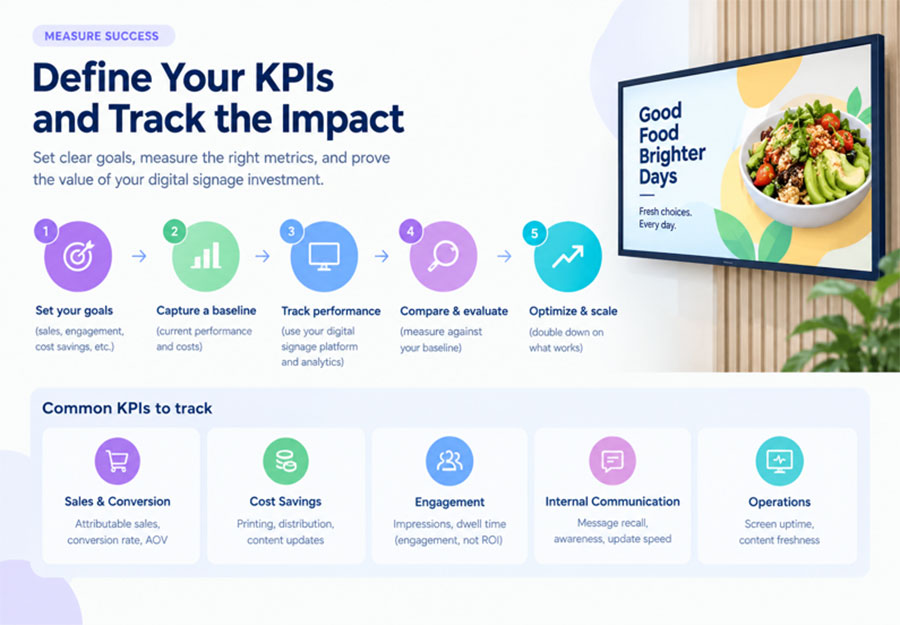
Step 5: Show management how you’ll measure success
A common weakness in technology proposals is that they explain what the solution can do but don’t define how success will be evaluated.
Kitcast’s State of Digital Signage 2026 report found that 76.5% of surveyed digital signage operators did not measure the ROI of their screens. The finding highlights why measurement deserves a place in the original proposal rather than being left until after deployment.
Choose a small number of KPIs that relate directly to the problem you’re trying to solve.
| KPI | How to measure it | Example target |
|---|---|---|
| Printing cost reduction | Compare printing and distribution expenses before and after rollout | Reduce eligible costs by 25% |
| Content update time | Track the time required to publish an update across locations | Publish approved updates within 15 minutes |
| Employee message awareness | Use short surveys or knowledge checks | Improve awareness of priority announcements |
| Promotional performance | Compare promoted-product sales with a suitable baseline or control group | Improve contribution margin from selected campaigns |
| Screen uptime | Monitor device status and playback availability | Maintain 99% uptime during scheduled operating hours |
The targets above are examples to help structure a measurement plan. Set your own targets using baseline data, operational requirements, and vendor service commitments.
Where possible, measure performance before and after implementation. If you want to establish whether digital signage influenced sales, for example, compare equivalent periods or use a control group where practical. Account for seasonality, pricing changes, and other campaigns that might affect results.
For internal communications, consider whether employees actually notice, understand, or remember the information displayed. Counting the number of announcements published is not the same as measuring whether those announcements made a difference.
Step 6: Address the questions management is likely to ask
Even a well-researched business case can stall if it doesn’t anticipate the concerns of the people approving it. Think through the likely objections before the meeting.
| Management’s concern | How to respond |
|---|---|
| “Why can’t we continue using printed signs?” | Compare the cost, update frequency, and flexibility of the current process with the proposed solution. Acknowledge where print still makes sense. |
| “What’s the return on this investment?” | Present your cost assumptions, estimated benefits, ROI calculation, and payback period. Separate verified savings from projected benefits. |
| “Who will manage the screens?” | Define ownership for content creation, approvals, publishing, troubleshooting, and software administration. |
| “Will employees or customers actually look at them?” | Explain where the screens will be placed, what information they will display, and how you’ll assess audience engagement or message recall. |
| “What happens if a screen stops working?” | Outline device monitoring, support arrangements, replacement procedures, and the vendor’s service commitments. |
| “Is the system secure?” | Explain how access controls, software updates, network access, and device management will be handled. Involve IT and security teams early. |
| “What if the project doesn’t deliver results?” | Propose a limited pilot with agreed success criteria and a clear decision point before expanding the rollout. |
It’s also important to acknowledge that digital signage won’t automatically replace every existing communication channel. Email, messaging platforms, printed notices, and face-to-face communication may still be necessary.
Your proposal will be more credible if it explains where digital signage fits into the existing communication strategy rather than presenting it as a complete replacement for everything else.
Step 7: Propose a pilot before asking for a company-wide rollout
If management is uncertain about the investment, a pilot can make the decision easier.
Instead of requesting approval for screens across every office or store, propose a smaller deployment in an area where the business problem is clear and the results can be measured.
For example, a retailer could test digital signage in five stores before expanding to the wider network. A corporate communications team could start with the cafeteria, reception area, or a manufacturing floor.
A practical pilot plan should include:
- A defined scope: Identify the locations, screens, use cases, and stakeholders involved.
- A baseline: Record current costs, processes, and performance before launch.
- A timeline: Set a realistic period for installation, content testing, and evaluation.
- Success criteria: Agree on the KPIs and thresholds that would justify further investment.
- A review meeting: Present the results, lessons learned, total costs, and recommendation to expand, adjust, or stop.
A pilot should test the actual business case, not just whether the screens turn on. If your objective is to reduce printing costs, measure those costs. If your objective is to improve communication, evaluate whether the intended audience receives and understands the information.
Also, give the pilot enough time to produce meaningful evidence. Some operational improvements may become apparent quickly, while changes in employee awareness or sales performance may require a longer observation period.
Step 8: Make a clear recommendation
Once you’ve explained the problem, costs, potential benefits, risks, and measurement plan, end with a specific request.
Avoid finishing with a general statement such as “Digital signage could be a good investment for us.” Management needs to know what decision you’re asking them to make.
Your recommendation should state:
- The business problem you’re addressing.
- The proposed digital signage solution and its initial scope.
- The estimated implementation and ongoing costs.
- The expected benefits and how you’ll measure them.
- The main risks and how you’ll manage them.
- The budget, resources, and approvals you need.
- The next decision point and the conditions for expanding the project.
For example, you could recommend approving a pilot across five retail locations, with a defined budget, a three-month evaluation period, and agreed targets for printing costs and promotional performance.
That gives management a concrete decision to consider, with a clear way to evaluate the outcome before committing to a larger investment.
What should a digital signage business case presentation include?
If you’re presenting your proposal in a meeting, keep the deck focused on the decision rather than every detail of the technology.
A useful presentation structure is:
| Slide | What to cover |
|---|---|
| 1. Executive summary | The problem, recommendation, and approval you’re requesting |
| 2. Current challenges | Existing costs, communication gaps, and inefficiencies |
| 3. Proposed solution | Where digital signage will be used and how it fits existing workflows |
| 4. Cost breakdown | Initial investment, recurring costs, and total cost of ownership |
| 5. Business benefits | Expected savings, operational improvements, and potential revenue impact |
| 6. ROI and KPIs | Financial assumptions, payback period, and success measures |
| 7. Risks and implementation | Ownership, security, maintenance, and rollout timeline |
| 8. Pilot and next steps | Scope, budget approval, evaluation criteria, and decision date |
Keep detailed calculations, vendor comparisons, and implementation requirements in an appendix. This gives finance, IT, operations, and other stakeholders the information they need without overwhelming the main presentation.
Learn more on Intelisa
FAQs about pitching digital signage to management
How do you convince management to invest in digital signage?
Start by identifying a measurable business problem, such as recurring printing costs, slow content updates, inconsistent messaging, or missed promotional opportunities. Explain how digital signage could address that problem, estimate the total cost of ownership, present realistic benefits, and define how you’ll measure success. A small pilot can help reduce the perceived risk of a larger investment.
How do you calculate the ROI of digital signage?
Subtract the total project costs from the financial benefits over a defined period, divide the result by the total costs, and multiply by 100 to calculate ROI. Include hardware, installation, software, content, maintenance, and relevant staff costs. Count incremental profit or defensible cost savings as financial benefits, and identify non-financial benefits separately.
Formula: ROI (%) = (Total benefits − Total costs) ÷ Total costs × 100.
What costs should be included in a digital signage proposal?
Include displays, mounts, media players, signage software, installation, cabling, network requirements, content creation, maintenance, support, training, and staff time. Separate one-time costs from recurring expenses and compare the total cost of ownership over a consistent period.
How can you justify digital signage if it doesn’t directly increase revenue?
Focus on the outcomes the project is designed to improve. These may include lower printing costs, faster information updates, more consistent communication, better wayfinding, or improved access to safety information. Use measurable operational KPIs and explain how the benefits support wider organizational goals, even when they cannot be assigned a reliable monetary value.
What KPIs should you track after implementing digital signage?
Choose KPIs based on the use case. Cost-focused projects can track printing expenses and staff time. Retail deployments can track promoted-product sales, conversion rates, and contribution margin. Internal communications projects can track message awareness, recall, and the speed of information delivery. Screen uptime and content freshness are useful operational measures across many deployments.
Should you run a pilot before investing in digital signage?
A pilot is useful when management needs evidence before committing to a larger rollout. Start with a limited number of screens and locations, establish a baseline, define success criteria, and review the results before expanding. The pilot should test the business outcomes, not just the technical setup.
How long does it take for digital signage to pay for itself?
There is no universal payback period. It depends on the upfront investment, recurring costs, the benefits generated, and how quickly those benefits materialize. Calculate payback using your organization’s own assumptions and validate them with pilot results rather than relying on a generic industry benchmark.
Build a stronger business case for digital signage with Intelisa
Making the case for digital signage is easier when you can show management how it fits your business goals, simplifies content management, and helps you measure results. The key is to start with a clear objective, track the right metrics, and demonstrate the value before scaling up.
With Intelisa, you can explore how digital signage fits into your communication and operational needs, whether you’re managing screens across multiple locations or looking to make updates simpler and more efficient.
Ready to see how digital signage could work for your business? Explore how the right digital signage solution can help you turn your business case into action.
- Schedule content with start and end dates
- Works with LCDs, standees, video walls, and kiosks
- Manage every location from one dashboard
- Offline playback when the internet drops
Recent Posts
-
How to Pitch Digital Signage to Your Management: Building the Business Case
2026-11-05 16:38:51 -

Diwali Digital Signage Ideas 2026: 30 Festive Screen Ideas and a Day-by-Day Plan for Indian Businesses
2026-10-29 16:05:23 -
How to Manage 100+ Digital Signage Screens Across Cities from One Dashboard
2026-10-15 18:12:55 -
Digital Signage ROI: How to Measure the Impact of Your Screens on Business Performance
2026-10-06 00:00:21

