Categories
Digital Signages

Real-Time vs. Scheduled Data Refresh: Choosing the Right Update Frequency for Your Signage Dashboards

A digital signage dashboard is only useful if the information on it is current enough for the people looking at it.

That does not always mean you need real-time data.

A factory manager may need to see production numbers as they change. A retail store may only need to update its promotions a few times a day. A corporate office might refresh employee announcements every morning.

The right update frequency depends on what you are displaying, how quickly that information changes, and what your audience needs to do with it.

This is where the choice between real-time and scheduled data refresh becomes important.

What Is a Data Refresh in Digital Signage?

A data refresh is simply the process of updating the information displayed on your digital signage screen.

When your signage is connected to a data source such as a Power BI dashboard, Google Sheet, API, CRM, POS system, or IoT platform, the information on the screen can change when the source data changes. Your digital signage CMS plays an important role in managing how that content is updated, scheduled, and displayed.

The important question is how often that update should happen.

You can set your digital signage to refresh continuously or at specific intervals, depending on the platform and data source.

For some use cases, a few scheduled updates are enough. For others, even a short delay can make the information less useful.

Real-Time Data Refresh vs. Scheduled Refresh

The difference is fairly straightforward.

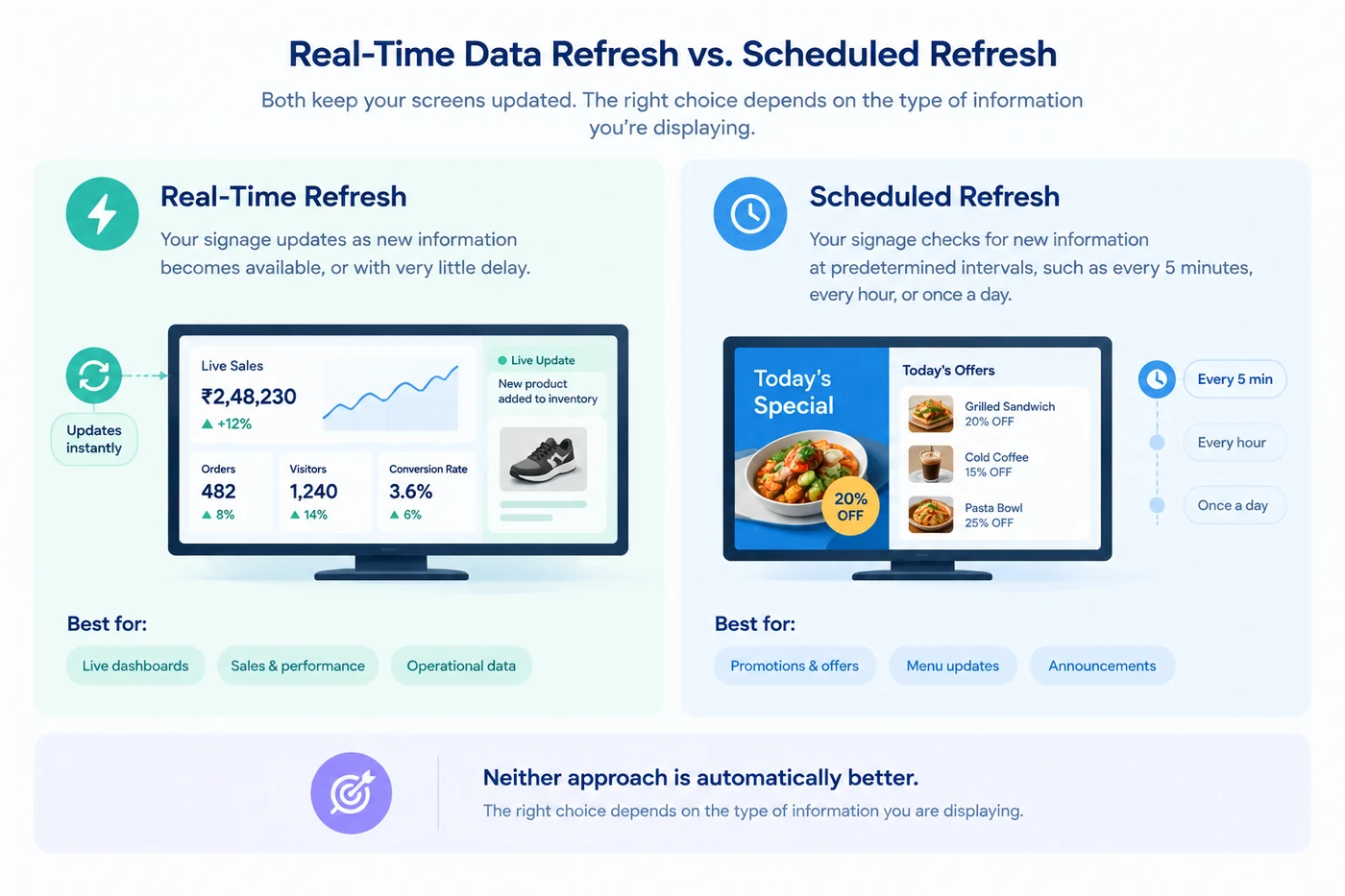
Real-time refresh means your signage updates as new information becomes available, or with very little delay.

Scheduled refresh means your signage checks for new information at predetermined intervals, such as every 5 minutes, every hour, or once a day.

Neither approach is automatically better.

The right choice depends on the type of information you are displaying.

FeatureReal-Time RefreshScheduled Refresh
Best forFast-changing informationStable or predictable information
Update frequencyContinuous or near real-timeFixed intervals
Common examplesMachine status, live sales, queuesMenus, prices, announcements
Main benefitKeeps information currentReduces unnecessary updates
Main considerationCan require more system resourcesInformation may be slightly outdated
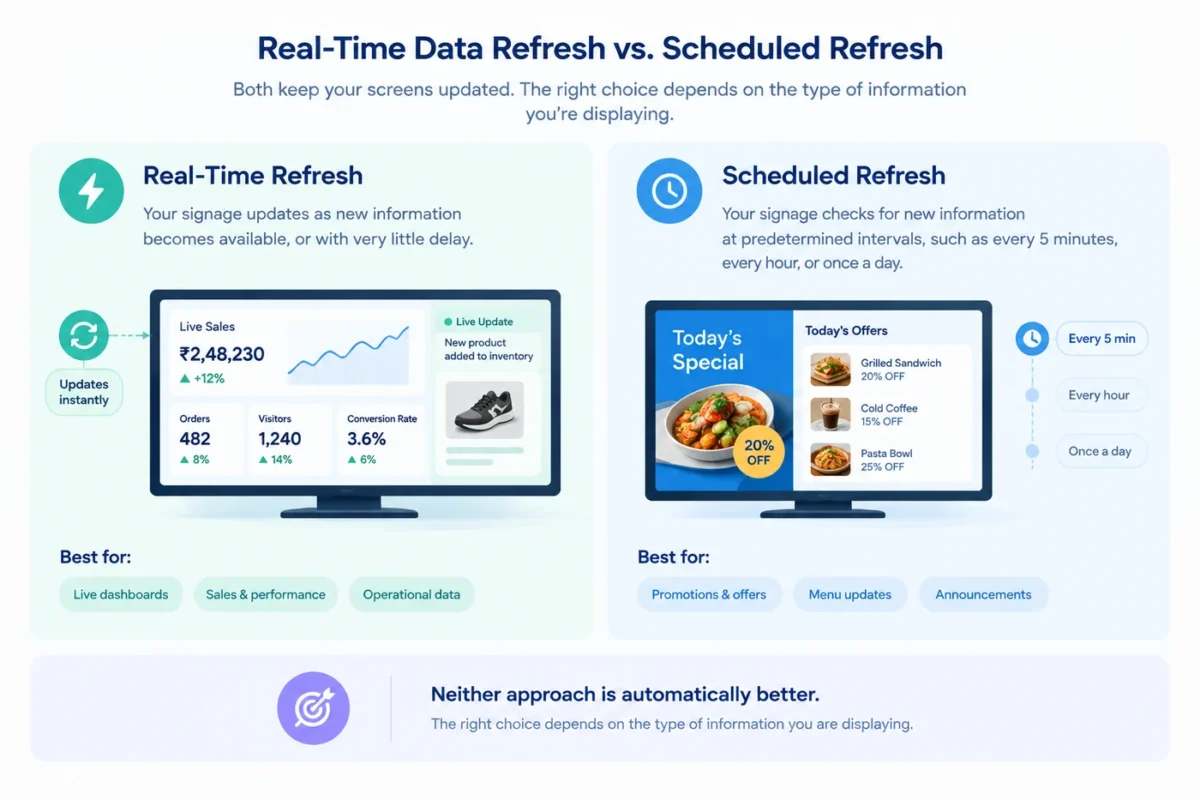
Real-time refresh versus scheduled refresh: real-time updates instantly for live dashboards, sales and operational data; scheduled refresh runs every 5 minutes, every hour or once a day for promotions, menus and announcements

When Should You Use Real-Time Data?

Real-time data makes sense when the information can change quickly and people need to see those changes immediately.

Think about a manufacturing floor where a screen shows machine status. If a machine stops working, displaying that information several hours later does not help the operations team.

The same applies to environments where the screen supports time-sensitive decisions.

Manufacturing and Operations

A factory can connect digital signage to production systems or IoT devices to display information such as:

  • Production output
  • Machine status
  • Downtime
  • Temperature
  • Energy consumption
  • Safety alerts

If these numbers change frequently, real-time or near-real-time updates can make the screen much more useful.

Retail Sales and Inventory

Retail teams may want to display live sales numbers, inventory levels, or store targets.

For example, a screen in a retail back office could show how much the store has sold today and how close the team is to its target. If the numbers update throughout the day, employees can see their progress without checking a separate system.

Queues and Customer Information

Real-time updates can also be useful when customers are waiting for something.

Healthcare facilities, banks, airports, and service centres can use connected data to display queue numbers, appointment information, or other updates that change throughout the day.

In these cases, outdated information can create confusion rather than simply being inconvenient.

When Is Scheduled Data Refresh Better?

Not every piece of information needs to update every few seconds.

If you are displaying content that changes predictably, scheduled refreshes are often the more sensible option.

Menus and Prices

Restaurants and cafes may change prices, menu items, or promotions occasionally rather than constantly. A scheduled update can keep the screens current without repeatedly checking for changes that are unlikely to happen. With the right digital signage content scheduling setup, you can also plan when specific content should appear on different screens.

Corporate Communications

An office screen might display company announcements, meeting schedules, employee events, or internal news.

Most of this information does not need to refresh continuously. Updating it every few hours or once a day may be more than enough.

Daily Targets and Performance Reports

A sales team may want to see yesterday's performance or the latest daily target on a screen.

If the underlying report is updated once every morning, there is little reason for the signage to refresh every minute.

The goal is to match the refresh rate to the pace of the information.

How Often Should a Digital Signage Dashboard Refresh?

There is no universal refresh rate that works for every digital signage dashboard.

Instead, ask how quickly the underlying data changes and how quickly someone needs to act on it.

Here is a simple way to think about it:

  • Every few secondsUse this for information that changes continuously and requires immediate visibility, such as machine status or live operational data.
  • Every few minutesThis can work well for sales dashboards, inventory information, queues, or other frequently changing business data.
  • Every few hoursThis is suitable for information such as schedules, internal updates, or performance reports that change throughout the day but do not require constant monitoring.
  • Once a dayThis works for content such as daily announcements, menus, planned promotions, and other relatively stable information.

The important thing is not to refresh data simply because you can. Refresh it when doing so provides value to the person viewing the screen.

What Happens If Your Dashboard Refreshes Too Often?

More frequent updates are not always better.

If your data source changes once an hour, refreshing the signage every 10 seconds does not give your audience any additional information.

It can also create unnecessary requests between your signage platform and the connected system.

This becomes particularly relevant when you have a large network of screens pulling data from the same source.

For example, updating one screen every minute is very different from updating 500 screens every minute. Your integration needs to handle the scale without creating unnecessary load.

What Happens If Your Dashboard Refreshes Too Slowly?

The opposite problem can be just as frustrating.

Imagine a production screen showing machine data that is 30 minutes old. The information might look perfectly accurate, but it could give the team a misleading picture of what is happening right now.

The same issue can occur with inventory, sales, queues, or other time-sensitive information.

A useful rule is to ask:

"How old can this information be before it becomes misleading?"

That answer can help you determine the appropriate refresh frequency.

Real-Time Does Not Always Mean Instant

There is an important distinction here.

When a platform says it supports real-time data, that does not necessarily mean the screen changes at the exact moment the source system changes.

There can be a small delay caused by the data source, API, network, processing, or digital signage platform.

For most business use cases, near-real-time data is perfectly adequate.

If a sales dashboard updates every 30 seconds or every minute, for example, the difference from true instant updates may not matter to the people viewing it.

What matters is whether the information is fresh enough for the decision they need to make.

How APIs Affect Data Refresh

APIs are often used to connect digital signage with business systems that do not have a ready-made integration.

Your signage platform can request information from a system such as a CRM, ERP, POS, inventory platform, or internal application.

The refresh frequency can then depend on how that API works.

Some systems can provide updates frequently. Others may have rate limits or restrictions on how often data can be requested.

That is why API support alone is not enough when evaluating digital signage software. You should also understand how the platform handles refresh intervals, caching, data requests, and failures.

What About Power BI and Google Sheets?

Power BI and Google Sheets are common examples of business data sources that teams may want to bring onto digital signage.

A Power BI dashboard can be useful for displaying sales, revenue, targets, inventory, or operational KPIs.

Google Sheets can work well when a team needs a simple way to manage information such as prices, offers, schedules, or daily targets.

The best refresh frequency depends on the data inside them.

If a Google Sheet contains a weekly event schedule, refreshing it every few seconds adds little value.

If a Power BI dashboard is tracking live operational performance, more frequent updates may make sense.

The integration should follow the behaviour of the data, rather than the other way around.

How to Choose the Right Refresh Frequency

Before choosing a refresh interval, look at five things.

  1. How quickly does the data change?

    If the information changes once a day, you probably do not need real-time updates.

    If it changes every few seconds, a daily refresh will not be useful.

  2. How quickly does your audience need to react?

    A screen displaying production alerts has different requirements from a screen displaying the week's cafeteria menu.

    Think about what happens when the information is outdated.

  3. How many screens are connected?

    A single screen and a network of hundreds of screens have very different data requirements.

    Your digital signage platform should be able to handle the refresh frequency across your entire network.

  4. Does the data source have limitations?

    Check whether your API, dashboard platform, spreadsheet, or business system has limits on how often data can be accessed or updated.

  5. What happens when the connection fails?

    A good digital signage setup should have a sensible fallback.

    If your screen temporarily loses internet access, it should not simply go blank. Features such as offline playback can help screens continue displaying previously downloaded content until the connection is restored.

Why Refresh Frequency Matters for Digital Signage

The point of connecting business data to your screens is to make the information more useful.

That means freshness matters, but usefulness matters more.

A dashboard that updates every five seconds is not necessarily better than one that updates every hour. If the information itself only changes once an hour, the extra refreshes do not make the screen more valuable.

On the other hand, showing yesterday's production numbers on a screen that is supposed to help a team manage today's operations defeats the purpose of connecting the data in the first place.

The right refresh frequency sits somewhere between those two extremes.

How Intelisa Fits Into a Connected Digital Signage Setup

If you want your digital signage to do more than play the same content on repeat, Intelisa gives you the tools to build a more connected setup.

With Intelisa’s cloud-based CMS, you can manage content across multiple screens, schedule updates, monitor displays remotely, and use custom widgets to bring dynamic information onto your screens. Offline playback also keeps your content running when a screen temporarily loses its connection.

The idea is simple: connect your signage to the information your audience actually needs, decide how often it should change, and manage it all from one place.

Want to see what that could look like for your screens?

Start your Intelisa trial

Explore the platform for yourself.

FAQs

What is real-time data in digital signage?

Real-time data in digital signage refers to information that is updated on a screen with little delay after the underlying data changes. It is useful for fast-changing information such as machine status, sales, inventory, queues, and operational metrics.

How often should a digital signage dashboard refresh?

The ideal refresh frequency depends on how quickly the data changes and how quickly viewers need to act on it. Fast-changing operational data may need updates every few seconds or minutes, while menus, announcements, and schedules may only need a few updates per day.

Is real-time digital signage better than scheduled refresh?

Not necessarily. Real-time refresh is useful for time-sensitive information, while scheduled refresh is often more efficient for stable or predictable content. The best approach is to match the refresh frequency to the use case.

Can digital signage dashboards update automatically?

Yes. Digital signage can be connected to data sources such as APIs, dashboards, spreadsheets, and business systems so that information can update automatically according to the capabilities of the platform and data source.

Does digital signage need an internet connection for data refresh?

Connected dashboards generally need network access to retrieve new data. However, digital signage platforms with offline playback can continue showing previously downloaded content when the connection is temporarily unavailable.
Categories
Digital Signages

Digital Signage Integrations: Power BI, Google Drive & More

A digital screen is only as useful as the information it shows.

A promotional video or a product image might do the job in a retail store. But what if you want that same screen to show today's sales numbers, a live dashboard, business content, social media posts, or information your team already manages elsewhere?

That is where digital signage integrations come in.

Instead of treating your screens as separate from the systems your business already uses, integrations let you bring information and content from those systems onto the screen. Depending on your setup, that could mean connecting Power BI, Google Drive, OneDrive, or social media.

And there is a good reason businesses are investing in this kind of setup. The global digital signage market was valued at around $31.1 billion in 2025 and is expected to reach $58.4 billion by 2033, according to Grand View Research. India's market was worth an estimated $1.32 billion in 2025 and is projected to grow at a 10.7% CAGR between 2026 and 2033.

Global digital signage market

2025$31.1B
2033$58.4B

India, 2025 to 2033

10.7% CAGR

From an estimated $1.32 billion in 2025, growing between 2026 and 2033.

The screens are growing. What they can do is growing with them.

What Are Digital Signage Integrations?

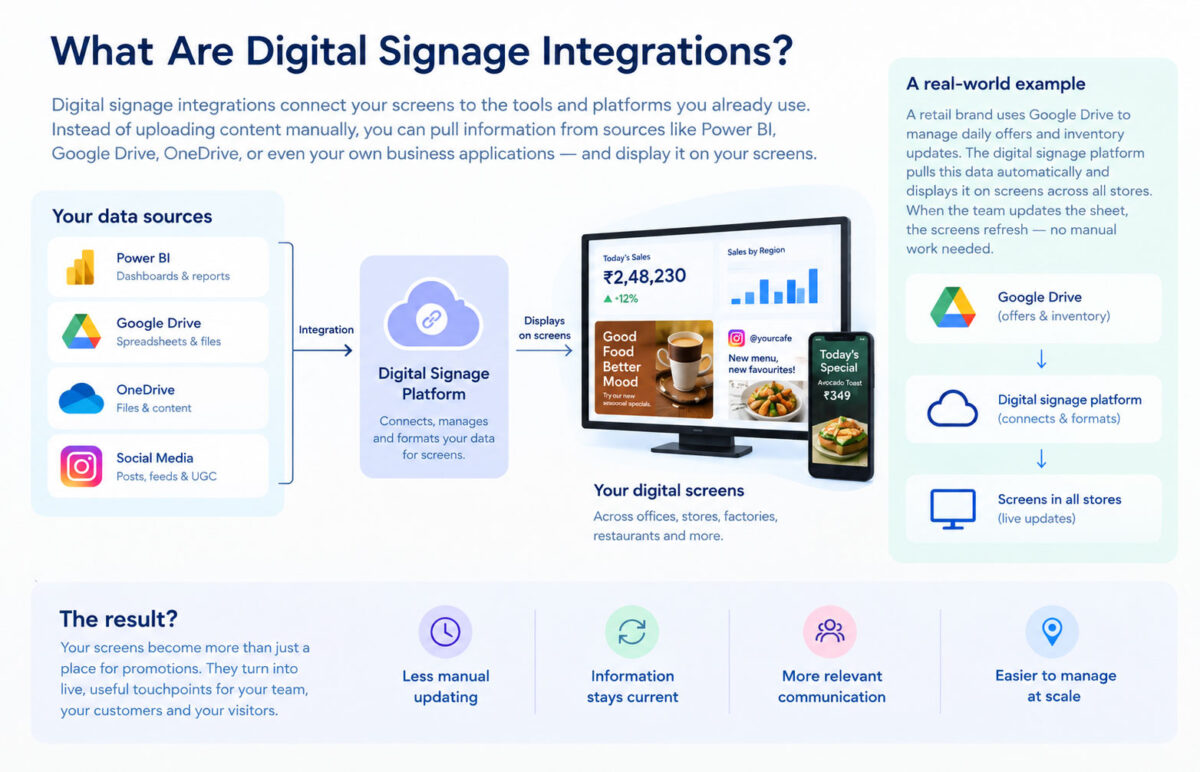
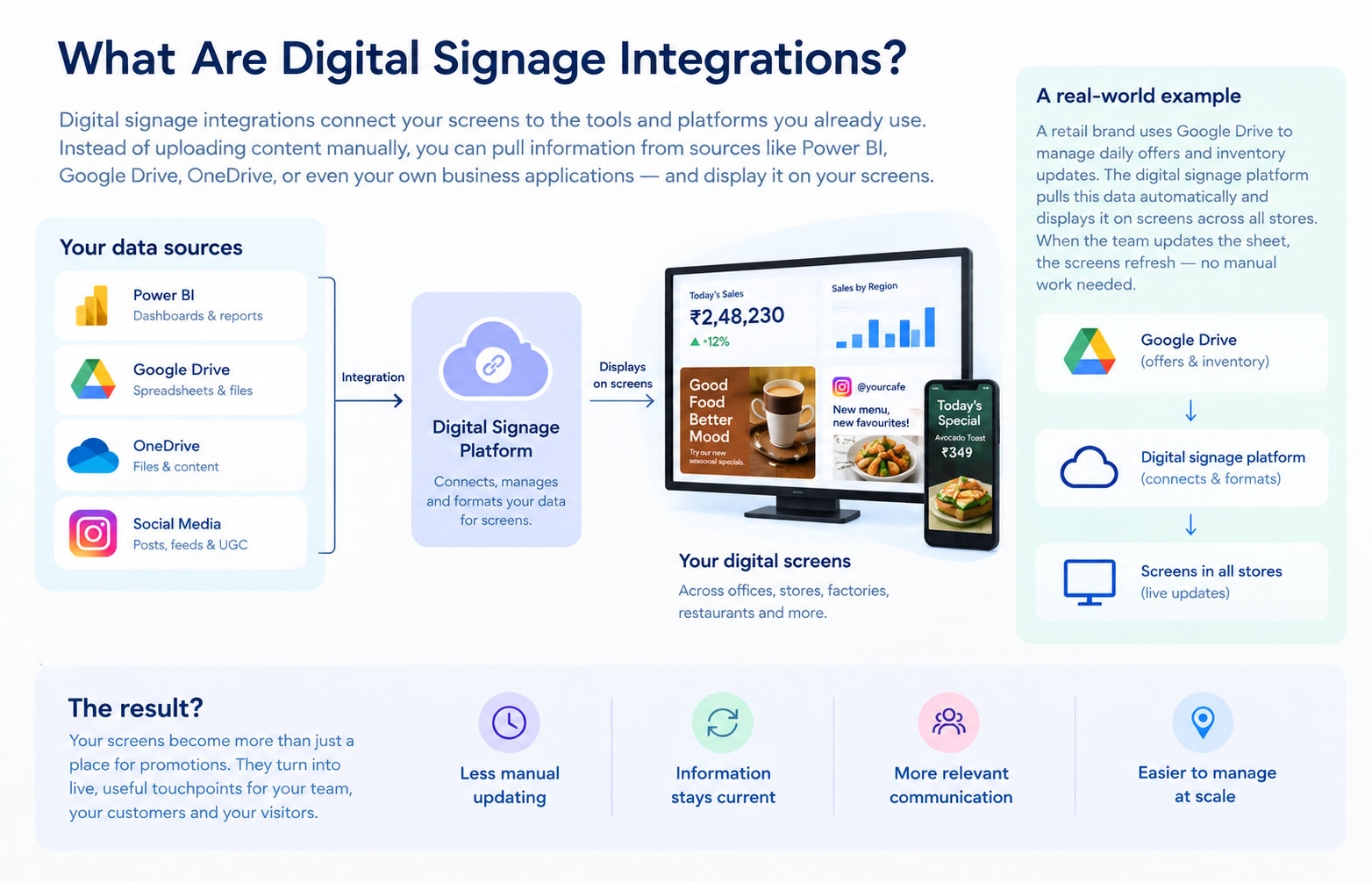
What are digital signage integrations: Power BI, Google Drive, OneDrive and social media connected to a digital signage platform and displayed on screens

A digital signage integration connects your signage software to another platform or content source. It lets your screen use information or content from somewhere else instead of relying entirely on manually uploaded content.

For example:

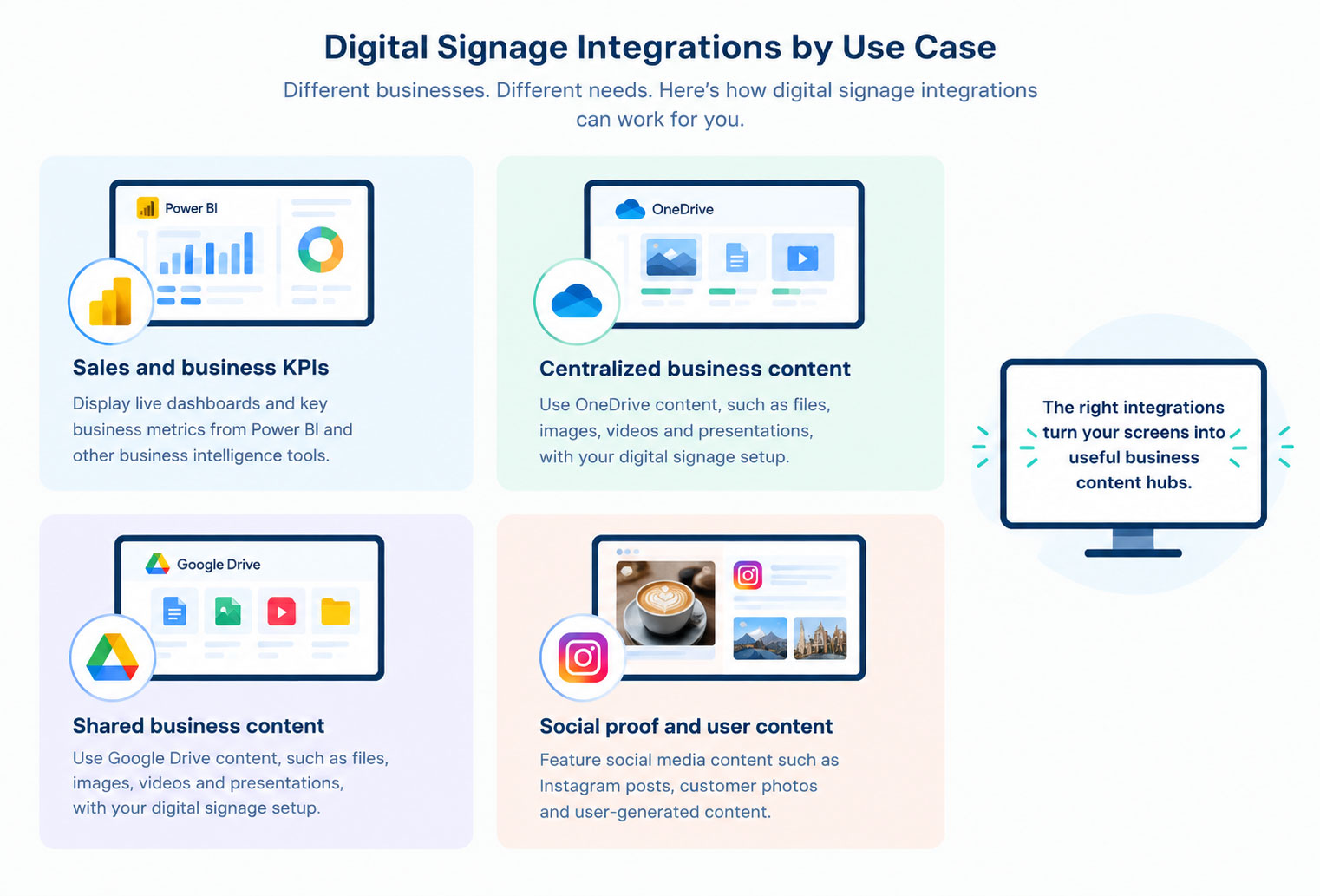
  • A sales team could display a Power BI dashboard on a screen in the office.
  • A business could use content stored in Google Drive as part of its digital signage setup.
  • A company could connect OneDrive content to its screens.
  • A retail brand could show social media content alongside promotional campaigns.

The important part is that the screen and the source can work together.

Instead of managing everything separately, your team can use the systems it already works with and bring relevant content onto digital signage screens.

Why Connect Digital Signage to Your Business Data?

Think about a sales dashboard.

Your sales team already has one. They might check it every morning, during a meeting, or whenever someone asks for an update.

Now imagine that dashboard is on a screen in the office.

Nobody has to open a laptop. Nobody has to send a screenshot to the team WhatsApp group. The numbers are simply there.

That is the real value of connected digital signage.

Less manual work

If information or content changes frequently, manually creating new signage content gets old very quickly.

An integration can take some of that work off your team's plate.

Information stays current

A printed poster can become outdated the moment a price, offer, or piece of information changes.

A connected screen can use information from its source instead.

Your screens become useful beyond advertising

This is particularly important for internal communication.

A screen in a corporate office can show business dashboards or announcements. A retail screen can combine promotions with product information and social content.

The screen becomes part of the business workflow, rather than something that simply plays a playlist.

You can manage information at scale

This matters when you have multiple locations.

Updating one screen manually isn't difficult. Updating 100 screens across 20 cities is another story.

A cloud-based digital signage platform gives teams a central place to manage screens, content, schedules, and updates. Intelisa, for example, is built around centralized screen management, with scheduling, remote updates, screen grouping, custom widgets, and real-time management available through its platform.

1. Power BI Digital Signage Integration

If your company already uses Power BI, you already have a lot of useful information sitting inside dashboards like sales, revenue, marketing performance, operations, inventory, and KPIs.

So why keep that information trapped inside someone's laptop?

A Power BI digital signage integration can bring selected dashboards or reports onto a large display where employees, managers, or customers can see them.

For example, a sales office could have a screen showing:

  • Today's revenue
  • Monthly targets
  • Sales by region
  • Top-performing products
  • Conversion rates
  • Team performance

A manufacturing business could use a similar setup to show production targets, output, or operational KPIs.

The point isn't to put an entire Power BI report on a screen and hope people figure it out. Digital signage works best when you pick the information people need to understand quickly.

How do you display Power BI on digital signage?

A compatible digital signage platform can connect to a Power BI report or dashboard and display the relevant information on a screen. The exact setup depends on the signage platform, Power BI configuration, authentication requirements, and how frequently the data needs to refresh.

For a public-facing screen, you also need to think about permissions and sensitive business information. A dashboard that is perfectly fine for an internal office screen may not be appropriate for a customer-facing display.

2. Google Drive Digital Signage Integration

Your team may already use Google Drive to store and organize business content.

Instead of treating that content as completely separate from your digital signage, an integration can help bring relevant content into your screen network.

Google Drive can be useful for businesses managing content such as:

  • Images
  • Videos
  • Presentations
  • Promotional materials
  • Internal communications
  • Other business content

The benefit is simple: your team can continue using a familiar system for managing content while connecting it with the digital signage workflow.

That can be particularly useful when multiple people are responsible for creating or updating content.

Can Google Drive be used with digital signage?

Yes, when the digital signage platform supports the relevant Google Drive integration and content type.

The exact setup depends on the platform and the content you want to display. The goal is to make it easier to move content from the systems your team already uses to the screens where people need to see it.

3. OneDrive Digital Signage Integration

Many businesses already use Microsoft's ecosystem to store and manage their files.

OneDrive can be another source for content used in a digital signage setup.

For businesses that already manage content through OneDrive, an integration can help connect that existing workflow with their digital screens.

This can be useful for content such as:

  • Images
  • Videos
  • Presentations
  • Promotional materials
  • Internal communications
  • Other business content

Instead of maintaining separate copies of the same content for different systems, businesses can connect their existing content workflow with their digital signage network.

Can OneDrive be used with digital signage?

When supported by the digital signage platform, OneDrive can be used as a source for content displayed on digital signage screens.

The exact setup depends on the platform and the type of content being used.

4. Social Media Integrations

Not every integration has to involve business dashboards or cloud storage.

Social media is another obvious source of fresh content.

For example:

  • A retail store could show Instagram posts alongside product promotions.
  • A restaurant could feature customer-generated content.
  • An event venue could display social media content related to an event.

Fresh content gives people a reason to look at the screen again.

Intelisa supports social media integration, including Instagram, as part of its digital signage platform. Its Pro plan also includes features such as widgets, reporting, split-screen layouts and live streaming. For more, check out our pricing plans.

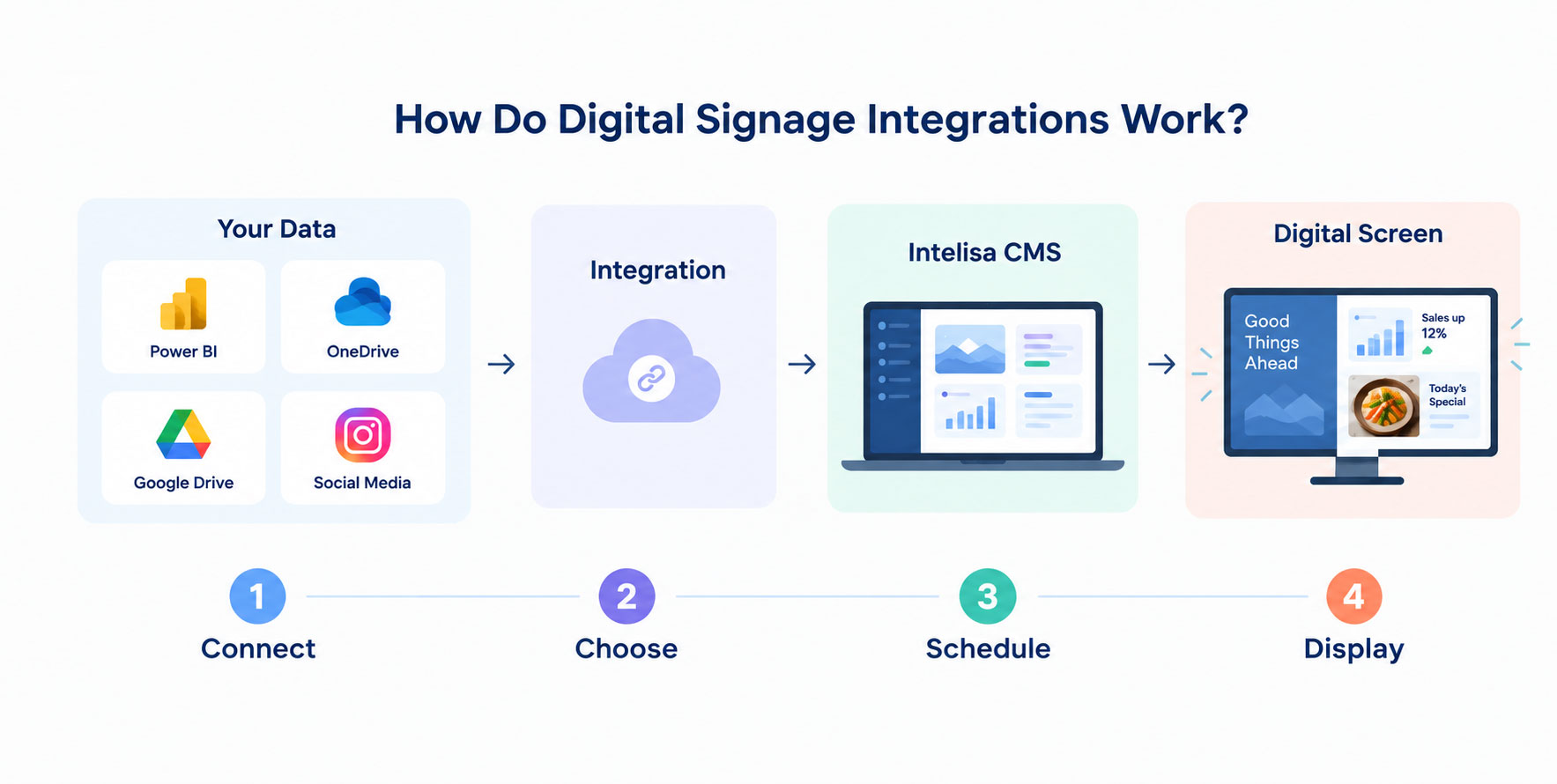
How digital signage integrations work: your data, integration, Intelisa CMS and digital screen — connect, choose, schedule, display

What Can You Do With Digital Signage Integrations?

The use case depends on the business.

  • A retailer might combine promotional content with social media.
  • A corporate office might display business dashboards.
  • A sales team might use Power BI to keep important numbers visible.
  • A business might use cloud-stored content from Google Drive or OneDrive on its screens.
  • An organization might combine several content sources on the same display.

And the same screen can often do more than one of these things.

A split-screen layout could show a business dashboard on one side, social content on another, and promotional content underneath.

That flexibility is one reason digital signage is moving beyond simple posters on screens.

How Do Digital Signage Integrations Work?

The setup will vary depending on the platform, but the process usually looks something like this.

1. Find the source

First, figure out where the information or content currently lives.

Power BI? Google Drive? OneDrive? Social media?

2. Connect it to your signage platform

Use the available integration or other supported connection.

3. Decide what should appear

Don't dump an entire dashboard onto a 55-inch screen.

Pick the metrics, messages, or content that make sense for the audience and viewing distance.

4. Design the screen

Use a layout that can be understood quickly.

This matters because people usually aren't standing in front of a digital sign for five minutes studying it.

5. Schedule and publish

Decide which screens should show the content and when.

A retail chain might show one set of information during opening hours and another after closing. An office might display business KPIs during the workday and announcements at other times.

6. Keep an eye on the network

Once you have multiple screens, monitoring becomes important.

You want to know whether screens are online, whether content is playing correctly, and whether anything needs attention.

This is one area where a centralized digital signage CMS can save a lot of time.

What Should You Look for in Digital Signage Integration Software?

Integrations can look impressive on a feature page. What matters is whether they actually make your day-to-day work easier.

Here are a few things worth checking before choosing digital signage software.

Multiple integration options

Your business might use different platforms for different types of content.

Look for a system that gives you multiple ways to bring information and content onto your screens rather than limiting you to one source.

Custom widgets

This is useful when you want to display information that doesn't fit neatly into a standard template.

Intelisa supports custom widgets as part of its digital signage platform, giving businesses more flexibility in how they display business information and dashboards.

Remote management

If you have 50 screens, you don't want to physically visit 50 screens to change a campaign.

Scheduling

Look for scheduling by date, time, location, screen, or content group.

Offline playback

Internet connections aren't perfect everywhere.

A signage system that can continue playing cached content when the connection drops is much more practical for real-world deployments. Intelisa includes offline playback among its digital signage capabilities.

Permissions and security

This becomes especially important when you're connecting screens to internal business data.

Not everyone who can update a screen should necessarily be able to access every business dashboard.

How Intelisa Fits Into a Connected Digital Signage Setup

How digital signage integrations work: your data, integration, Intelisa CMS and digital screen — connect, choose, schedule, display

The interesting part about integrations is that the integration itself isn't the end goal.

You still need somewhere to manage all that information.

That's where a digital signage CMS comes in.

Intelisa gives businesses a centralized platform for managing their digital screens, with features including scheduling, screen grouping, remote management, custom widgets, social media integration, reporting and offline playback.

So instead of thinking about your setup as:

Screen + Power BIScreen + Google DriveScreen + OneDrive

think of it as:

Business content→Integration→Intelisa→Screen network

That distinction becomes more important as your network grows.

One screen is easy to manage.

Twenty screens are manageable.

Two hundred screens need a system.

Are Digital Signage Integrations Worth It?

If your screen content changes often, connected digital signage can make it easier to keep your displays useful and current.

The strongest use cases are usually businesses where information changes frequently or where employees and customers need to see information without actively looking for it.

Think sales numbers, business dashboards, promotional content, social media, announcements, or other frequently updated information.

The right combination of integrations depends on what your business needs to communicate and where that content already lives.

FAQs

1. What can digital signage integrate with?

Digital signage can connect with platforms and content sources such as Power BI, Google Drive, OneDrive and social media, depending on the digital signage software and the specific integration available.

2. How do I display a Power BI dashboard on digital signage?

You need a digital signage platform that supports Power BI or can display the relevant dashboard through a supported connection. Once connected, you can configure the dashboard or selected information to appear on your digital signage screen.

3. Can Google Drive be used with digital signage?

Yes, when the digital signage platform supports the relevant Google Drive integration and content type. This can help businesses bring content stored in Google Drive into their digital signage workflow.

4. Can OneDrive be used with digital signage?

Yes, when supported by the digital signage platform. OneDrive can serve as a source for content that businesses want to display on their digital signage screens.

5. Can digital signage display social media content?

Yes. Digital signage platforms with social media integrations can display supported social content on screens. This can help businesses keep their displays more current and engaging.

6. Can digital signage display real-time data?

Yes. Digital signage can display live or frequently updated information when it is connected to a suitable data source. How quickly the information refreshes depends on the source and the signage platform.

7. Why integrate digital signage with business dashboards?

It puts important information where people can see it without requiring them to open another application. This can be useful for sales teams, corporate offices, and other environments where quick access to KPIs matters.

8. What should I integrate with digital signage first?

Start with the information or content that changes most often or takes the most effort to update manually. For one business, that might be a Power BI dashboard. For another, it could be promotional content, social media, or content stored in Google Drive or OneDrive.

The Bottom Line

Digital signage doesn't have to be a screen that plays the same playlist all day.

Connect it to the systems your business already uses and it can become a live information point for customers, employees, managers, or visitors.

Power BI can bring business intelligence to the screen. Google Drive and OneDrive can connect existing content workflows with your displays. Social media integrations can keep content fresh and engaging.

The right combination depends on what your business needs to communicate.

And once you move beyond a handful of screens, you'll need a platform that can actually keep everything under control.

That's where Intelisa comes in.

With centralized screen management, scheduling, custom widgets, social integrations, reporting, and offline playback, Intelisa gives businesses a way to manage connected digital signage without turning every content update into a manual task.

Want to see what connected digital signage could look like for your business?

Start a free trial today!
Categories
Digital Signages

Touch or Non-Touch Digital Standee: How to Choose the Right One

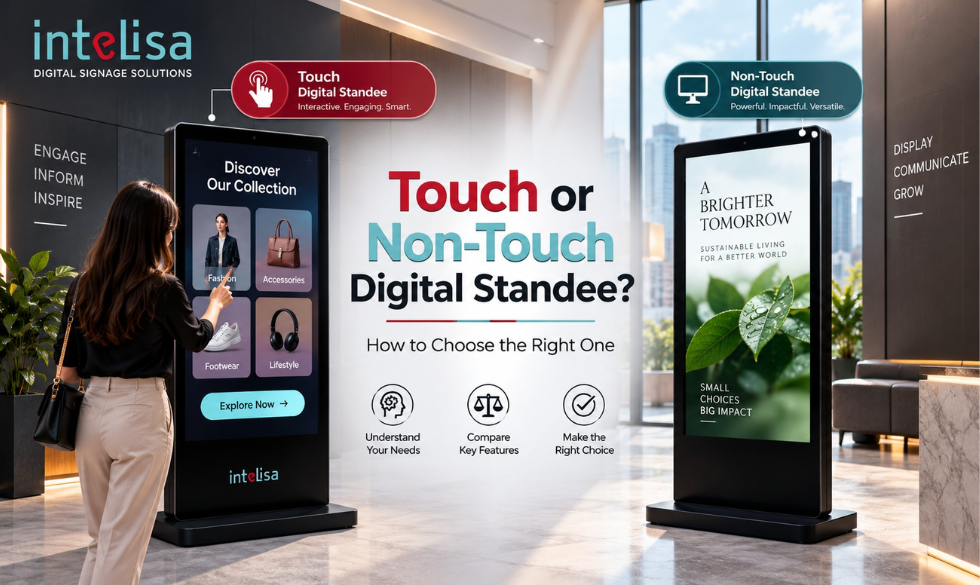
Touch or Non-Touch Digital Standee How to Choose the Right One

You have decided to add a digital standee to your store, showroom, or lobby. Good move. But now you face a choice that trips up almost every first-time buyer: should you get a touch screen standee, or a non-touch one? The two look almost identical from a distance, yet they serve very different purposes and sit at different price points.

Pick the wrong one and you either overpay for touch you never use, or you buy non-touch and later wish customers could interact with it. This guide breaks down the difference clearly, shows where each one shines, and helps you choose the right digital standee for your business in 2026.

What Is a Digital Standee?

A digital standee is a freestanding display screen that shows dynamic content such as ads, offers, menus, and information, updated remotely through digital signage software. Instead of a printed poster on a stand, you get a bright screen you can change in seconds from anywhere. You will see them at store entrances, reception areas, malls, restaurants, and events. Explore the full range on the digital standees page.

The main decision within standees is simple: touch or non-touch. Let us look at each.

What Is a Non-Touch Digital Standee?

A non-touch digital standee is a display that plays content one way, from the screen to the viewer. People look at it, but they do not interact with it. It runs your images, videos, menus, and offers on a loop or a schedule, making it perfect for broadcasting a message to everyone who walks past.

Think of it as a smart, updatable poster. It grabs attention, communicates clearly, and costs less because it has no touch layer or extra processing power. For most advertising and branding use cases, non-touch does the job beautifully.

What Is a Touch Screen Digital Standee?

A touch screen digital standee adds interaction. Viewers can tap the screen to browse a catalogue, place an order, check stock, find their way, or fill in a form. It turns a passive display into a two-way tool, closer to a self-service interactive kiosk.

Touch standees cost more because of the touch panel and stronger hardware, but they unlock experiences non-touch simply cannot: self-ordering, product exploration, wayfinding, and data capture. Where engagement and self-service matter, touch earns its price.

Touch vs Non-Touch Digital Standee: Side by Side

Here is the clearest way to compare the two at a glance.

FactorNon-Touch StandeeTouch Screen Standee
InteractionOne-way, view onlyTwo-way, tap to interact
Best forAds, branding, menus, infoSelf-service, ordering, wayfinding
CostLowerHigher
HardwareSimpler, fewer partsTouch panel, stronger processor
MaintenanceMinimalSlightly more (touch wear)
Customer engagementPassive attentionActive, hands-on
Data captureNoYes, tracks choices
Content updatesRemote, instantRemote, instant

Notice the last row: both are updated remotely through software. The difference is interaction, not control. Whichever you choose, you manage the content the same easy way.

The Digital Standee Opportunity in 2026

Self-service and screen-based communication are growing fast, especially in India, which shapes how businesses choose between touch and non-touch.

$37.7BGlobal interactive kiosk and touch display market in 2026
11.1%India self-service and kiosk market growth rate to 2030
400%Higher view rate for digital signage vs static, per Intel

The takeaway is not that touch is always better. It is that both formats are growing because screens simply outperform print. The right choice depends entirely on what you want the viewer to do.

When to Choose a Non-Touch Digital Standee

Non-Touch

Best Use Cases

  • Store entrances promoting offers and new arrivals
  • Restaurant and cafe digital menu boards
  • Brand and product advertising in malls
  • Reception and lobby welcome screens
  • Event and exhibition branding
  • Any place where you broadcast, not interact
Choose it if

It Fits You When

You want to grab attention and communicate a message to everyone passing by, on a tighter budget, without needing customers to touch anything. For advertising, promotions, and information, non-touch delivers almost all the value at a lower cost.

When to Choose a Touch Screen Digital Standee

Touch

Best Use Cases

  • Self-ordering in QSRs and cafes
  • Product catalogues and stock checks in retail
  • Wayfinding in malls, hospitals, and campuses
  • Self check-in at clinics, gyms, and offices
  • Interactive brand experiences and product demos
  • Feedback, registration, and lead capture
Choose it if

It Fits You When

You want customers to do something, order, browse, navigate, or sign up, rather than just watch. Touch reduces queues, captures useful data, and creates a memorable experience. If interaction drives your goal, the higher cost pays back.

"Do not buy touch because it sounds advanced. Buy it because you have a job for the customer to do on the screen. If there is no task, non-touch gives you the same reach for less." Intelisa Product Team

What About Cost?

Non-touch standees are more affordable because they have fewer components. Touch standees cost more due to the touch panel and stronger internals, but they replace tasks that would otherwise need staff, so they often pay for themselves in busy environments. A smart approach many businesses use: start with non-touch for advertising, and add touch units only where self-service clearly helps.

Tip: You do not have to choose blindly. See both options and get exact pricing on the Intelisa digital standees page, or check plans on the pricing page.

One Platform for Touch and Non-Touch

Whichever standee you choose, Intelisa runs it. Our cloud platform powers both touch and non-touch displays, so you can manage all your content and screens from one dashboard.

  • Runs touch and non-touch standees alike
  • Update content in seconds from anywhere
  • Schedule by time, day, location or campaign
  • Works offline if the internet drops
  • Scales from one screen to a nationwide network
Explore the Platform
Intelisa digital standee running cloud-based digital signage software

So, Which One Should You Buy?

Here is the simple rule. If you want to show a message, promote offers, or run menus and ads, choose a non-touch digital standee and save money. If you want customers to interact, order, navigate, or sign up, choose a touch screen standee and gain engagement and data. Many businesses run both: non-touch for advertising near entrances, touch for self-service inside.

Either way, the screen is only half the story. The software running it decides how easy the whole thing is to manage, and with a cloud platform like Intelisa, both touch and non-touch standees are controlled from one place.

Not Sure Which Standee Fits Your Business?

Tell us your use case and we will recommend the right touch or non-touch setup, then show you how Intelisa runs it all. Start free for 14 days, no credit card required.

Start Your Free Trial

Frequently Asked Questions

What is the difference between a touch and non-touch digital standee?

A non-touch digital standee shows content one way, so viewers watch but do not interact. A touch screen standee lets viewers tap the screen to browse, order, navigate, or sign up. Non-touch suits advertising and menus, while touch suits self-service and interactive experiences.

Is a touch screen standee worth the extra cost?

It is worth it when you have a clear task for the customer, such as self-ordering, wayfinding, or registration. Touch reduces queues, captures data, and improves engagement, which pays back in busy environments. If you only need to broadcast a message, non-touch delivers similar reach for less.

Which digital standee is better for a restaurant?

Both have a role. Non-touch standees work well as digital menu boards and for promoting offers, while touch standees enable self-ordering that cuts queues and lifts average order value. Many restaurants use non-touch menu screens and add touch self-ordering standees where footfall is high.

Do both touch and non-touch standees update remotely?

Yes. Both are powered by digital signage software, so you can update content, schedule playlists, and monitor screens remotely from one dashboard. The difference between them is interaction, not how you control the content.

Can I use one software for both touch and non-touch standees?

Yes. Intelisa is a single cloud platform that runs both touch and non-touch standees, so you can manage a mixed fleet of screens across locations from one dashboard, without separate systems.

I
Intelisa Content Team

The Intelisa team writes about digital signage, standees and smart display technology for businesses across India and worldwide. Questions? Write to us at info@intelisa.in

Categories
Digital Signages

How Much Does Digital Signage Cost? Prices in India (2026)

How Much Does Digital Signage Cost? Prices in India (2026)

If you are thinking about digital signage for your business, the first question is almost always the same: how much does it cost? It is a fair question, and the honest answer is that it depends on a few things, the screens you choose, the software that runs them, and how many locations you want to cover.

The good news is that digital signage is far more affordable than most people assume, and cloud-based software has brought the entry cost down dramatically. This guide breaks down digital signage prices in India and around the world, so you know exactly what to budget, with no surprises.

What Makes Up the Cost of Digital Signage?

A digital signage setup has three cost components. Understanding them makes the total much easier to plan.

  • The hardware: the display screen and a media player. This is usually a one-time purchase.
  • The software: the digital signage software or CMS that runs your content, usually a monthly or yearly subscription per screen.
  • Content and setup: designing your content and installing the screens. Content can be free if you use ready templates, or a small cost if you hire a designer.

The screen and player are paid once, while the software is an ongoing subscription. That subscription is where most people want clarity, so let us start there.

Digital Signage Software Pricing in India

Software is the part that runs everything: your content, scheduling, and remote control. Here is exactly what Intelisa's cloud-based digital signage software costs in India, priced simply per screen.

Intelisa Lite

₹5,500 / screen / year
or ₹550 / screen / month
  • Creative management
  • Integration with Canva
  • Playlist management
  • Scheduling in advance for 10 days
  • Offline mode
  • Screen grouping and tagging
  • Live preview of every screen
  • Plug and play setup
  • Email support
Most Popular

Intelisa Pro

₹8,000 / screen / year
or ₹800 / screen / month
  • All Intelisa Lite features
  • User access management
  • Scheduling 3 months in advance
  • Social media integration (Instagram)
  • Split screen
  • Advanced reporting
  • Live streaming and YouTube videos
  • Widgets
  • Onboarding with an account executive

Enterprise

Custom
Contact for a quote
  • All Intelisa Pro features
  • Advanced, customized features
  • Tailored for retail, hospitals and wayfinding
  • Volume pricing for large networks

Best for large or multi-location deployments.

Note: Prices shown are per screen. The more screens you run, the simpler it is to manage them all from one dashboard. See live plans on the Intelisa pricing page.

Digital Signage Software Pricing Worldwide

For businesses outside India, Intelisa is priced in US dollars, and the structure is the same simple per-screen model. Pricing varies slightly by region.

PlanMonthly (per screen)Yearly (per screen)
Intelisa LiteFrom $7From $70
Intelisa ProFrom $10From $100
EnterpriseCustom pricing, contact the team

Intelisa serves businesses across India, the USA, Canada, the UAE, Qatar, and Australia, so pricing and support are available in multiple regions.

How Much Does the Hardware Cost?

Software is predictable, but hardware varies the most because it depends on the type of display you choose, indoor or outdoor, a standee, a touch screen, or a large video wall. Rather than guess a number, the easiest way to plan hardware is to look at the actual options.

Intelisa offers ready-to-use displays built for signage, so you do not have to source screens separately. You can see the full range and get exact pricing for your setup on the digital standees and fabricated displays page, and for larger installations, the custom video walls page.

A practical tip: you do not need the most expensive screen to start. Many businesses begin with one or two displays in high-traffic spots, prove the value, then expand. If you want to understand the screen options first, read our guide to digital display screens and their business uses.

Digital Signage Cost in India vs Worldwide

Software pricing is broadly similar across regions when converted, since it is cloud-based and delivered the same way everywhere. Hardware is where local cost differs, driven by import duties, local manufacturing, and installation rates. In India, locally available commercial screens and low-cost media players keep the total entry cost very reasonable, which is a big reason digital signage adoption is growing so fast across Indian retail, restaurants, and offices.

How to Get the Most Value for Your Budget

A few simple choices keep your costs down without cutting corners.

  • Start small and scale: begin with a few screens, measure the impact, and grow. Cloud software makes adding screens simple.
  • Choose cloud over on-premise: no servers to buy or maintain means a much lower upfront cost. See our cloud digital signage software.
  • Use ready templates: tools like the built-in Canva integration let you create professional content without hiring a designer.
  • Pick the right plan: start on Lite if you need the essentials, and move to Pro when you want features like social feeds, reporting, and live streaming.
  • Buy commercial-grade hardware: it costs a little more upfront but lasts far longer than a consumer TV, lowering long-term cost.
"Digital signage is not just a cost, it is an investment that pays back. Screens lift sales through better promotion, cut printing costs, and keep working around the clock." Intelisa Product Team

Get Started From Just ₹550 a Month

Intelisa is a cloud-based digital signage platform priced simply per screen, with no servers to buy and no hidden costs. Start with one screen or roll out a nationwide network, all managed from one dashboard.

Try everything free for 14 days, no credit card required. Explore plans on the Intelisa pricing page.

Start Your 14-Day Free Trial

Frequently Asked Questions

How much does digital signage cost in India?

Digital signage software from Intelisa starts at 550 rupees per screen per month, or 5,500 rupees per screen per year for the Lite plan. The Pro plan is 800 rupees per screen per month, or 8,000 rupees per screen per year. Hardware such as the screen and media player is a separate one-time cost that varies by size and type.

What is the difference between the Lite and Pro plans?

Lite covers the essentials: creative management, Canva integration, playlists, 10-day scheduling, offline mode, and live preview. Pro adds user access management, 3-month scheduling, social media integration, split screen, advanced reporting, live streaming, YouTube videos, widgets, and onboarding with an account executive.

Is there a free trial for digital signage software?

Yes. Intelisa offers a 14-day free trial with no credit card required, so you can test the platform on your own screens before choosing a plan.

Does digital signage cost include the screen and hardware?

The software subscription and the hardware are usually separate. The subscription covers the platform that runs your content, while the display screen and media player are a one-time hardware purchase. Some smart screens include a media player built in, which reduces the hardware cost.

How much does digital signage cost outside India?

For businesses outside India, Intelisa is priced in US dollars, starting from about 7 dollars per screen per month for Lite and 10 dollars per screen per month for Pro, with pricing varying slightly by region. Enterprise plans are custom priced.

Can small businesses afford digital signage?

Yes. Cloud-based pricing means a single cafe, salon, clinic, or retail store can start with one screen for a low monthly cost and add more over time. There is no large upfront server investment, which makes digital signage accessible to small and growing businesses.

The Bottom Line

Digital signage costs less than most businesses expect. In India, the software starts at just 550 rupees per screen per month, with hardware as a one-time cost you can scale over time. Worldwide, cloud pricing keeps the entry point low and predictable. Whether you run a single screen or a nationwide network, you can start small, prove the value, and grow.

Want an exact quote for your setup? Explore the plans on the Intelisa pricing page or start a free trial and see how affordable smart digital signage can be.

Ready to See the Numbers for Your Business?

Start your 14-day free trial with Intelisa, no credit card required, and find the plan that fits your screens and your budget.

Start Your Free Trial
I
Intelisa Content Team

The Intelisa team writes about digital signage, display technology and smart communication for businesses across India and worldwide. Questions? Write to us at info@intelisa.in

Need a quote or product info?
Our sales assistant is here to help.