A digital screen is only as useful as the information it shows.
A promotional video or a product image might do the job in a retail store. But what if you want that same screen to show today's sales numbers, a live dashboard, business content, social media posts, or information your team already manages elsewhere?
That is where digital signage integrations come in.
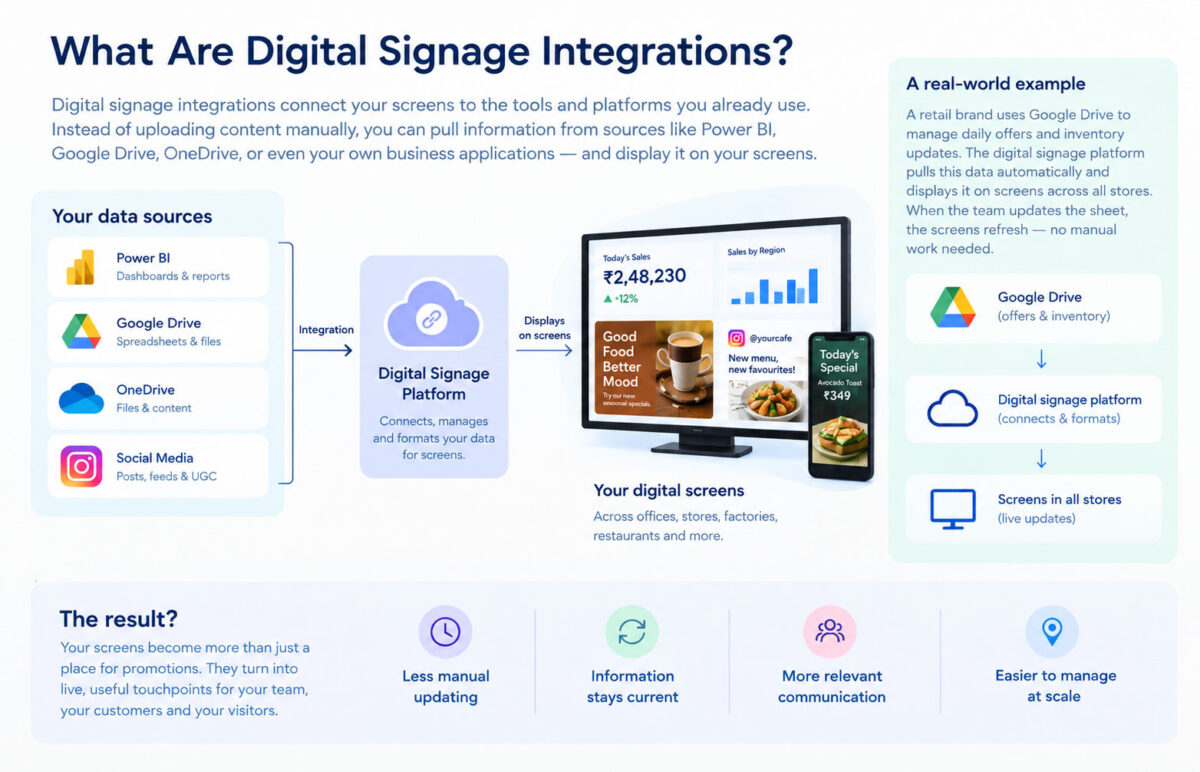
Instead of treating your screens as separate from the systems your business already uses, integrations let you bring information and content from those systems onto the screen. Depending on your setup, that could mean connecting Power BI, Google Drive, OneDrive, or social media.
And there is a good reason businesses are investing in this kind of setup. The global digital signage market was valued at around $31.1 billion in 2025 and is expected to reach $58.4 billion by 2033, according to Grand View Research. India's market was worth an estimated $1.32 billion in 2025 and is projected to grow at a 10.7% CAGR between 2026 and 2033.
Global digital signage market
India, 2025 to 2033
From an estimated $1.32 billion in 2025, growing between 2026 and 2033.
The screens are growing. What they can do is growing with them.
What Are Digital Signage Integrations?
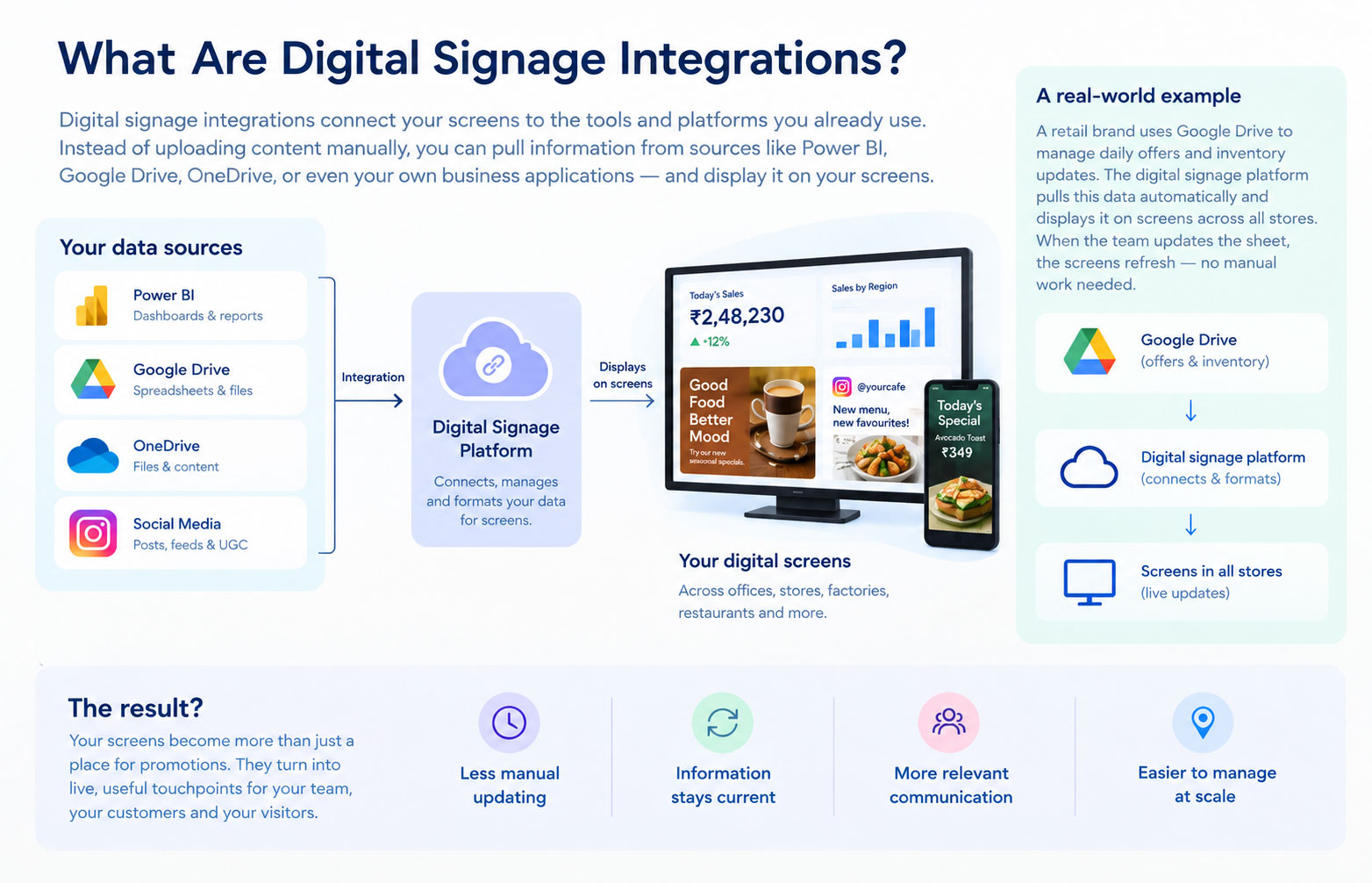
A digital signage integration connects your signage software to another platform or content source. It lets your screen use information or content from somewhere else instead of relying entirely on manually uploaded content.
For example:
- A sales team could display a Power BI dashboard on a screen in the office.
- A business could use content stored in Google Drive as part of its digital signage setup.
- A company could connect OneDrive content to its screens.
- A retail brand could show social media content alongside promotional campaigns.
The important part is that the screen and the source can work together.
Instead of managing everything separately, your team can use the systems it already works with and bring relevant content onto digital signage screens.
Why Connect Digital Signage to Your Business Data?
Think about a sales dashboard.
Your sales team already has one. They might check it every morning, during a meeting, or whenever someone asks for an update.
Now imagine that dashboard is on a screen in the office.
Nobody has to open a laptop. Nobody has to send a screenshot to the team WhatsApp group. The numbers are simply there.
That is the real value of connected digital signage.
Less manual work
If information or content changes frequently, manually creating new signage content gets old very quickly.
An integration can take some of that work off your team's plate.
Information stays current
A printed poster can become outdated the moment a price, offer, or piece of information changes.
A connected screen can use information from its source instead.
Your screens become useful beyond advertising
This is particularly important for internal communication.
A screen in a corporate office can show business dashboards or announcements. A retail screen can combine promotions with product information and social content.
The screen becomes part of the business workflow, rather than something that simply plays a playlist.
You can manage information at scale
This matters when you have multiple locations.
Updating one screen manually isn't difficult. Updating 100 screens across 20 cities is another story.
A cloud-based digital signage platform gives teams a central place to manage screens, content, schedules, and updates. Intelisa, for example, is built around centralized screen management, with scheduling, remote updates, screen grouping, custom widgets, and real-time management available through its platform.
1. Power BI Digital Signage Integration
If your company already uses Power BI, you already have a lot of useful information sitting inside dashboards like sales, revenue, marketing performance, operations, inventory, and KPIs.
So why keep that information trapped inside someone's laptop?
A Power BI digital signage integration can bring selected dashboards or reports onto a large display where employees, managers, or customers can see them.
For example, a sales office could have a screen showing:
- Today's revenue
- Monthly targets
- Sales by region
- Top-performing products
- Conversion rates
- Team performance
A manufacturing business could use a similar setup to show production targets, output, or operational KPIs.
The point isn't to put an entire Power BI report on a screen and hope people figure it out. Digital signage works best when you pick the information people need to understand quickly.
How do you display Power BI on digital signage?
A compatible digital signage platform can connect to a Power BI report or dashboard and display the relevant information on a screen. The exact setup depends on the signage platform, Power BI configuration, authentication requirements, and how frequently the data needs to refresh.
For a public-facing screen, you also need to think about permissions and sensitive business information. A dashboard that is perfectly fine for an internal office screen may not be appropriate for a customer-facing display.
2. Google Drive Digital Signage Integration
Your team may already use Google Drive to store and organize business content.
Instead of treating that content as completely separate from your digital signage, an integration can help bring relevant content into your screen network.
Google Drive can be useful for businesses managing content such as:
- Images
- Videos
- Presentations
- Promotional materials
- Internal communications
- Other business content
The benefit is simple: your team can continue using a familiar system for managing content while connecting it with the digital signage workflow.
That can be particularly useful when multiple people are responsible for creating or updating content.
Can Google Drive be used with digital signage?
Yes, when the digital signage platform supports the relevant Google Drive integration and content type.
The exact setup depends on the platform and the content you want to display. The goal is to make it easier to move content from the systems your team already uses to the screens where people need to see it.
3. OneDrive Digital Signage Integration
Many businesses already use Microsoft's ecosystem to store and manage their files.
OneDrive can be another source for content used in a digital signage setup.
For businesses that already manage content through OneDrive, an integration can help connect that existing workflow with their digital screens.
This can be useful for content such as:
- Images
- Videos
- Presentations
- Promotional materials
- Internal communications
- Other business content
Instead of maintaining separate copies of the same content for different systems, businesses can connect their existing content workflow with their digital signage network.
Can OneDrive be used with digital signage?
When supported by the digital signage platform, OneDrive can be used as a source for content displayed on digital signage screens.
The exact setup depends on the platform and the type of content being used.
4. Social Media Integrations
Not every integration has to involve business dashboards or cloud storage.
Social media is another obvious source of fresh content.
For example:
- A retail store could show Instagram posts alongside product promotions.
- A restaurant could feature customer-generated content.
- An event venue could display social media content related to an event.
Fresh content gives people a reason to look at the screen again.
Intelisa supports social media integration, including Instagram, as part of its digital signage platform. Its Pro plan also includes features such as widgets, reporting, split-screen layouts and live streaming. For more, check out our pricing plans.
What Can You Do With Digital Signage Integrations?
The use case depends on the business.
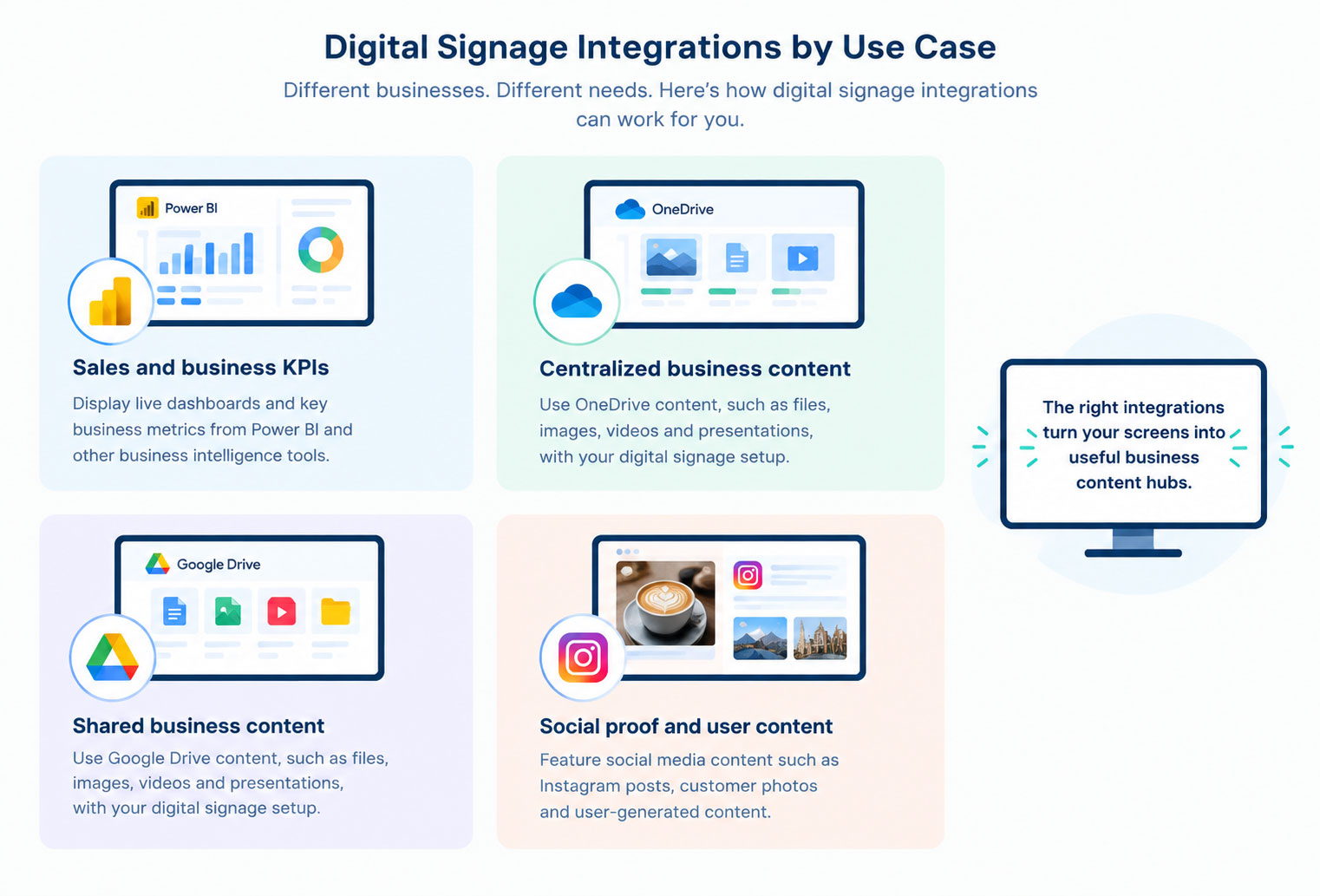
- A retailer might combine promotional content with social media.
- A corporate office might display business dashboards.
- A sales team might use Power BI to keep important numbers visible.
- A business might use cloud-stored content from Google Drive or OneDrive on its screens.
- An organization might combine several content sources on the same display.
And the same screen can often do more than one of these things.
A split-screen layout could show a business dashboard on one side, social content on another, and promotional content underneath.
That flexibility is one reason digital signage is moving beyond simple posters on screens.
How Do Digital Signage Integrations Work?
The setup will vary depending on the platform, but the process usually looks something like this.
1. Find the source
First, figure out where the information or content currently lives.
Power BI? Google Drive? OneDrive? Social media?
2. Connect it to your signage platform
Use the available integration or other supported connection.
3. Decide what should appear
Don't dump an entire dashboard onto a 55-inch screen.
Pick the metrics, messages, or content that make sense for the audience and viewing distance.
4. Design the screen
Use a layout that can be understood quickly.
This matters because people usually aren't standing in front of a digital sign for five minutes studying it.
5. Schedule and publish
Decide which screens should show the content and when.
A retail chain might show one set of information during opening hours and another after closing. An office might display business KPIs during the workday and announcements at other times.
6. Keep an eye on the network
Once you have multiple screens, monitoring becomes important.
You want to know whether screens are online, whether content is playing correctly, and whether anything needs attention.
This is one area where a centralized digital signage CMS can save a lot of time.
What Should You Look for in Digital Signage Integration Software?
Integrations can look impressive on a feature page. What matters is whether they actually make your day-to-day work easier.
Here are a few things worth checking before choosing digital signage software.
Multiple integration options
Your business might use different platforms for different types of content.
Look for a system that gives you multiple ways to bring information and content onto your screens rather than limiting you to one source.
Custom widgets
This is useful when you want to display information that doesn't fit neatly into a standard template.
Intelisa supports custom widgets as part of its digital signage platform, giving businesses more flexibility in how they display business information and dashboards.
Remote management
If you have 50 screens, you don't want to physically visit 50 screens to change a campaign.
Scheduling
Look for scheduling by date, time, location, screen, or content group.
Offline playback
Internet connections aren't perfect everywhere.
A signage system that can continue playing cached content when the connection drops is much more practical for real-world deployments. Intelisa includes offline playback among its digital signage capabilities.
Permissions and security
This becomes especially important when you're connecting screens to internal business data.
Not everyone who can update a screen should necessarily be able to access every business dashboard.
How Intelisa Fits Into a Connected Digital Signage Setup
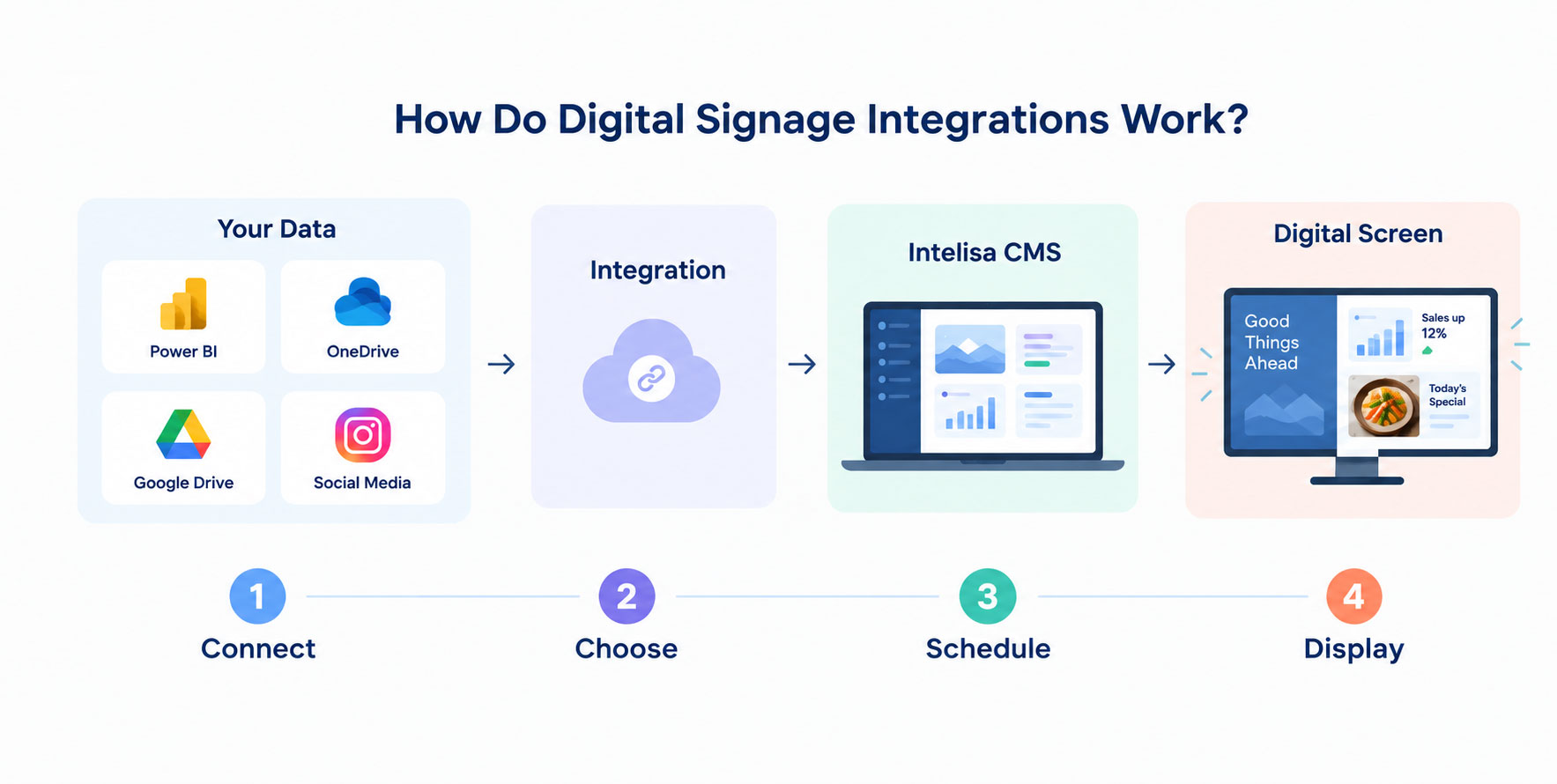
The interesting part about integrations is that the integration itself isn't the end goal.
You still need somewhere to manage all that information.
That's where a digital signage CMS comes in.
Intelisa gives businesses a centralized platform for managing their digital screens, with features including scheduling, screen grouping, remote management, custom widgets, social media integration, reporting and offline playback.
So instead of thinking about your setup as:
think of it as:
That distinction becomes more important as your network grows.
One screen is easy to manage.
Twenty screens are manageable.
Two hundred screens need a system.
Are Digital Signage Integrations Worth It?
If your screen content changes often, connected digital signage can make it easier to keep your displays useful and current.
The strongest use cases are usually businesses where information changes frequently or where employees and customers need to see information without actively looking for it.
Think sales numbers, business dashboards, promotional content, social media, announcements, or other frequently updated information.
The right combination of integrations depends on what your business needs to communicate and where that content already lives.
FAQs
1. What can digital signage integrate with?
Digital signage can connect with platforms and content sources such as Power BI, Google Drive, OneDrive and social media, depending on the digital signage software and the specific integration available.
2. How do I display a Power BI dashboard on digital signage?
You need a digital signage platform that supports Power BI or can display the relevant dashboard through a supported connection. Once connected, you can configure the dashboard or selected information to appear on your digital signage screen.
3. Can Google Drive be used with digital signage?
Yes, when the digital signage platform supports the relevant Google Drive integration and content type. This can help businesses bring content stored in Google Drive into their digital signage workflow.
4. Can OneDrive be used with digital signage?
Yes, when supported by the digital signage platform. OneDrive can serve as a source for content that businesses want to display on their digital signage screens.
5. Can digital signage display social media content?
Yes. Digital signage platforms with social media integrations can display supported social content on screens. This can help businesses keep their displays more current and engaging.
6. Can digital signage display real-time data?
Yes. Digital signage can display live or frequently updated information when it is connected to a suitable data source. How quickly the information refreshes depends on the source and the signage platform.
7. Why integrate digital signage with business dashboards?
It puts important information where people can see it without requiring them to open another application. This can be useful for sales teams, corporate offices, and other environments where quick access to KPIs matters.
8. What should I integrate with digital signage first?
Start with the information or content that changes most often or takes the most effort to update manually. For one business, that might be a Power BI dashboard. For another, it could be promotional content, social media, or content stored in Google Drive or OneDrive.
The Bottom Line
Digital signage doesn't have to be a screen that plays the same playlist all day.
Connect it to the systems your business already uses and it can become a live information point for customers, employees, managers, or visitors.
Power BI can bring business intelligence to the screen. Google Drive and OneDrive can connect existing content workflows with your displays. Social media integrations can keep content fresh and engaging.
The right combination depends on what your business needs to communicate.
And once you move beyond a handful of screens, you'll need a platform that can actually keep everything under control.
That's where Intelisa comes in.
With centralized screen management, scheduling, custom widgets, social integrations, reporting, and offline playback, Intelisa gives businesses a way to manage connected digital signage without turning every content update into a manual task.
Want to see what connected digital signage could look like for your business?
Start a free trial today!Recent Posts
-
Digital Signage Integrations: Power BI, Google Drive & More
2026-09-29 18:51:21 -
Touch or Non-Touch Digital Standee: How to Choose the Right One
2026-09-21 11:52:34 -
How Much Does Digital Signage Cost? Prices in India (2026)
2026-09-04 11:39:46 -
What Is a Digital Signage CMS? Features & Benefits
2026-08-26 16:40:53