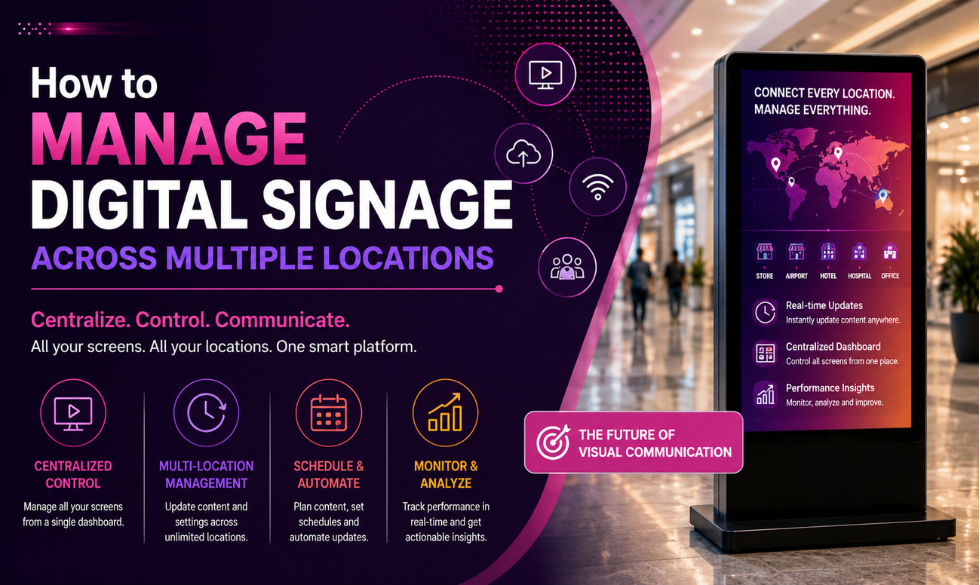
Managing a few digital screens is straightforward. Managing screens across dozens of stores, offices, restaurants, or branches is a different challenge. Your team needs to keep content consistent, deliver location-specific updates, schedule campaigns, and know when a screen goes offline.
That is where Digital Signage Solutions designed for multi-location businesses come in. A cloud-based digital signage platform gives teams one place to manage content, schedules, devices, and updates across the entire network while still giving individual locations room to communicate what matters locally.
The market is moving in the same direction. The global digital signage market was valued at approximately $31.1 billion in 2025 and is projected to reach $58.4 billion by 2033, according to Grand View Research. India's digital signage market was estimated at around $1.32 billion in 2025 and is projected to grow at a 10.7% CAGR between 2026 and 2033.
For businesses operating across multiple locations, the takeaway is straightforward: digital signage needs to be managed as a connected network rather than as a collection of individual screens.
What Is Multi-Location Digital Signage?
Multi-location digital signage refers to a system that allows a business to manage digital screens across different physical locations through a centralized platform.
Rather than sending files or instructions to individual branches, teams can use a digital signage content management system (CMS) to publish content across an entire network or target specific locations and screens. Depending on the platform, they can also schedule campaigns, manage user permissions, monitor device health, and make changes remotely.
This is typically enabled by cloud based digital signage, where the CMS is hosted in the cloud and connected to the displays through the internet.
The screen is only the part customers see. Behind it is a system that determines what content appears, when it appears, where it appears, and who has permission to change it.
That distinction becomes increasingly important as a business grows.
A network of five screens can still be managed manually without too much trouble. A network of 100 screens spread across several cities requires a completely different approach.
Challenges of Multi-Location Digital Signage
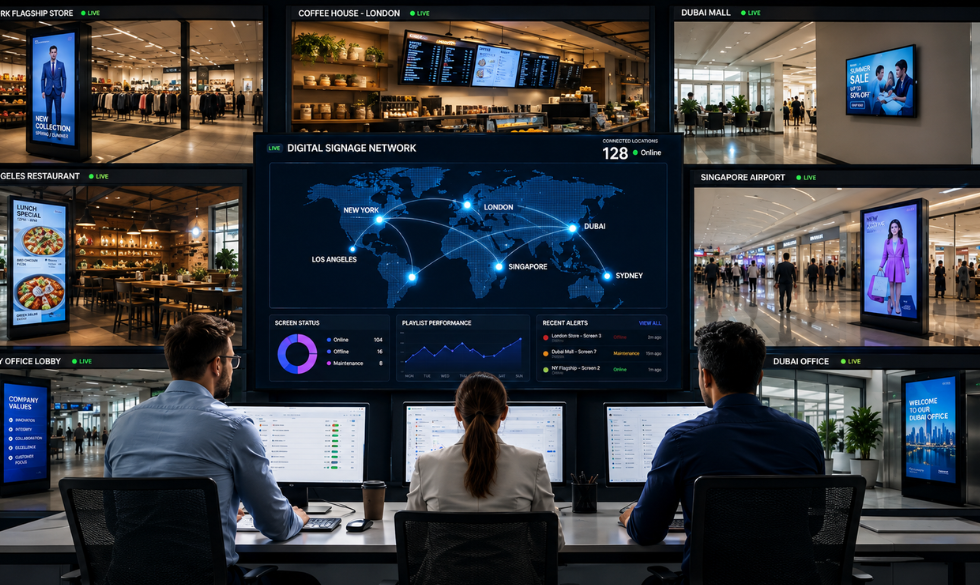
The operational challenges of digital signage usually become obvious when a business starts expanding its network. What worked for a handful of screens can quickly become inefficient when every campaign requires coordination between headquarters, regional teams, and individual locations.
Keeping Every Location on Brand
Imagine a retail chain with 40 stores launching a new seasonal campaign. The head office creates the campaign and sends it to every location, but some stores update their screens immediately while others take a day or two to make the change. A few may accidentally continue displaying the previous promotion.
The problem is not the creative itself. It is the lack of centralized control.
A well-structured Digital Signage Solution allows corporate teams to manage core brand messaging while still giving local teams room to publish approved, location-specific content.
For example, a business could organize its signage network into a hierarchy such as Corporate → Region → City → Store. Corporate campaigns can then be distributed across the entire network, while regional promotions or store-level announcements can be assigned only to the locations that need them.
The goal is not to make every screen identical. It is to make sure every screen is working within the same brand framework.
Reducing Manual Updates
Traditional signage creates a surprising amount of administrative work. Someone has to create the artwork, send it to the relevant location, make sure the right person receives it, replace the existing creative, and then confirm that the new version is actually being displayed.
That process may be manageable for a small business, but repeating it across 50 or 100 locations quickly becomes a full-time coordination exercise.
With cloud-based digital signage, teams can publish content remotely and assign it to specific locations or groups of screens. A campaign that previously required dozens of individual updates can be managed from a single dashboard.
Managing Different Content at Different Locations
A multi-location network does not necessarily need to display the same content everywhere. In fact, forcing every location to show identical content can make digital signage less useful.
A restaurant chain, for example, may want breakfast menus in the morning, lunch promotions during the afternoon, and dinner offers in the evening. Individual locations may also have different pricing, local events, inventory, or promotions.
The same principle applies to retailers, hotels, banks, healthcare facilities, universities, and corporate offices.
A strong CMS should make these variations easy to manage rather than forcing the content team to maintain dozens of separate playlists manually.
Knowing When a Screen Goes Offline
There is another problem that becomes harder to manage as the network grows: knowing whether the screens are actually working.
A campaign can be correctly scheduled and the content can be perfectly designed, but none of that matters if a display has lost its network connection or its media player has stopped responding.
For a large network, this kind of visibility can significantly reduce unnecessary site visits and shorten the time it takes to resolve problems.
Benefits of Cloud Management
Cloud management changes how businesses operate a distributed digital signage network because the team no longer needs to treat every location as a separate system.
Instead, content, devices, schedules, and permissions can be managed from a central platform.
Centralized Content Management
A centralized CMS gives headquarters control over brand assets, templates, campaigns, playlists, and publishing permissions.
If a campaign needs to be updated across every location, the change can be made centrally rather than communicated to dozens of individual branches. If only a specific group of stores needs the update, the team can target that group instead.
This approach becomes particularly valuable when a business has different types of locations or operates across multiple regions.
Faster Content Updates
One of the biggest advantages of digital signage is the ability to change content without physically replacing anything.
A restaurant can update a menu when an item becomes unavailable. A retailer can promote products that need additional visibility. A hotel can update information about an event taking place that evening. A bank can change customer instructions during an operational disruption.
Cloud management makes these updates possible from wherever the content team is working.
Platforms such as Samsung VXT combine cloud-based content management with remote screen management and monitoring, reflecting the industry's broader shift toward centralized management of connected displays.
Lower Operational Workload
The value of centralized management is not limited to saving printing costs. A significant benefit comes from reducing the amount of staff time spent coordinating content across locations.
When content creation, approvals, scheduling, publishing, and monitoring happen within the same system, teams can spend more time developing campaigns and less time chasing individual stores for updates.
The operational benefit becomes more noticeable as the network grows.
Better Visibility Across the Network
A centralized CMS can also give teams a much clearer picture of what is happening across their signage network.
Instead of relying on individual locations to report problems, teams can see which screens are online, which devices need attention, what content is scheduled, and which locations are running specific campaigns.
That visibility turns digital signage into a managed communication channel rather than a collection of screens that happen to be installed in different places.
Centralized Content Scheduling
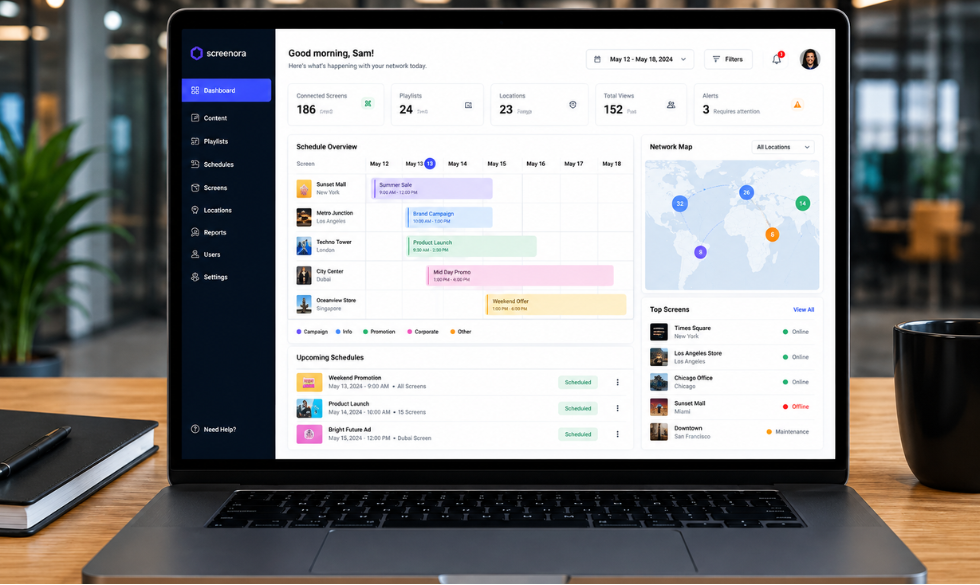
Scheduling is one of the most useful features of a multi-location digital signage system because it allows businesses to decide not only what content appears, but also where and when it appears.
A restaurant chain, for example, could schedule breakfast promotions from 8 a.m. to 11 a.m., lunch campaigns from 11 a.m. to 3 p.m., and dinner promotions from 5 p.m. onward. The same system could then apply different schedules to locations with different operating hours.
Businesses can also schedule content around holidays, product launches, sales events, local promotions, weather conditions, store hours, or regional campaigns.
The important part is that these changes can be planned in advance instead of relying on someone at each location to remember to update a screen.
Organize Screens Into Groups
One of the easiest ways to make a large network manageable is to organize screens into logical groups.
You might group them by region, store type, screen type, or campaign. For example, a retail business could create groups for North, South, East, and West India, and then create additional groups for flagship stores, standard stores, entrance displays, checkout screens, and promotional displays.
This means the content team can publish a campaign to a relevant group rather than selecting individual screens one by one.
As the network grows, this kind of structure becomes less of a convenience and more of a necessity.
Give Local Teams Controlled Flexibility
Multi-location businesses often make one of two mistakes. They either give local teams no control over their screens or give them unrestricted access to everything.
Neither approach works particularly well.
A better model is to establish clear permissions. Corporate teams can control brand guidelines, master campaigns, templates, and company-wide announcements. Regional teams can manage approved regional promotions, while individual locations can publish store-specific information within defined boundaries.
With user permissions and approval workflows in place, local teams can respond to their customers without compromising the broader brand.
Real-Time Monitoring
Content management is only one part of operating a digital signage network. You also need to know whether the content is actually playing.
Imagine launching a nationwide promotion and discovering several days later that a number of screens have been offline since the campaign started. Without remote monitoring, someone would have to physically visit each location to identify the problem.
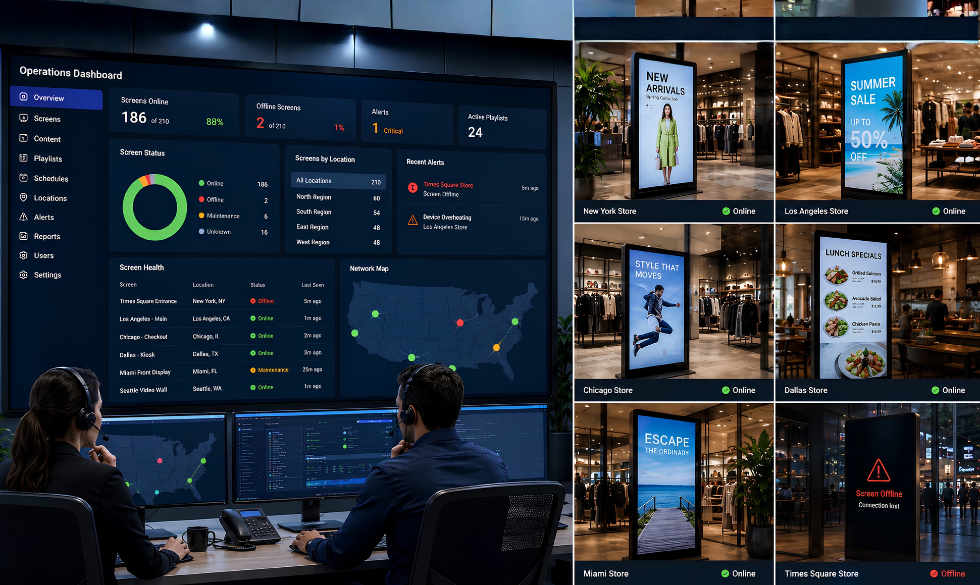
With a connected signage network, teams can monitor screen status remotely and investigate issues before they become prolonged outages.
What Should You Monitor?
At a minimum, businesses should monitor:
- Screen online and offline status
- Network connectivity
- Device health
- Playback status
- Storage
- Temperature
- Screen uptime
- Content errors
Larger deployments may also benefit from automated alerts and deeper device diagnostics.
Samsung's MagicINFO platform, for example, includes device monitoring, device grouping, playback analysis, and other network-management capabilities.
Monitoring matters because screen downtime is not simply an IT issue. If a display is offline, a promotion may not be seen, a menu may be unavailable, an important customer message may disappear, or an advertising slot may not be delivered.
The faster your team knows about the problem, the faster it can be fixed.
Personalization Without Losing Control
Managing multiple locations does not mean every screen has to show identical content. In fact, one of the biggest advantages of a centrally managed network is the ability to deliver more relevant local content without losing overall control.
A retailer could tailor promotions according to store location, local inventory, time of day, weather, or store format. A restaurant could promote cold beverages more heavily during particularly hot weather, while a hotel could use its displays to promote local events and attractions happening nearby.
The infrastructure remains centralized, but the content becomes more relevant to the audience in each location.
That shift is becoming increasingly important as digital signage platforms connect with analytics, APIs, sensors, inventory systems, and other business data. Instead of relying entirely on fixed playlists, businesses can build signage experiences that respond to what is happening around them.
Best Practices for Managing Digital Signage Across Multiple Locations
A scalable digital signage network depends as much on good processes as it does on technology. Before adding more screens, businesses should establish a system that makes content, hardware, permissions, and monitoring easy to manage.
Define Your Content Structure First
Before deploying a large number of screens, decide who owns the content, who approves it, who can publish it, and which locations should receive different types of campaigns. It is also worth deciding which content is global and which content can be customized locally. Establishing these rules early prevents the CMS from becoming difficult to navigate as the network expands.
Standardize Your Hardware
You do not necessarily need identical screens in every location, but standardizing your core hardware wherever possible can make maintenance significantly easier. Try to keep screen specifications, media players, operating systems, network requirements, and maintenance procedures consistent across the network. The fewer hardware combinations your team has to troubleshoot, the easier it becomes to manage the system.
Use Templates
Your content team should not have to rebuild the same designs every time a promotion changes. Create templates for common use cases such as promotions, product announcements, events, price changes, corporate communications, and local offers. Approved users can then update the relevant information without changing the underlying design.
Create Location Groups
Organize screens according to how your business actually operates. Region, city, store type, screen type, and campaign are all useful grouping structures. The right structure allows your team to publish content to hundreds of screens without manually selecting each device.
Automate Recurring Content
If the same type of content changes regularly, schedule it instead of relying on someone to remember. Opening hours, breakfast menus, weekly promotions, monthly announcements, and holiday campaigns can all be planned ahead of time. Automation removes unnecessary manual work and reduces the chances of human error.
Establish an Approval Workflow
Not everyone who can create content needs to be able to publish it. A simple workflow such as Create → Review → Approve → Schedule → Publish gives teams enough flexibility to work quickly while ensuring that content meets brand and compliance requirements before it reaches customers.
Monitor Before Customers Notice
Set up alerts for offline devices and other common issues so your team can respond proactively. If the first indication that a screen is broken comes from a customer or store employee, your monitoring process is already too slow.
Measure Business Outcomes
A digital signage network should not be evaluated simply by the number of screens installed. The right metrics depend on the role of the signage. A retailer may care about sales and promotion redemption, while a corporate office may focus on employee engagement. A hotel could measure guest interactions, and an advertising network may focus on impressions and playback. The important thing is to connect the signage network to the business outcome it is meant to influence.
How to Choose Digital Signage Solutions for Multiple Locations
When comparing Digital Signage Solutions for a distributed network, it is tempting to start with screen size, resolution, or display technology. Those specifications matter, but they are not what will determine whether the network is easy to manage six months after deployment.
Start with the CMS and ask whether it can support the way your business actually operates.
Centralized Content Management
Can your team manage all locations from one dashboard, or will different locations require separate systems?
Location-Level Control
Can you publish content to a single screen, a store, a region, or the entire network without creating separate campaigns for each one?
Scheduling
Can campaigns be scheduled by date, time, location, screen, or recurring schedule?
Remote Monitoring
Can your team identify offline screens and device problems without visiting the location?
User Permissions
Can corporate, regional, and local teams have different levels of access?
Hardware Compatibility
Can the platform work with your existing displays and media players, or does it require proprietary hardware?
Integrations
Can the platform connect with your POS, inventory systems, APIs, data feeds, analytics tools, or other business software?
Security
Does it provide appropriate controls for user access, devices, network connections, and publishing permissions?
Reporting
Can you confirm that content was played and understand how the network is performing?
These capabilities become considerably more important once a business moves beyond a handful of screens.
What Does a Multi-Location Digital Signage Setup Look Like?
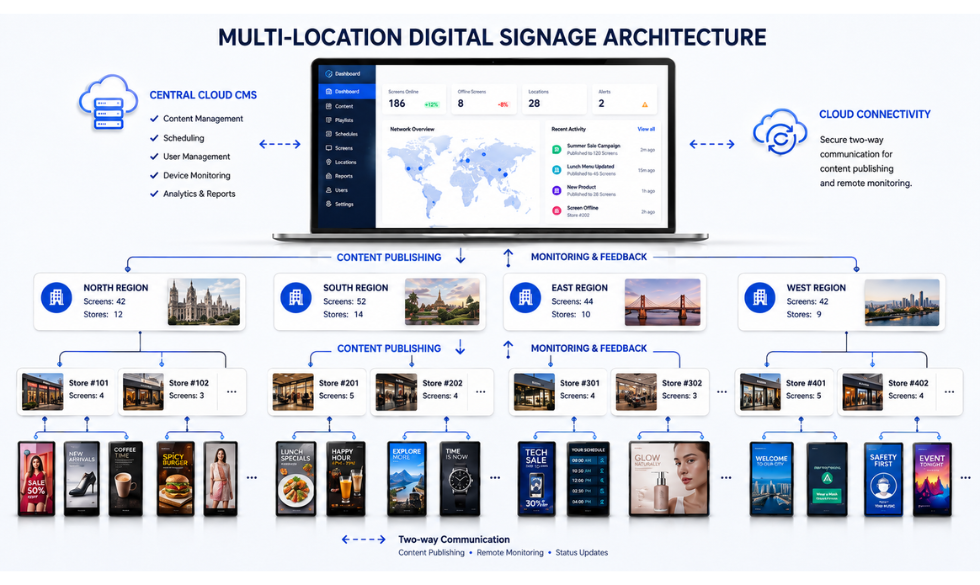
A typical multi-location digital signage setup has four main layers.
Content Layer
The first is the content layer, which contains images, videos, menus, promotions, announcements, dashboards, and other digital assets.
Cloud CMS
That content is managed through the second layer: the cloud CMS. This is where teams create, organize, approve, schedule, and publish content.
Media Players or Smart Displays
The third layer consists of media players or smart displays, which receive the content and make it available for playback.
Digital Display Screens
Finally, there are the digital display screens that customers, employees, visitors, or passengers actually see.
The CMS connects these layers and gives the business a central point of control. That is why choosing the right software architecture can be just as important as choosing the displays themselves.
The Future of Multi-Location Digital Signage
The digital signage industry is moving toward more connected and intelligent display networks. Cloud management, remote device monitoring, analytics, APIs, energy management, and integrations with business systems are becoming increasingly important as organizations scale their deployments.
Display technology is evolving as well. India's digital signage market is projected to grow from approximately $1.46 billion in 2026 to nearly $3 billion by 2033, with a 10.7% CAGR. Video walls were the largest type segment in 2025, while transparent LED displays are expected to be among the faster-growing segments.
But the more important shift is happening behind the screens.
Businesses are moving from individual displays to connected display networks that can be managed, monitored, and adapted from a central platform.
Manage Every Screen From One Dashboard
Its cloud-based digital signage platform lets businesses manage and monitor screens remotely, schedule content, and keep digital displays running across multiple locations.
- Centralized content management across every location
- Scheduling by date, time, location or screen group
- Remote monitoring of device and playback status
- Role-based permissions for corporate, regional and local teams
FAQs: Managing Digital Signage Across Multiple Locations
How do you manage digital signage across multiple locations?
The most efficient approach is to use a cloud-based digital signage CMS that lets you manage content, schedules, users, devices, and screen groups from one central dashboard. You can then publish content across the entire network or target specific stores, regions, or individual screens.
Can digital signage be managed remotely?
Yes. Cloud-based digital signage allows teams to create, schedule, publish, and update content remotely. Many platforms also provide remote device monitoring, allowing teams to identify connectivity or hardware problems without sending someone to the location.
What is cloud based digital signage?
Cloud based digital signage uses a cloud-hosted CMS to manage content and connected display devices over the internet. Instead of maintaining separate systems at each location, businesses can manage their signage network through a centralized platform.
How do you keep digital signage consistent across locations?
Businesses can maintain consistency by using centralized brand templates, content libraries, user permissions, approval workflows, and location groups. Corporate teams can control core brand messaging while local teams publish approved content that is specific to their location.
How many screens can one digital signage system manage?
The number depends on the platform and its architecture, but enterprise digital signage systems are designed to support large, distributed networks that can include hundreds or thousands of screens. When evaluating a platform, look beyond the maximum device count and consider whether it can also support the number of users, locations, content groups, integrations, and monitoring requirements your business needs.
What should businesses monitor on digital screens?
At a minimum, businesses should monitor screen connectivity, device health, playback status, uptime, and content errors. Larger networks can also benefit from monitoring temperature, storage, network performance, and automated device alerts.
Is digital signage useful for businesses in India?
Yes. India's digital signage market was estimated at approximately $1.32 billion in 2025 and is projected to grow at a 10.7% CAGR from 2026 to 2033. That growth reflects increasing adoption of digital displays across retail, hospitality, transportation, corporate environments, and other sectors.
Final Takeaway
Managing digital signage across multiple locations should not require your team to manage every location manually. A well-designed Digital Signage Solution gives you one place to manage content, schedules, permissions, devices, and campaigns while still giving individual locations enough flexibility to communicate information that matters to their customers. As a business grows from a handful of screens to dozens or hundreds of locations, cloud-based management, centralized scheduling, and remote monitoring become essential for keeping the entire network under control.
That is where Intelisa can help.
See It Work For Your Business
Its cloud-based digital signage platform lets businesses manage and monitor screens remotely, schedule content, and keep digital displays running across multiple locations. Want to see how it works for your business? Book a free trial with Intelisa and experience the platform with your own digital signage setup.
Book a Free Trial